
We’d love to have your feedback on Info view restructure
-
thanks for the great feedback. On our draft we listed every information what is shown in Solibri in general, but not all information is displayed behind all components/containers. For example, the information FireRating is only displayed for buildings (ifcBuilding). We are aware that the FireRating information is available in Pset_*Common. Therefore, it is only displayed there for all other components/containers.
We will certainly add information like inheritance attributes/properties in the future after we have changed the UI. This is only the first step.
At that time, the term GUID was chosen, but if there is a lot of interest in naming it GlobalID, we can consider that as well.
An approach to Building Smart is quite reasonable. I am curious to see if our other users also see it that way.
-
in this draft it is still mixed. There is only a distinction between custom info (API) and hyperlinks. Do you have any suggestions on how this should be categorised from your point of view?
-
I agree with @b-huijskes. The closer we get to placement and terminology to the standard, the easier it is to implement, give feedback, teach etc.
-
I also agree with both @b-huijskes and @tsolsen. Overall I think the information is presented a lot clearer. Will it be possible to open/close all paragraphs at ones?
-
@b-huijskes said in We’d love to have your feedback on Info view restructure:
The Entity in turn has Property Sets (Pset) and Quantity Sets (Qto). Again, both sticking as close as possible to the BuildingSmart naming.
Thank you for the feedback, in addition to what Paul mentioned above, we will also add Quantity Sets as a category to the new Info view structure.
-
@Sebastiaan said in We’d love to have your feedback on Info view restructure:
I also agree with both @b-huijskes and @tsolsen. Overall I think the information is presented a lot clearer. Will it be possible to open/close all paragraphs at ones?
Something small but I think is important for the user experience; when you cycle through the tabs of information, the open/closed paragraphs should retain their position. At the top/bottom of the view I would add a ‘collapse all’ or ‘open all’ button.
Overall, I like the new view, it looks cleaner. I agree with the abovementioned replies about sticking close to the BuildingSmart standard.
If I may add, maybe not about the restructure but more of a request; a ‘select similar’ option for information in a right click menu. And in theory that could be made more powerfull with options like ‘make ITO based on this parameter’.
-
@Ricardo said in We’d love to have your feedback on Info view restructure:
Something small but I think is important for the user experience; when you cycle through the tabs of information, the open/closed paragraphs should retain their position. At the top/bottom of the view I would add a ‘collapse all’ or ‘open all’ button.
Definitely - it’s for sure cleaner but also brings a lot of more clicking with it and therefore collapsed/expanded status should be remembered. Just thinking out loud, but probably even a small search bar to filter within one element would make sense. Best case with the same behaviour, so if I type e.g. “Floor” and click on several elements to quickly check the searched information on those the should stay on that focus.
-
Thank you for the input. We welcome the great ideas and think it’s great that so many ideas are in line with what we have in our mind. Such things like search bar and Expand and Collapse, information connection to ITO/Classification functionality are part of our to-do list. First, however, we want to start with a restructuring of the information view.
-
Hi @cecilia-wang , Hi @Paul-Linder,
I really like the Solibri Info View Redesign. It looks very orderly and clear.
Great also the idea to adding the Quantities Sets Tab.
I agree too about sticking close to BuildingSmart standard.
I like the request of @Ricardo about a “select similar” option for information.I would also like to add another request on the Info View: the possibility of directly reading the parameters of the IfcProject entity (now this entity must be retrieved from the IfcSite Relations).
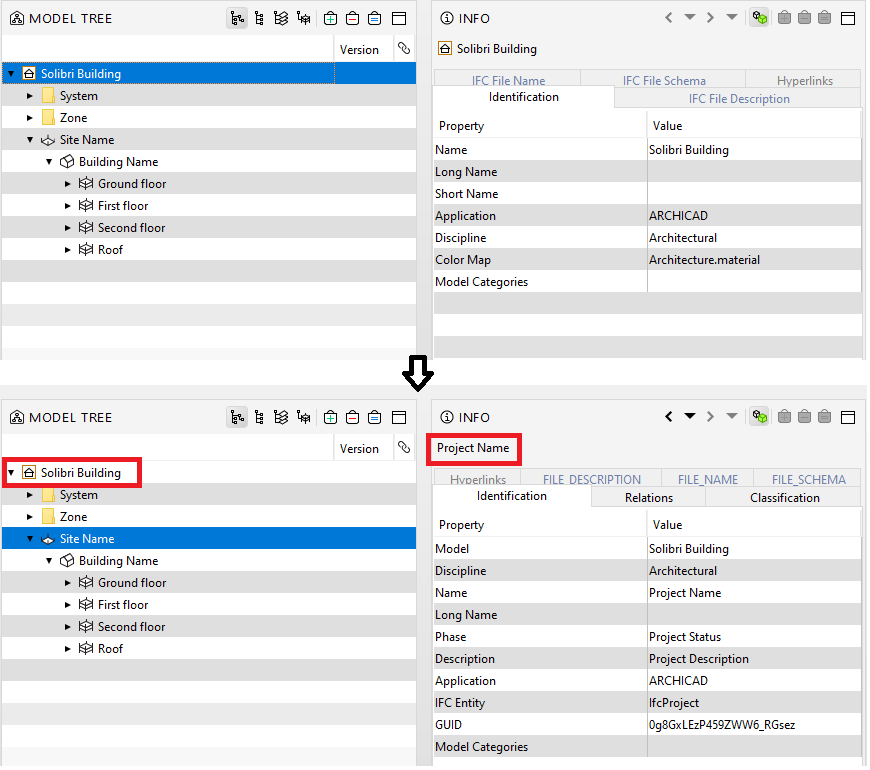
Thanks
Paola -
I also have a request that is related… it would be really nice to be able to drag and drop properties…
For example: drag a propertyvalues to an ITO to add this value as a cloumn.
Or maybe that you can create a personal propertyset by dragging different properties from different propertiesets and combine them in a personal propertyset with just the information you want people to see.
I know it is a big ask… but would be a big improvement!
-
Hi @cecilia-wang and @Paul-Linder
The new Info view looks like a great improvement

I agree with everything said (sticking the closest to bS terminology would be best, IfcQtoSets should have their own tab, selecting elements with same property value, seeing IfcProject in the hierarchy).
I have a related suggestion: pinning/bookmark some properties so that they appear on top of their tab or in a dedicated tab. That way you could have a quick manual check on how they are used throughout multiple elements. It would be nice to arrange and maybe even group your own pinned properties to your preference.
In this use case, it is also slightly annoying that the active tab is “reset” when you click on an element that doesn’t have the pset.
e.g I’m checking content of Pset_DoorCommon but click on a Door that doesn’t have it. Then when I click on the next Door, I need to reselect the Pset_DoorCommon.






Copyright © 2025 Solibri Inc. | Powered by NodeBB