
Hyperlink Templates
-
Hello!
Lately I’ve been messing around with Hyperlink Templates and I decided to share my findings here. For those not familiar with the Hyperlink function: you can link documents or folders to a selection of elements. This can be particularly useful when you want to link files, such as drawings, to the model without actually importing them.
However, when you assign a Hyperlink to a selection of elements, like selecting a Classification, the Hyperlink does not update when elements get added or removed from the Classification. The Hyperlink is statically paired to elements selected at that time, and not dynamically to elements within the Classification.
This has changed with the introduction of Hyperlink Templates, currently a new feature in Solbri. Through this function (and some JavaScript), we can now dynamically add Hyperlinks to elements. Before we start getting into JavaScript, I’d like to go on record that I have just started learning the language and am by no means an expert. If there is a better way of doing things, please let me know in the comments.
To open the Hyperlink template…:
- Go to the Hyperlink Manager View
- Select New Hyperlink Template
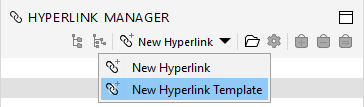
- A new Hyperlink Template tab opens:
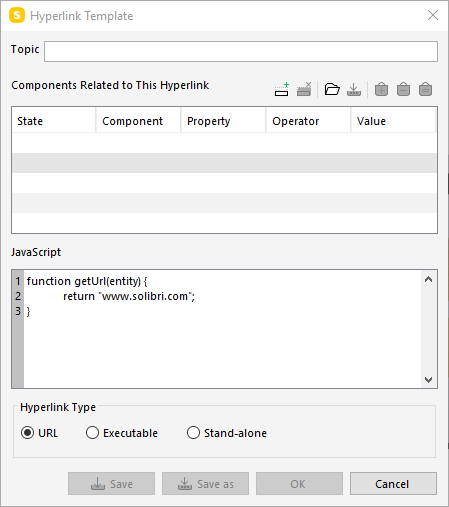
Hyperlink Templates
You start with selecting Components Related to This Hyperlink. As we are used to in Classifications, you can include or exclude based on Component Type, Property, Operator and Value. Nothing new here. Select the Classification you wish to add the files to.Linking to websites
By default the JavaScript references to the website “www.solibri.com”, making this a fairly straightforward Hyperlink to their website. Simply adjust the value in line 2 in between the quotation marks to reference a different website, like a specific file in your online DMS. Keep in mind that you want the link to remain the same, especially when you update the document in your DMS regularly, else you will have to edit this line over and over again.Linking to files (absolute path)
When you want to link to files on your company server using an absolute path, you only have to edit the JavaScript code in line 2. Anything on line 1 and line 3 can stay as it is. This time, we usefile:///to reference to a local file or folder:function getUrl(entity) { return "file:///<filePath>" }The
<filePath>value will host the actual file path to the document you are trying to link to. It will look something like this:return "file:///C:/Users/Desktop/RandomFile.pdf"Note: if you do not specify a file, it will simply open the folder from the file path.
Extra note: keep in mind that the link does not like spaces in its File Path. Either replace all spaces with underscore (_) or use camelCasing on your folder names. I haven’t found a decent way to escape spaces yet.Linking to files (relative path)
will follow soon!So what are your thoughts on Hyperlink Templates?
I still have a lot to research to do (like Hyperlink Executables or Stand-alone), but I can see this having a lot of potential. If there is anything I have missed, please let me know and I’ll update the post.Kind regards,
Ben
-
This looks quite interesting! However I don’t see the triangle in my Hyperlink Manager View that allows you to choose between creating a new Hyperlink or a new Hyperlink Template. In fact, the only mention of Hyperlink templates I can find is in the main Settings View but that brings up a different pop up dialog. Does this require an extension or some sort of activation somewhere in order for this functionality to become available?
-
@BartBol We went to the Solibri event in Barcelona, where I believe the Solibri team enabled this function for us. I’m not sure if this is a beta feature, or an additional feature to be really honest…
I’m certain the Solibri team can help if you message them here.
-
@b-huijskes
Ah ok. I’ll hold off tinkering with it until it’s a feature that’s available for all users then. -
Hey @BartBol,
sorry for the late “official” answer

Indeed, this is a feature which we shared specifically with some of the BCN society event attendees for testing purposes. However, the plan is to make this feature as an Alpha available as part of our Beta Testing program as we then have it separated and in a safe environment. Please have a bit of patience as we still have to do some things with the activation in the beta environment.
And another info: This is really an alpha preview and is more of an experiment to see if it makes sense to offer our APIs this way. In this respect, please do not see it as a promise that it will be included in the product in the same way.
So stay tuned and register for the Beta program if you want to make use of it

KR
Cornelius -
@cpreidel said in Hyperlink Templates:
Hey @BartBol,
sorry for the late “official” answer
Indeed, this is a feature which we shared specifically with some of the BCN society event attendees for testing purposes. However, the plan is to make this feature as an Alpha available as part of our Beta Testing program as we then have it separated and in a safe environment. Please have a bit of patience as we still have to do some things with the activation in the beta environment.
And another info: This is really an alpha preview and is more of an experiment to see if it makes sense to offer our APIs this way. In this respect, please do not see it as a promise that it will be included in the product in the same way.
So stay tuned and register for the Beta program if you want to make use of it
KR
CorneliusWhile the Javascript API is in alpha preview phase, and if you want to give the hyperlinks to many components at the same time,
please have a look at this post here for an alternative workflow without the need of using the javasript:https://society.solibri.com/topic/366/hyperlinks-through-classification-ito
-
after 4 years Hyperlink manager still can’t give the possibility to modify template…
-
 J JSN referenced this topic on




Copyright © 2025 Solibri Inc. | Powered by NodeBB