Skip to content
  • Categories
Collapse
Solibri Society Forum
  1. Home
  2. General Discussion
  3. Wall geometry check

Wall geometry check

Scheduled Pinned Locked Moved General Discussion
8 Posts 2 Posters 1.6k Views
  • Oldest to Newest
  • Newest to Oldest
  • Most Votes
Log in to reply
This topic has been deleted. Only users with topic management privileges can see it.
  • S Offline
    S Offline
    Stanislava
    wrote on last edited by
    #1

    Hi,

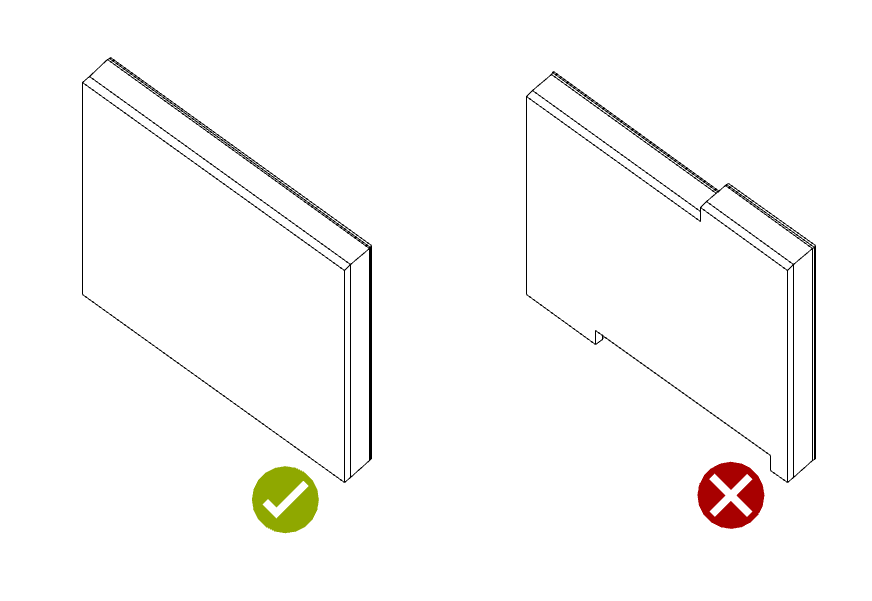
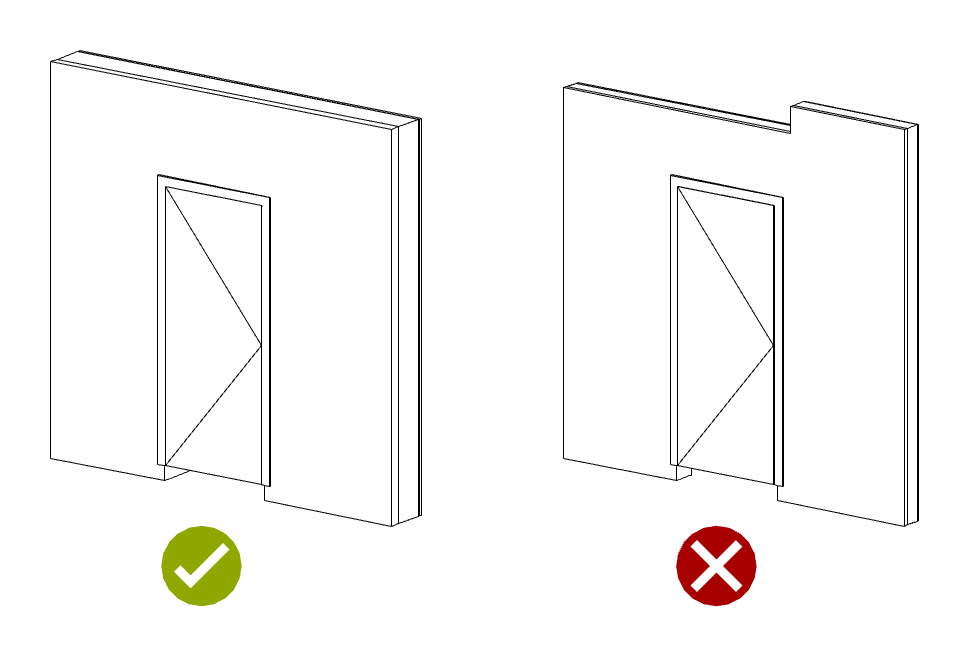
    I am interested in a solibri rule that would help me to check the correct geometry of the wall. Correct geometry is a rectangular wall with no cutouts or notches. Incorrect wall geometry created after intersection with other objects (other walls, flooring), resulting in the formation of grooves and indentations.
    254cf672-652a-42ff-a82b-ae138b579158-image.png
    At the moment I am trying the rule “216 Wall Validation” (support tag: SOL/216/2.0) with the parameter “Check wall area consistency”. However, this rule does not work so well when I need to check the geometry of the wall where the door is located. Since there is also a floor under the door, the door is raised from the bottom of the wall, so the rule points out the error where there is none. As far as I know, the parameter “Check wall area consistency” compares the gross wall area with the net area of the wall and door leaf, and then the distance from the bottom edge of the wall to the door leaf represents an error for the rule.
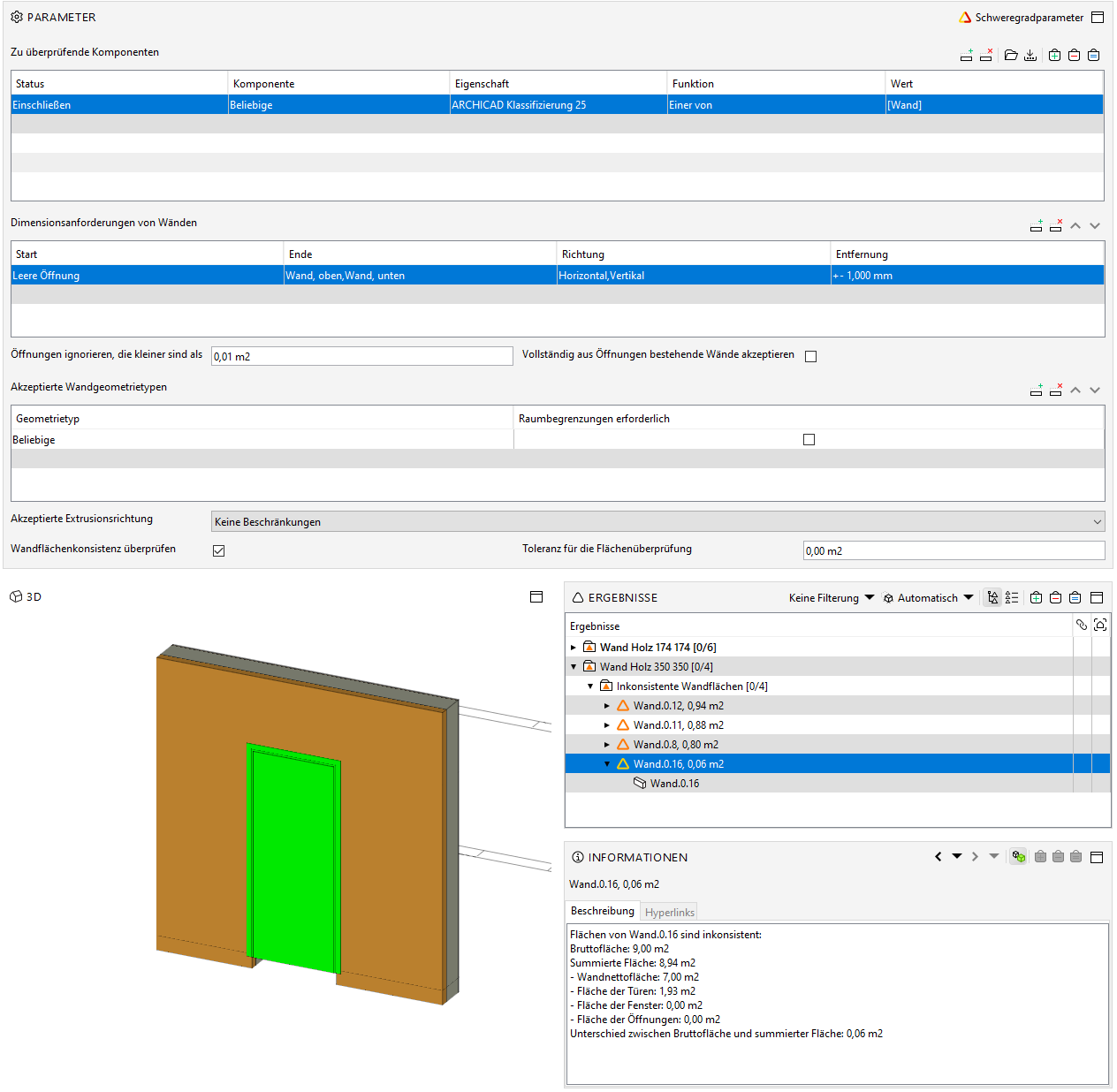
    6a80e4ba-2e59-44ae-a991-6a8c90f7cae8-image.png
    However, this test result does not suit me. I would like to get the following result: Please take a look at the diagram.
    8f9a1e8d-9bfe-40af-b27b-6c6ba4acc95e-image.png
    Could you recommend me another way to check if the wall geometry is correct, another rule or another setting for rule 216?

    Thanks in advance.

    Best regards

    1 Reply Last reply
    0
    • Lauri LuomaL Offline
      Lauri LuomaL Offline
      Lauri Luoma Solibrians
      wrote on last edited by Lauri Luoma
      #2

      Hello @Stanislava,

      One way to check this would be with rule #231 by comparing the wall values “Height” vs “Height (minimum)t”:
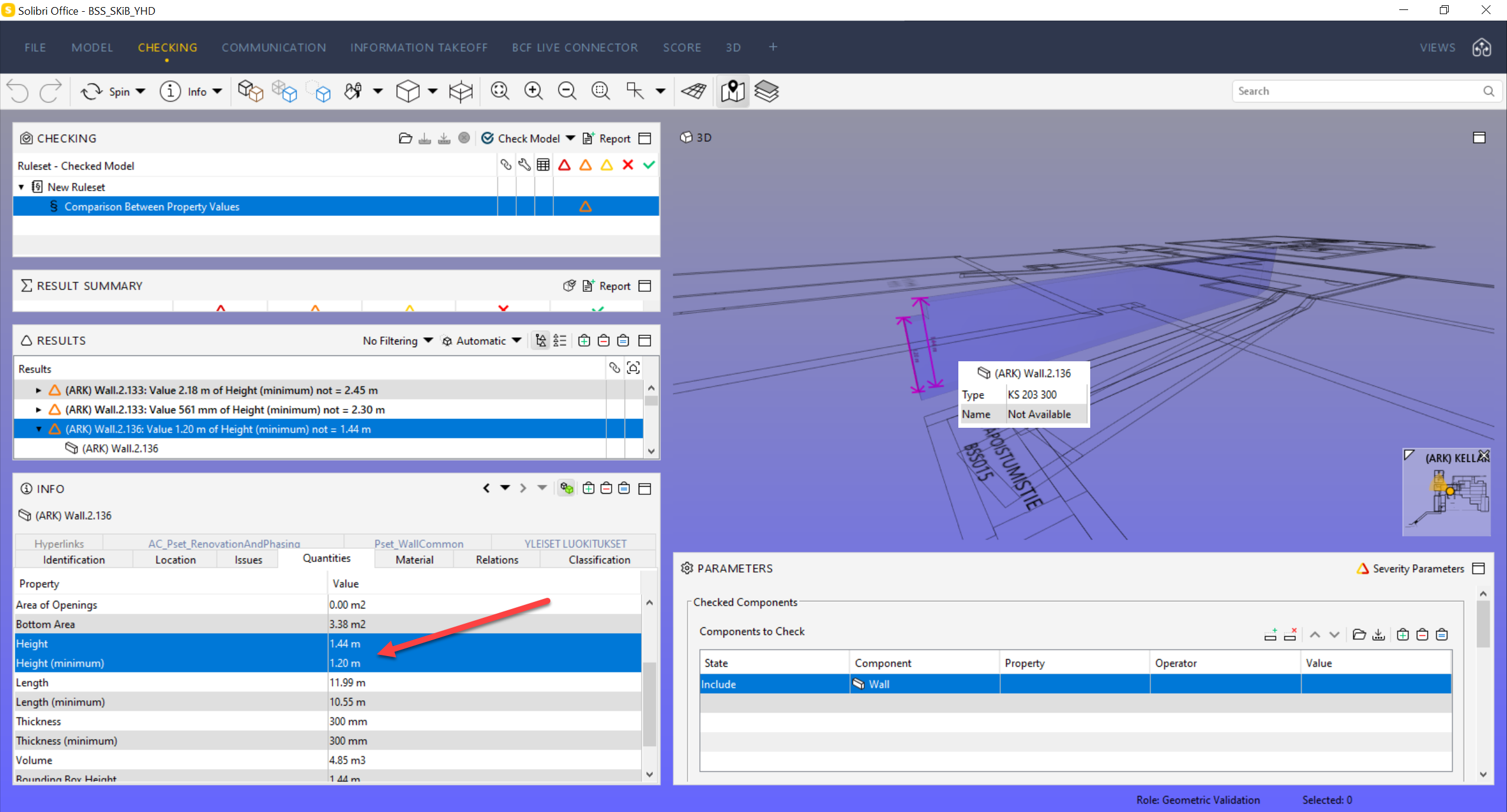
      fe9953a7-07a6-4c0f-9462-c15c544f4226-image.png

      You can try with this example rule if it works:
      example rule.cset

      S 1 Reply Last reply
      -1
      • S Offline
        S Offline
        Stanislava
        replied to Lauri Luoma on last edited by
        #3

        @Lauri-Luoma Hi!

        Thank you for your idea.
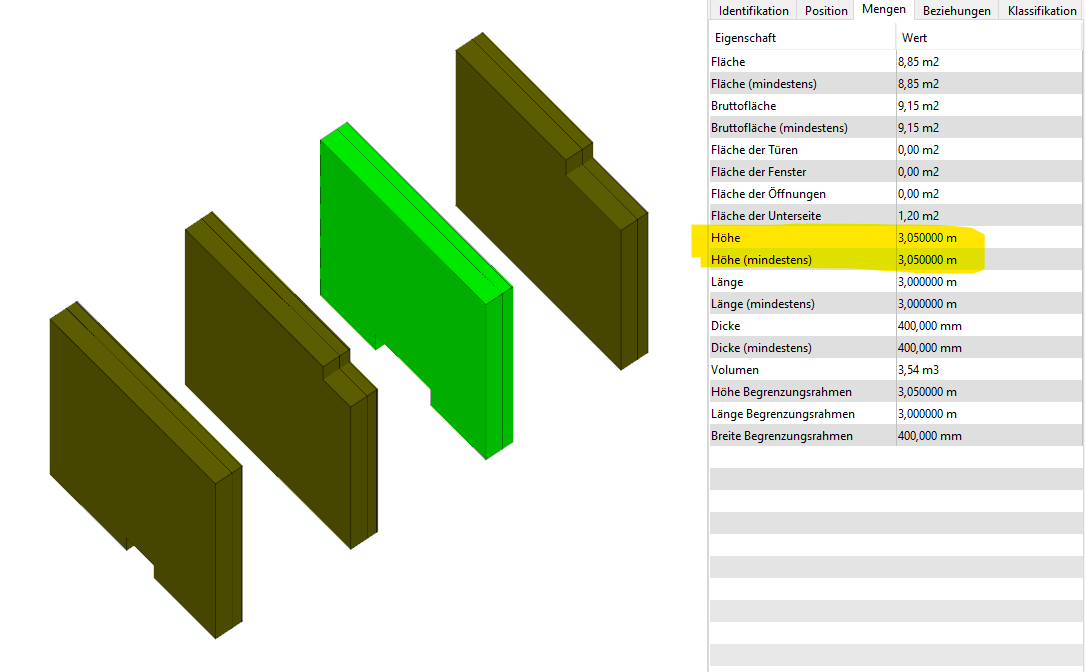
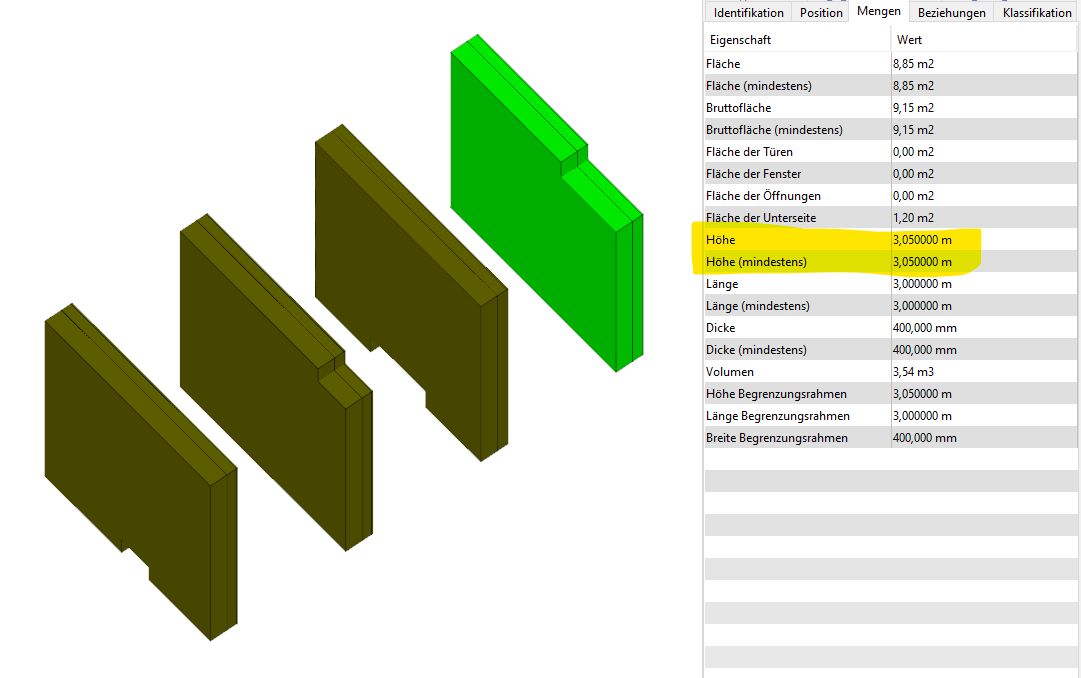
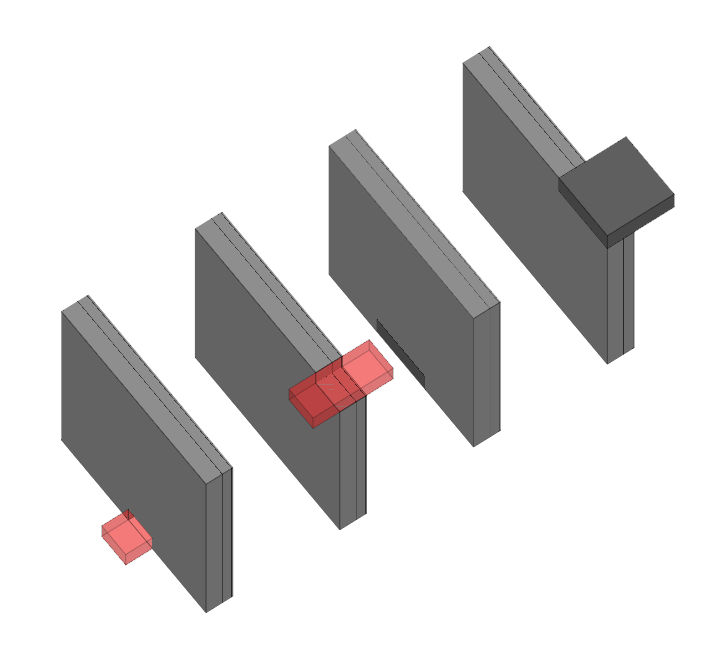
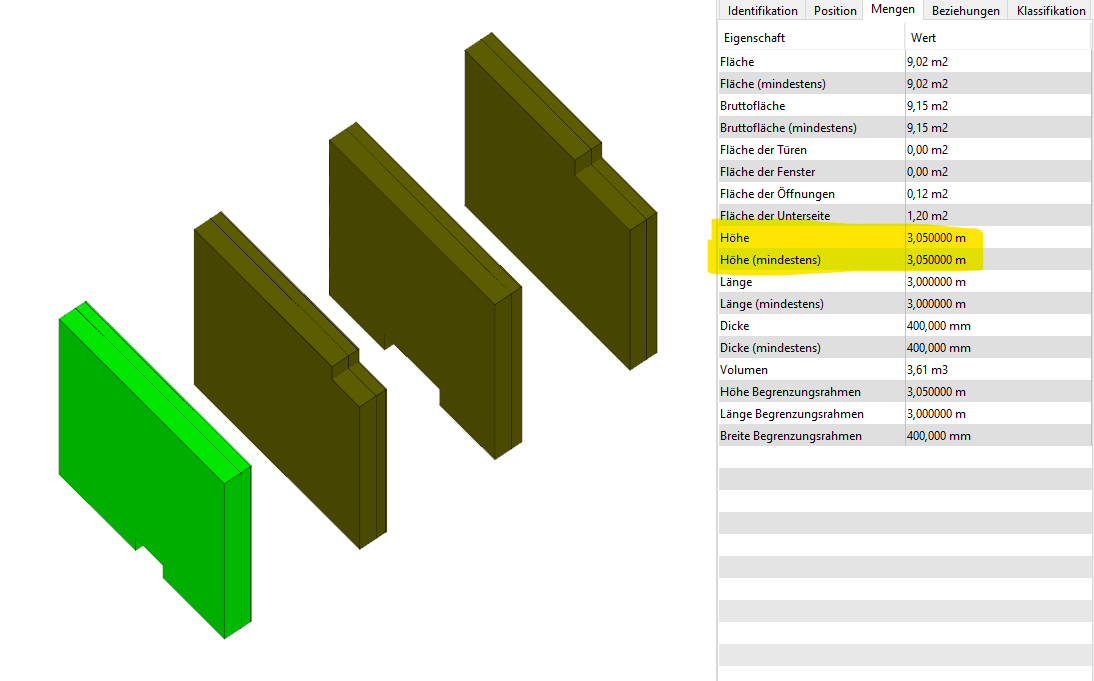
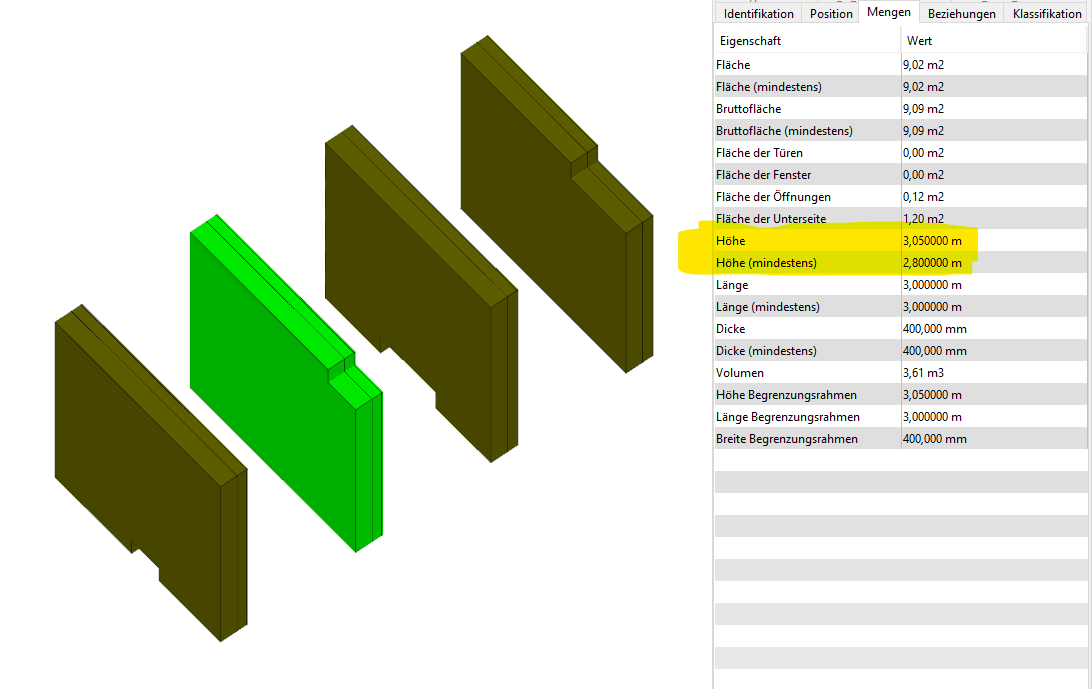
        Unfortunately, Quantities do not always represent the exact result for me. I have tested how the Height and Minimum Height of the wall will be presented depending on what is cut into the wall: the floor slab or the opening (red). Please have a look at the results:
        6a6ebe25-3a8e-480f-bafc-45beb2dd1eae-image.png
        2949dafe-db8b-42d7-ae07-0073e4adaa2d-image.png
        1c4a43b6-82e6-43cf-b499-ae5fd4acad40-image.png
        1fd91044-5b61-4e08-aaab-e133967dc7fa-image.png
        c417da64-8bc8-4ef3-a166-15f18f67a392-image.png

        That is, in most cases, there is no difference between height and minimum height (although this is not the case). Do you encounter the same problem?

        Thanks in advance.

        Lauri LuomaL 1 Reply Last reply
        0
        • Lauri LuomaL Offline
          Lauri LuomaL Offline
          Lauri Luoma Solibrians
          replied to Stanislava on last edited by
          #4

          @Stanislava I see the issue,

          Can you share the ifc file with all these variations?

          S 2 Replies Last reply
          0
          • S Offline
            S Offline
            Stanislava
            replied to Lauri Luoma on last edited by
            #5

            @Lauri-Luoma I had to redo it, but the result is the same, I see no difference between the Height and Minimum Height in QuantitiesStanislava_Solibri_Quantities Test.ifc

            1 Reply Last reply
            0
            • S Offline
              S Offline
              Stanislava
              replied to Lauri Luoma on last edited by
              #6

              @Lauri-Luoma and this one with the doors, but again - no difference Stanislava_Wandsgeometrie.ifc

              Lauri LuomaL 1 Reply Last reply
              0
              • Lauri LuomaL Offline
                Lauri LuomaL Offline
                Lauri Luoma Solibrians
                replied to Stanislava on last edited by
                #7

                @Stanislava thank you for the models. Unfortunately i don’t have any other ways to give you to get the exact results you are looking for.

                Anyways, for now if there are some issues reported that are not actual issues you can just accept those and report only the ones that are real issues: https://help.solibri.com/hc/en-us/articles/1500004886442-Making-Decisions-on-Checking-Results

                1 Reply Last reply
                0
                • S Offline
                  S Offline
                  Stanislava
                  wrote on last edited by
                  #8

                  Hi 🙂
                  Thanks anyway!

                  1 Reply Last reply
                  0

                  Copyright © 2025 Solibri Inc. | Powered by NodeBB

                  • Login

                  • Don't have an account? Register

                  • Login or register to search.
                  • First post
                    Last post
                  0
                  • Categories