
Fire rated walls, door, and windows
Solved
General Discussion
-
Hi
Good morning everyoneCan we change a walls, doors and windows properties In Solibri to be fire rated or it should be imported from modeling Software?
I have chosed fire rated doors and windows during modeling but when i run checking i face following issue???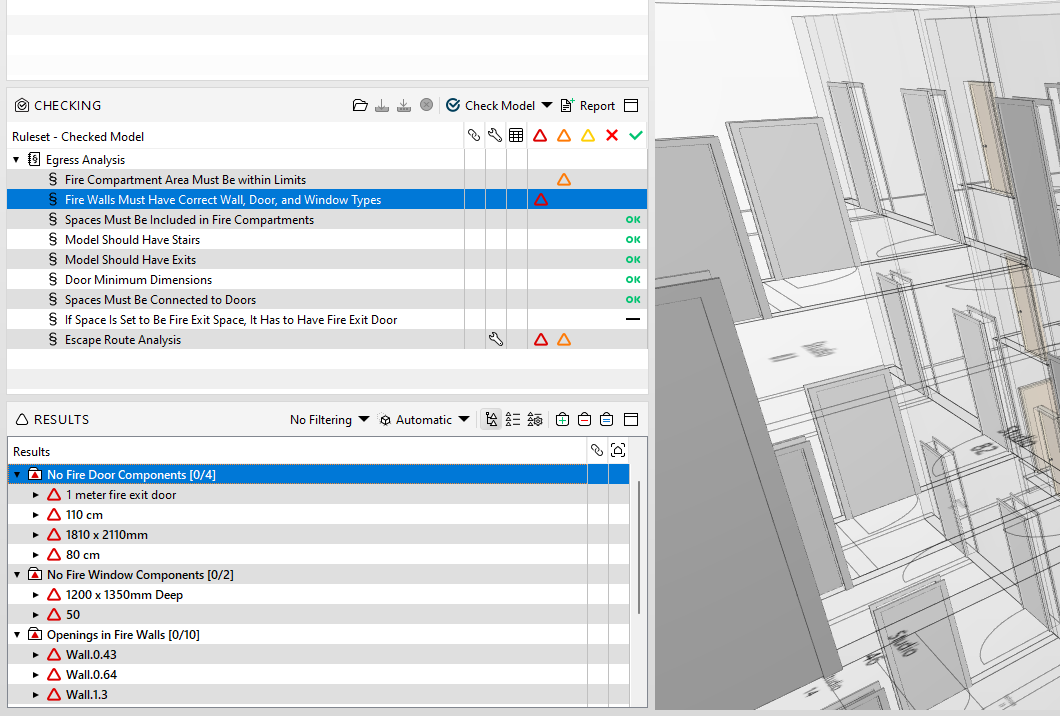
-
@Mohammadi said in Fire rated walls, door, and windows:
Can we change a walls, doors and windows properties In Solibri to be fire rated or it should be imported from modeling Software?
No, this information comes from and is edited by authoring tool and needs to be exported from it and updated in Solibri.
Hint: there is an auto update feature:
https://help.solibri.com/hc/en-us/articles/1500004052882-Updating-Models -
 J jakub.rusin marked this topic as a question on
-
 E Eric has marked this topic as solved on
-
J jakub.rusin unlocked this topic on
Copyright © 2025 Solibri Inc. | Powered by NodeBB