Skip to content
  • Categories
Collapse
Solibri Society Forum
  1. Home
  2. General Discussion
  3. Customize results description

Customize results description

Scheduled Pinned Locked Moved General Discussion
2 Posts 2 Posters 597 Views
  • Oldest to Newest
  • Newest to Oldest
  • Most Votes
Log in to reply
This topic has been deleted. Only users with topic management privileges can see it.
  • B Offline
    B Offline
    Bimiser
    wrote on last edited by
    #1

    Dose any body know how is it possible to customize the results description appears in Info view?
    Thanks in advance

    ![0_1566385540034_Result.jpg](Uploading 100%)

    MattiM 1 Reply Last reply
    0
    • MattiM Offline
      MattiM Offline
      Matti Solibrians
      replied to Bimiser on last edited by
      #2

      @Bimiser

      The customization can be done at least by using Manual Checking Rule #232.

      1. Go to Ruleset Manager

      2. Drag a new Manual Checking Rule #232 under your rule you want to customize
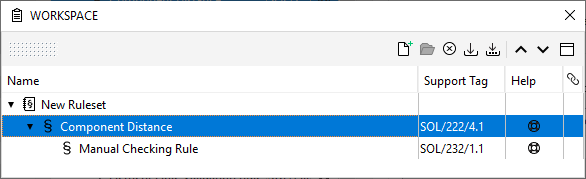
        e248a256-e1f2-4e71-87bf-39c8f1652cf0-image.png

      3. Set your rules “Sub Rule Options” to check only failed components
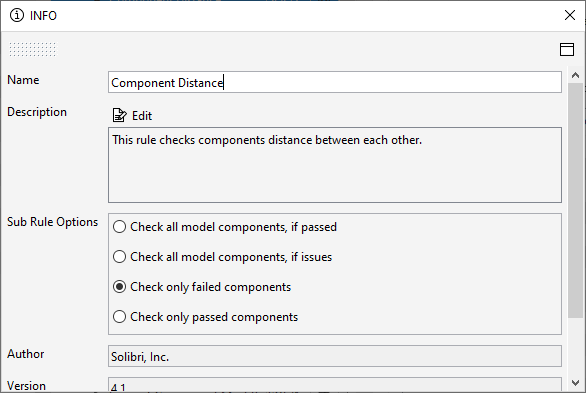
        6297c6f3-4d5e-418a-856a-6f0b0a5bd4de-image.png

      4. Customize the categories, issue names and descriptions for specific components (filters)
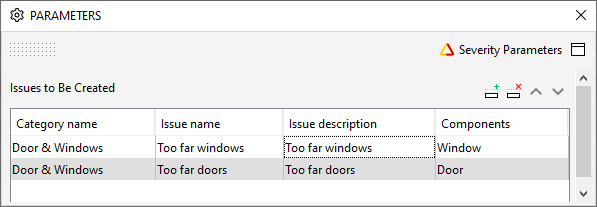
        f1ecfa4c-532a-4094-9dd4-59db92afed03-image.png

      1 Reply Last reply
      2

      Copyright © 2025 Solibri Inc. | Powered by NodeBB

      • Login

      • Don't have an account? Register

      • Login or register to search.
      • First post
        Last post
      0
      • Categories