Skip to content
  • Categories
Collapse
Solibri Society Forum
  1. Home
  2. General Discussion
  3. Rule 203 strange behaviour

Rule 203 strange behaviour

Scheduled Pinned Locked Moved Solved General Discussion
9 Posts 5 Posters 2.1k Views
  • Oldest to Newest
  • Newest to Oldest
  • Most Votes
Log in to reply
This topic has been deleted. Only users with topic management privileges can see it.
  • L Offline
    L Offline
    lraimo
    wrote on last edited by
    #1

    I have Solibri model where my rule 203 passes.
    Pass.smc
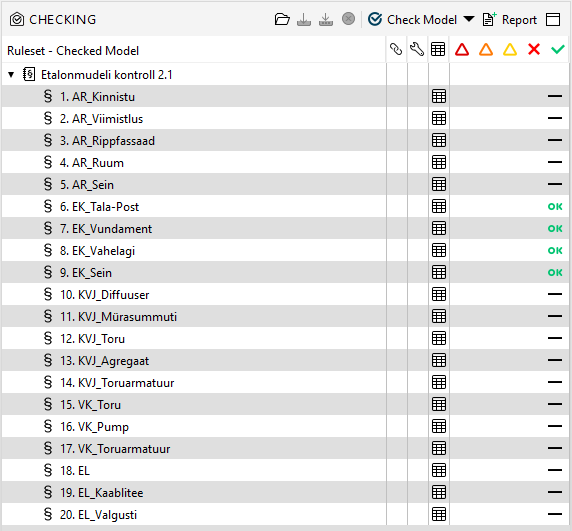
    ed04e136-6427-4fde-aaee-8093095dac89-image.png

    When I update ifc models with the same exact ifc model the rule does not pass
    d7ba5cc2-4fc7-4396-ac99-020c1e2b6a1a-EK.ifc
    8db05065-8d82-4ba6-a72a-1ce591b8c8af-NotPassed.smc
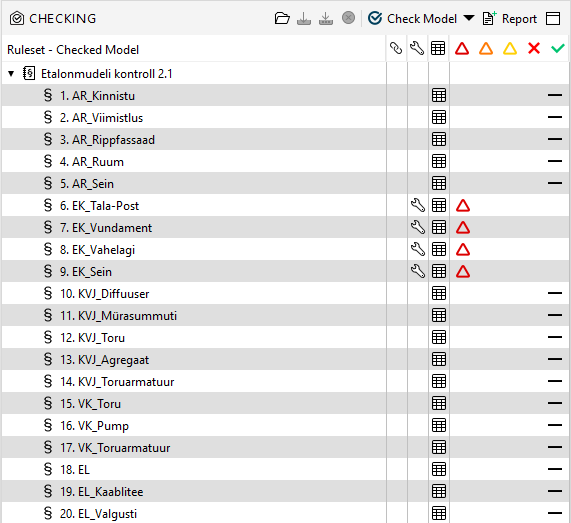
    4bca5d94-c920-424c-b54b-af4a82c319f3-image.png
    When I will reselect this properties in rule parameters then rule will pass again
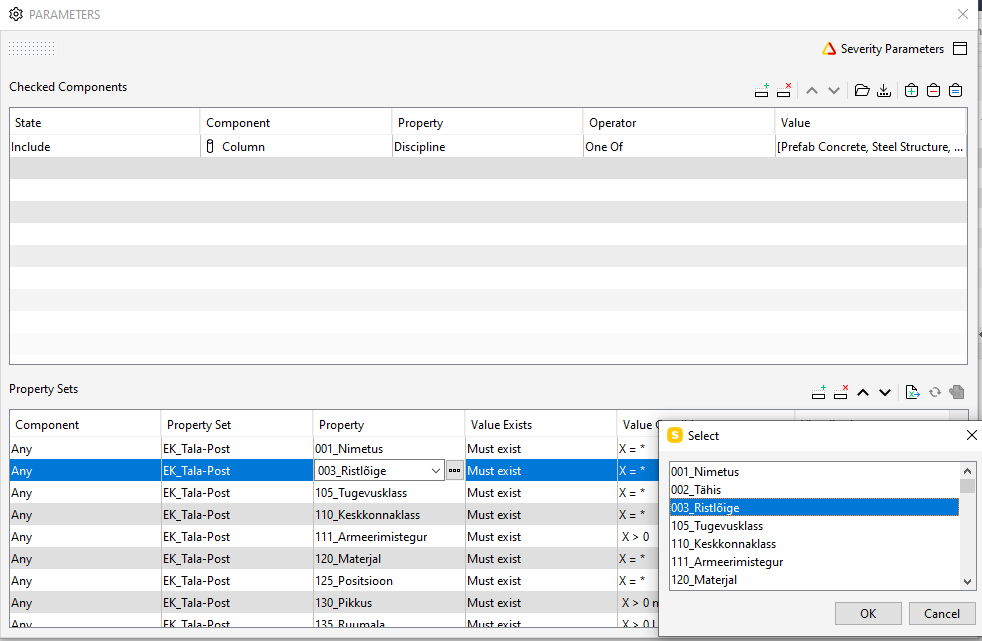
    81149197-71ae-4353-a25c-7325f22fb0eb-image.png
    What is causing this?

    1 Reply Last reply
    0
    • paola bronzoP Offline
      paola bronzoP Offline
      paola bronzo
      wrote on last edited by paola bronzo
      #2

      Hi @Solibrians,

      I would like to add to this post another strange behavior of rule 203 (especially if it is used in gatekeeper rule option), already indicated in the past (https://society.solibri.com/topic/2297/strange-outcome-of-sol-203/3)

      The rule#203 gives a summary of all models since the propertyset was not found in any of the component. In the results are listed also models/buildings with components that are not included in the “checked components” of the rule. This a bug. Do you think it can be fixed soon? Thanks.

      Here an example: Solibri Building_203.smc
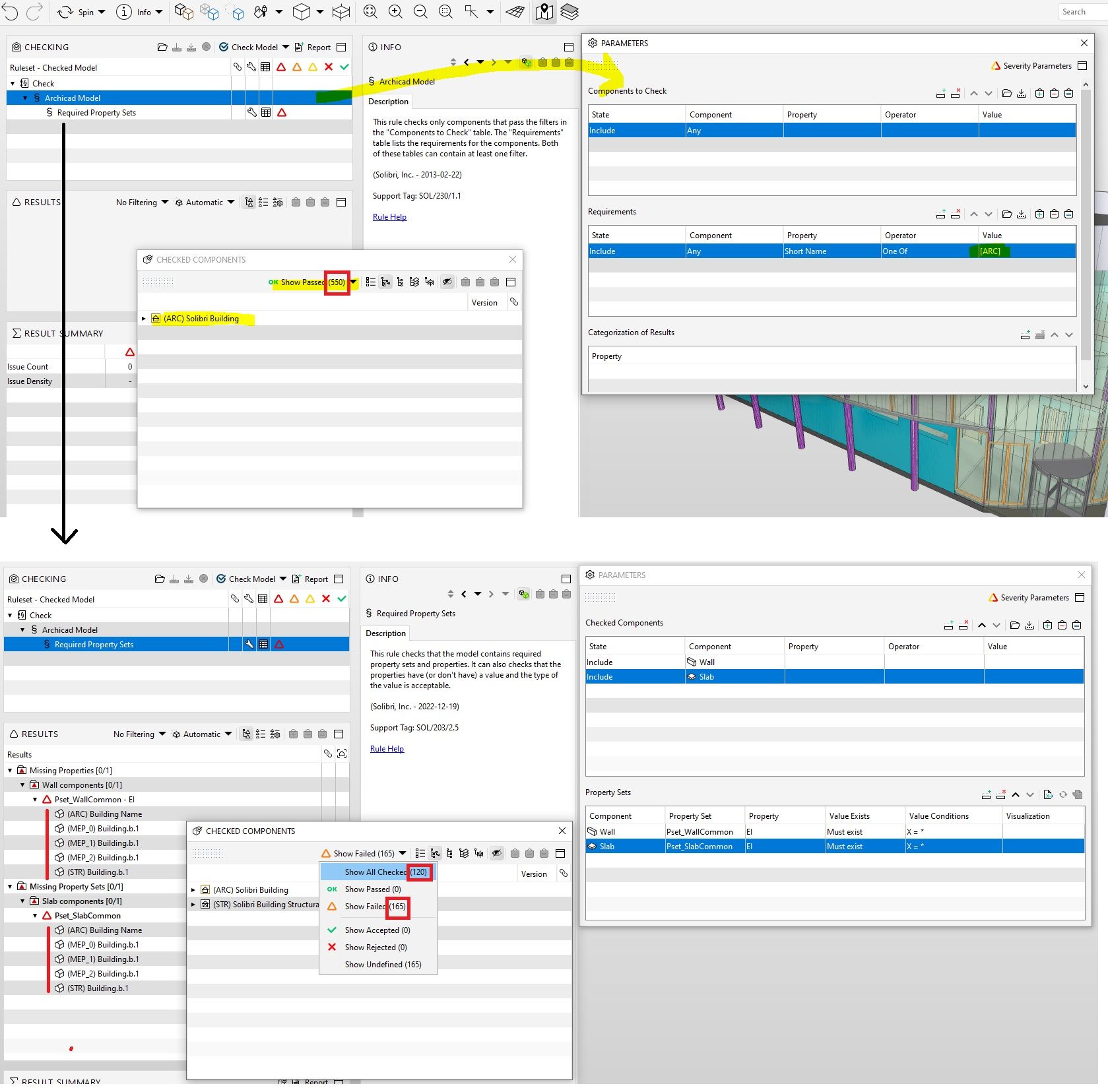
      rule203 results.jpg

      1 Reply Last reply
      2
      • paola bronzoP Offline
        paola bronzoP Offline
        paola bronzo
        wrote on last edited by
        #3

        Hi @Solibrians do you have any suggestions about this request? thanks

        violarenzoniV 1 Reply Last reply
        1
        • violarenzoniV Offline
          violarenzoniV Offline
          violarenzoni
          replied to paola bronzo on last edited by
          #4

          @paola-bronzo I have the same problem. Do you have any suggestions? Thank you

          1 Reply Last reply
          0
          • S Offline
            S Offline
            sahil.quazi
            wrote on last edited by
            #5

            Thanks for reminding. We will look into it.

            1 Reply Last reply
            1
            • paola bronzoP Offline
              paola bronzoP Offline
              paola bronzo
              wrote on last edited by
              #6

              Hi @sahil-quazi do you have any updates? Thanks

              1 Reply Last reply
              0
              • MattiM Offline
                MattiM Offline
                Matti Solibrians
                wrote on last edited by
                #7

                We investigated this.

                • This caused by bug in IFC import of version 9.13.4. That version was importing special characters in some cases.
                • The ruleset was configured with IFC model imported with 9.13.4 and the bad characters ended to the ruleset.

                How to fix this ruleset:

                1. Use newer version of Solibri
                2. Re-import the IFC file fix
                3. Re-configure the rulesets using special characters like ÜÄÖÅ.

                How fix .smc file:

                1. Use new version of Solibri
                2. Add option -Dremove-null-characters=true to Solibri.vmoptions
                3. Start Solibri
                4. Open the .smc file
                5. Save .smc file

                Note: We found out that the option is not fixing rule 203 parametrization automatically. This will be in the next release.

                paola bronzoP MattiM 2 Replies Last reply
                0
                • MattiM Matti marked this topic as a question on
                • MattiM Matti has marked this topic as solved on
                • MattiM Matti unlocked this topic on
                • paola bronzoP Offline
                  paola bronzoP Offline
                  paola bronzo
                  replied to Matti on last edited by paola bronzo
                  #8

                  Hi @Matti-Kannala,
                  I use version 9.13.8.
                  I tried to fix the smc file (posted above) by adding option -Dremove-null-characters=true to Solibri.vmoptions, and, when I started Solibri, this warning appeared:

                  71efa51b-da75-4375-92ac-b0ce9fa2ba4b-immagine.png

                  I opened the .smc file and re-save it. solibri-building_203 FIXED.smc
                  Unfortunately I continue to see all the models in the results even if the check has been set only for those created with Archicad.

                  It’s probably better to wait for the next version that fixes everything?
                  Thanks for your help.

                  1 Reply Last reply
                  0
                  • MattiM Offline
                    MattiM Offline
                    Matti Solibrians
                    replied to Matti on last edited by
                    #9

                    @Matti-Kannala said in Rule 203 strange behaviour:

                    Note: We found out that the option is not fixing rule 203 parametrization automatically. This will be in the next release.


                    1 Reply Last reply
                    1

                    Copyright © 2025 Solibri Inc. | Powered by NodeBB

                    • Login

                    • Don't have an account? Register

                    • Login or register to search.
                    • First post
                      Last post
                    0
                    • Categories