Skip to content
  • Categories
Collapse
Solibri Society Forum
  1. Home
  2. General Discussion
  3. Smartest way to use StatusConstruction as a filter?

Smartest way to use StatusConstruction as a filter?

Scheduled Pinned Locked Moved Solved General Discussion
3 Posts 2 Posters 554 Views
  • Oldest to Newest
  • Newest to Oldest
  • Most Votes
Log in to reply
This topic has been deleted. Only users with topic management privileges can see it.
  • Mats_KnutssonM Offline
    Mats_KnutssonM Offline
    Mats_Knutsson
    wrote on last edited by
    #1

    Hi,
    I’ve got a model with parts of the elements with StatusConstruction = “Existing” and some with “New”. The “New” element have a phasing property “Week8” or “Week9”. Is there a way to ge S to use this with the selections basket to show these individually and combined?

    Existing only
    Week8 only
    Week9 only
    Existing+Week8
    Existing+Week9
    All…

    🙂 Mats

    1 Reply Last reply
    0
    • L Offline
      L Offline
      lraimo
      wrote on last edited by
      #2

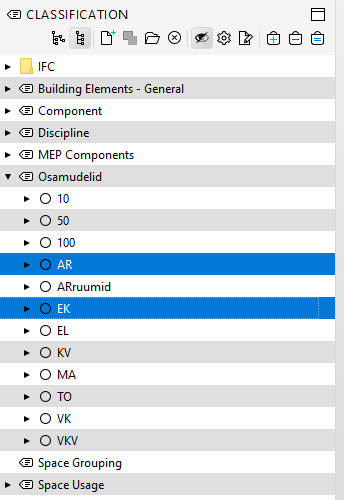
      Why do you want to use a selection basket? I’d suggest considering classifications instead. With classifications, you have the flexibility to select any combination simply by holding down the Ctrl key.
      image.png

      1 Reply Last reply
      0
      • Mats_KnutssonM Offline
        Mats_KnutssonM Offline
        Mats_Knutsson
        wrote on last edited by
        #3

        Ok I tried and it works. Thanks! Normally we never use Solibri Classifications since we focus on getting our authoring cad program to do the job correctly.

        1 Reply Last reply
        1
        • jakub.rusinJ jakub.rusin marked this topic as a question on
        • jakub.rusinJ jakub.rusin has marked this topic as solved on
        • jakub.rusinJ jakub.rusin unlocked this topic on

        Copyright © 2025 Solibri Inc. | Powered by NodeBB

        • Login

        • Don't have an account? Register

        • Login or register to search.
        • First post
          Last post
        0
        • Categories