
Don't show specific Model
-
Hello,
I have a question: In addition to the trade models, I have a model in which I have defined areas. I can then use a collision check with these areas to select all elements that belong to a specific area. This works very well for me.
However, the area model bothers me in my further work. I would like to deactivate it so that it is no longer displayed. Unfortunately, I have not yet found a way to do this, so I keep deleting it and bringing it back in when I update the models (weekly).
Does anyone have any idea what I can do?
thanks & best regards
Alex -
Use the selection basket. i.e. select, then add to the selection basket, save the basket. Then you should be able to turn it off from the 3d view.
-
I’m still using the selection basket. For my problem this is no solution…thanks anyway
-
@alex4omnicon said in Don't show specific Model:
However, the area model bothers me in my further work.
What is your further work? Do you want to exclude one of the models from 3D only (for Presentations)? Do you want to exclude it from checking?
Some tips:
You could use filtering (for displaying in 3D and to use in Checking).
Create new Filter, save it, and use where needed.
https://help.solibri.com/hc/en-us/articles/12771718136343-Filtering-Components
https://help.solibri.com/hc/en-us/articles/12771718174103-Adding-a-New-FilterAlso if your further work involves checking, Selection Basket can be used along with “Check Selected”:
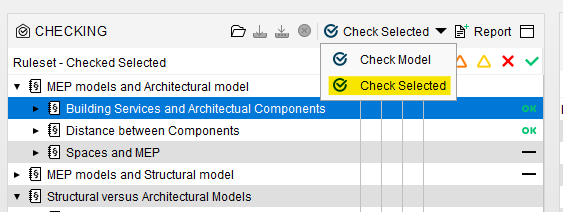
https://help.solibri.com/hc/en-us/articles/1500004090102-Using-the-Selection-Basket
-
My further work is navigation in the model. It’s annoying to click on the basket preset or set a filter every time. My colleagues also use the coordination model and are not so fit with solibri (or computers in general). I can’t explain to them that they have to hide the areas every time…
-
@alex4omnicon said in Don’t show specific Model:
I can’t explain to them that they have to hide the areas every time…
Seems like there might be also a non technical issue

Tipp: Maybe you can set a classification for model colours where this specific model gets fully transparent. Might be still annoying for selecting but at least “you don’t see it anymore”.
Apart from that, this discussion reminds me of the once tested “Unloading” feature …
https://society.solibri.com/topic/1848/10-0-0-alpha-version-6-is-ready-for-testing?_=1709727786939
… I am wondering if this is still something which is considered to be in a final release in the near future.Edit: In addition I’d also like to refer to this topic: https://society.solibri.com/topic/2517/deactivate-classifications
-
good hint with the model colours. I will try it. I don’t need too select

-
@JSN said in Don’t show specific Model:
Apart from that, this discussion reminds me of the once tested “Unloading” feature …
https://society.solibri.com/topic/1848/10-0-0-alpha-version-6-is-ready-for-testing?_=1709727786939
… I am wondering if this is still something which is considered to be in a final release in the near future.I thought the same… I think preset view selections had also been discussed at some point.
@Solibrians: It is easy to use classifications or selection basket to filter the view, but it’s still a few clicks, more so when you need both. Particularly when using rulesets, this can get very repetitive and turns out to be quite the time waster.
This might be a feature request for an extension of both the filter functionality as well as the “classification as model colour” functionality… -
 J JSN referenced this topic on



Copyright © 2025 Solibri Inc. | Powered by NodeBB