
Creating Presentations using Responsibilities.
-
Hi,
When clash detecting on projects I like to split my issues up in to separate presentations depending on the selected responsibility for a particular issue. This would result in a presentation for each discipline, such as Architects, Structural Engineers, MEP etc.Currently, I have to create a presentation from all results, sort by responsibilities and then delete any that don’t correspond to the required party. Whilst not an issue for a small amount of results, this can quickly become out of hand when the number skyrockets as this is required for the creation of multiple presentations. Not only does this slow down creation, but also when presentations are required to be updated after new models are issued as I basically have to repeat the process for each presentation.
I guess my question is: Is there a better way to achieve this? Can I create a presentation only from MEP tags for example? Or can I bundle it all into one presentation and then create reports out of specific responsibilities?
-
Hi Max,
as i see youre problem there are lots of issues in a presentation and you want them bundle by discipline.
if you create an issue and enter a responsible, for example by discipline, you can filter it by right-clicking on your presentation and selecting search presentation. There you select the discipline, and then click on mark matching and close. if you then click on Report you can choose from Report all or Report only marked, repeat these steps for all disciplines.
-
Hi @Max-Niras,
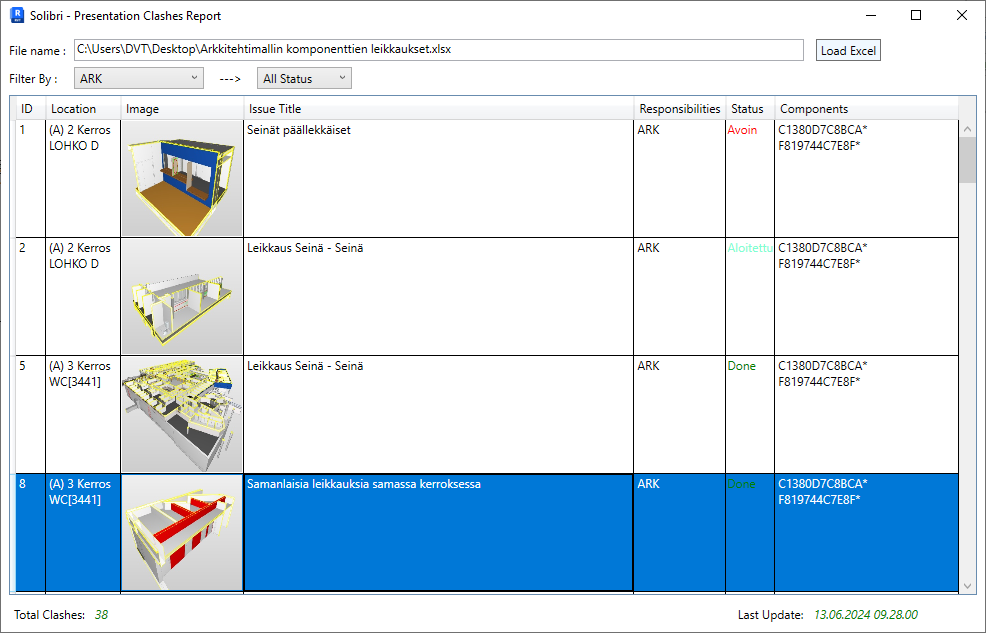
Before that I also had the same problem as you took a lot of time to do it and often repeated it in each project, this is my way:
- Read Clash reports from Solibri and load data into the Revit design model.
- Can double click into cell status and it will change to “Done,” so can easily see which clashes are fixed and save the info for the next time.
- Can also filter by Responsibility or Status.
- When click on a row, it shows the clash location in the model, making it easy to fix the error, search, and save a lot of time.
Does anyone have any ideas to further solve this problem?

Copyright © 2025 Solibri Inc. | Powered by NodeBB