
Obtain Nearest Space Number for elements
-
Hi,
I’m trying to get the number of the nearest space to an element. I then want to check this number against part of the object name to ensure it is correct.
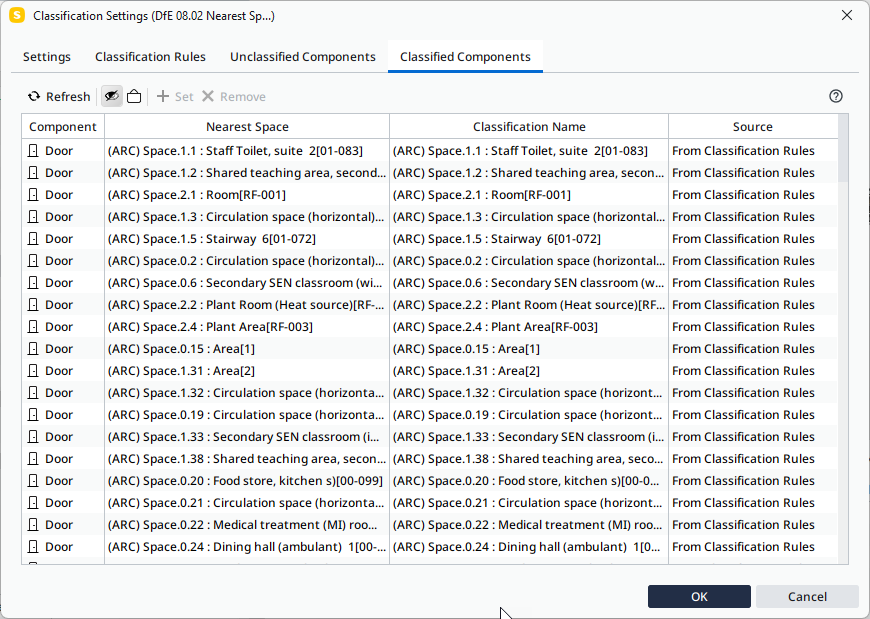
However, if I set up a classification to report the nearest space it (understandably perhaps) gives me the name and number of the space. Can anyone tell me how I can set this up to get the Classification to show only the Space Number?
-
Hi Keith, Im assuming that this is for COBie? If it is then simply add the additional column to the ITO that contains the manually entered space name in the component in the Component sheet ITO. You can then add the column to the COBie template file (make sure that the template file has the same column header name as the one in your ITO. This will then show you the two fields next to each other when calculated.
If you are using the classifications for space names(numbers) then you could compare the values from the object to the nearest space value to see if they are equal. -
Sort of for COBie, it’s to check the DfE requirements for object naming which for Doors and Windows needs to start with the Space Number so a manual process won’t work. I’m sure there will be some clever way of doing it in Solibri I just can see what it is.
-
Hi Keith, I think I have just done this same thing for another customer I will contact you directly.
-
Thanks Simon.
Copyright © 2025 Solibri Inc. | Powered by NodeBB