Skip to content
  • Categories
Collapse
Solibri Society Forum
  1. Home
  2. General Discussion
  3. Clash Matrix versus Filesize

Clash Matrix versus Filesize

Scheduled Pinned Locked Moved General Discussion
4 Posts 4 Posters 924 Views
  • Oldest to Newest
  • Newest to Oldest
  • Most Votes
Log in to reply
This topic has been deleted. Only users with topic management privileges can see it.
  • GraafG Offline
    GraafG Offline
    Graaf
    wrote on last edited by
    #1

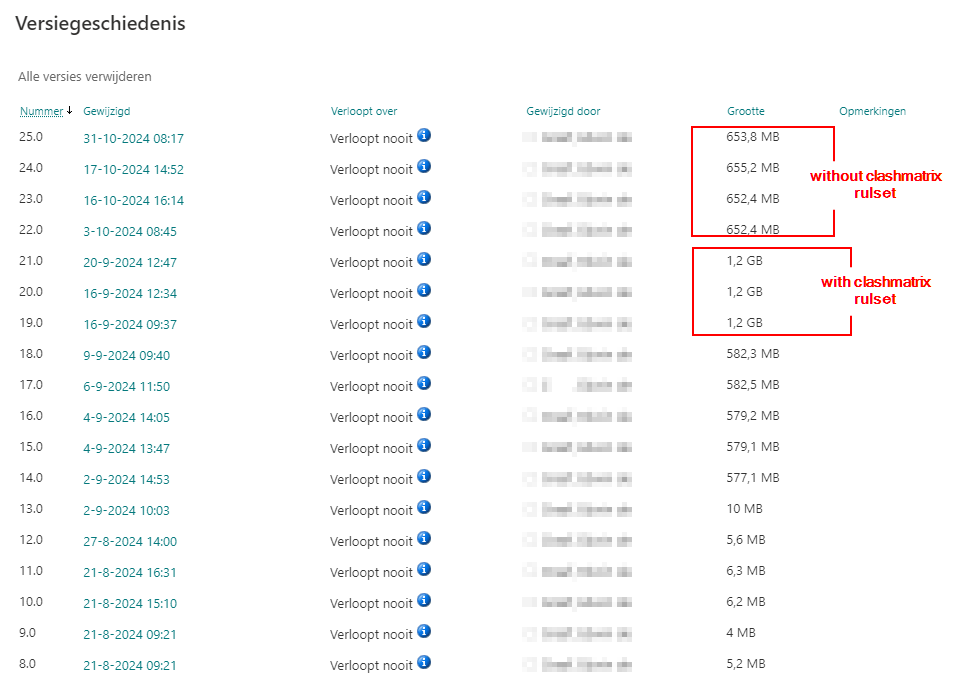
    When I use the clash matrix ruleset, I notice that the file size increases significantly. This has negative consequences for working in cloud environments combined with slow internet connections. This sometimes results in crashes and incorrectly saved files.

    Does anyone else have this problem?

    For me, this results in not using the matrix function.

    Is there anything else you need help with?
    9090935a-b564-4cf4-8294-f42700c8d333-image.png

    1 Reply Last reply
    1
    • MattiM Offline
      MattiM Offline
      Matti Solibrians
      wrote on last edited by
      #2

      The clash detection matrix can produce a lot of results (clashes).
      We know that the clash visualizations are reason for the increased file size.

      In case you have tens of thousands of clashes

      a) the best option is the disable the categories in the matrix that produces needless results (clashes).
      Select category in the matrix and click ignore at custom tab.

      b) Use the application launch option to discard all visualizations:

      "C:\Program Files\Solibri\SOLIBRI-24.9.0.38\Solibri.vmoptions"
      

      This option disables the visualization of the clashes. The visualizations are enabled by default.
      The visualizations increase the project file size.

      -DClashDetectionMatrix.NoClashVisualizations=true
      
      Harmen JorritsmaH 1 Reply Last reply
      0
      • M Offline
        M Offline
        Mvandenbrink
        wrote on last edited by
        #3

        @Graaf We noticed the increase off filesize too, it’s fine with a good internet connection. But slow or less reliable connections create issues with our Sharepoint integration. Updating models and saving models sometimes crash due to these unstable connections. I think in general these integrations should handle less reliable internet connections better.

        @Matti Would it be possible to add it as a setting in the Rule parameters? So you could create a Clash Detection rule which generates the visualizations and another which doesn’t? That would be more flexible than just on/off on a machine.

        1 Reply Last reply
        1
        • Harmen JorritsmaH Offline
          Harmen JorritsmaH Offline
          Harmen Jorritsma
          replied to Matti on last edited by
          #4

          @Matti

          When you change the vmoptions, how mutch slower is Solibri with showing the clashes?
          Have you test this?
          Or is it a matter of 1 or 2 seconds slower to show the clash?

          Met vriendelijke groet,
          Harmen Jorritsma

          BIM regisseur Van Wijnen Amsterdam
          Diemerhof 32 | 1112 XN Diemen | KvK 32129744

          020 -36 44 000 | 06-83 15 66 88 | LinkedIn | www.vanwijnen.nl
          Volg ons op Facebook en Twitter

          1 Reply Last reply
          0

          Copyright © 2025 Solibri Inc. | Powered by NodeBB

          • Login

          • Don't have an account? Register

          • Login or register to search.
          • First post
            Last post
          0
          • Categories
