
Read Error [Solved]
-
Hi!
I’ve started experiencing problems when opening models from networks other than the company network when trying to connect to ACC through the integration.
When I work at our office, the error magically disappears and everything works like it should.Before opening the model, I am able to connect to ACC and navigate to the right folder / model (implying that the connection itself works, else I would not show me the ACC folder structure).
Only upon selecting the model and trying to open it, will it displays this error. I am running the latest Solibri version (25.3.1.59) on a Windows 11 laptop.
Reading through the error code, I can’t really pin down what the cause might be. Is anyone having similar issues, or might know in what direction the solution might be?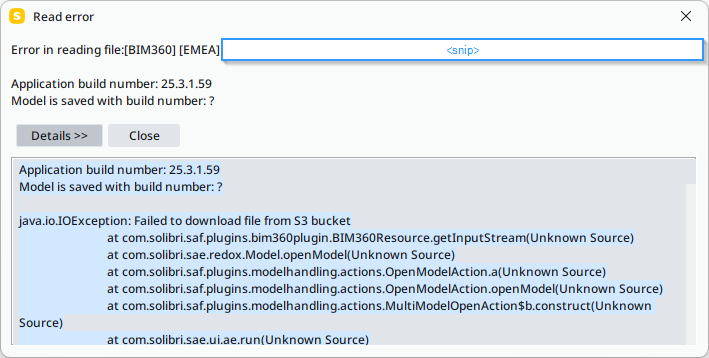
Application build number: 25.3.1.59 Model is saved with build number: ? java.io.IOException: Failed to download file from S3 bucket at com.solibri.saf.plugins.bim360plugin.BIM360Resource.getInputStream(Unknown Source) at com.solibri.sae.redox.Model.openModel(Unknown Source) at com.solibri.saf.plugins.modelhandling.actions.OpenModelAction.a(Unknown Source) at com.solibri.saf.plugins.modelhandling.actions.OpenModelAction.openModel(Unknown Source) at com.solibri.saf.plugins.modelhandling.actions.MultiModelOpenAction$b.construct(Unknown Source) at com.solibri.sae.ui.ae.run(Unknown Source) at java.base/java.lang.Thread.run(Thread.java:840) Caused by: javax.net.ssl.SSLHandshakeException: PKIX path building failed: sun.security.provider.certpath.SunCertPathBuilderException: unable to find valid certification path to requested target at java.base/sun.security.ssl.Alert.createSSLException(Alert.java:131) at java.base/sun.security.ssl.TransportContext.fatal(TransportContext.java:378) at java.base/sun.security.ssl.TransportContext.fatal(TransportContext.java:321) at java.base/sun.security.ssl.TransportContext.fatal(TransportContext.java:316) at java.base/sun.security.ssl.CertificateMessage$T13CertificateConsumer.checkServerCerts(CertificateMessage.java:1351) at java.base/sun.security.ssl.CertificateMessage$T13CertificateConsumer.onConsumeCertificate(CertificateMessage.java:1226) at java.base/sun.security.ssl.CertificateMessage$T13CertificateConsumer.consume(CertificateMessage.java:1169) at java.base/sun.security.ssl.SSLHandshake.consume(SSLHandshake.java:396) at java.base/sun.security.ssl.HandshakeContext.dispatch(HandshakeContext.java:480) at java.base/sun.security.ssl.HandshakeContext.dispatch(HandshakeContext.java:458) at java.base/sun.security.ssl.TransportContext.dispatch(TransportContext.java:201) at java.base/sun.security.ssl.SSLTransport.decode(SSLTransport.java:172) at java.base/sun.security.ssl.SSLSocketImpl.decode(SSLSocketImpl.java:1510) at java.base/sun.security.ssl.SSLSocketImpl.readHandshakeRecord(SSLSocketImpl.java:1425) at java.base/sun.security.ssl.SSLSocketImpl.startHandshake(SSLSocketImpl.java:455) at java.base/sun.security.ssl.SSLSocketImpl.startHandshake(SSLSocketImpl.java:426) at org.apache.http.conn.ssl.SSLConnectionSocketFactory.createLayeredSocket(SSLConnectionSocketFactory.java:436) at org.apache.http.conn.ssl.SSLConnectionSocketFactory.connectSocket(SSLConnectionSocketFactory.java:384) at org.apache.http.impl.conn.DefaultHttpClientConnectionOperator.connect(DefaultHttpClientConnectionOperator.java:142) at org.apache.http.impl.conn.PoolingHttpClientConnectionManager.connect(PoolingHttpClientConnectionManager.java:376) at org.apache.http.impl.execchain.MainClientExec.establishRoute(MainClientExec.java:393) at org.apache.http.impl.execchain.MainClientExec.execute(MainClientExec.java:236) at org.apache.http.impl.execchain.ProtocolExec.execute(ProtocolExec.java:186) at org.apache.http.impl.execchain.RetryExec.execute(RetryExec.java:89) at org.apache.http.impl.execchain.RedirectExec.execute(RedirectExec.java:110) at org.apache.http.impl.client.InternalHttpClient.doExecute(InternalHttpClient.java:185) at org.apache.http.impl.client.CloseableHttpClient.execute(CloseableHttpClient.java:83) at org.apache.http.impl.client.CloseableHttpClient.execute(CloseableHttpClient.java:108) at com.autodesk.client.api.ObjectsApi.getClientResponse(Unknown Source) at com.autodesk.client.api.ObjectsApi.downloadFileFromS3(Unknown Source) ... 7 more Caused by: sun.security.validator.ValidatorException: PKIX path building failed: sun.security.provider.certpath.SunCertPathBuilderException: unable to find valid certification path to requested target at java.base/sun.security.validator.PKIXValidator.doBuild(PKIXValidator.java:439) at java.base/sun.security.validator.PKIXValidator.engineValidate(PKIXValidator.java:306) at java.base/sun.security.validator.Validator.validate(Validator.java:264) at java.base/sun.security.ssl.X509TrustManagerImpl.checkTrusted(X509TrustManagerImpl.java:231) at java.base/sun.security.ssl.X509TrustManagerImpl.checkServerTrusted(X509TrustManagerImpl.java:132) at java.base/sun.security.ssl.CertificateMessage$T13CertificateConsumer.checkServerCerts(CertificateMessage.java:1335) ... 32 more Caused by: sun.security.provider.certpath.SunCertPathBuilderException: unable to find valid certification path to requested target at java.base/sun.security.provider.certpath.SunCertPathBuilder.build(SunCertPathBuilder.java:148) at java.base/sun.security.provider.certpath.SunCertPathBuilder.engineBuild(SunCertPathBuilder.java:129) at java.base/java.security.cert.CertPathBuilder.build(CertPathBuilder.java:297) at java.base/sun.security.validator.PKIXValidator.doBuild(PKIXValidator.java:434) ... 37 more -
PKIX in the error log is often related to SSL certificates and firewalls.
Try adding this line to “C:\Program Files\Solibri\SOLIBRI\Solibri.vmoptions”
-Djavax.net.ssl.trustStoreType=WINDOWS-ROOTThere is also another (harder) way to solve this by adding your certificate to Java keystore.
https://sentry.io/answers/how-to-solve-pkix-path-building-failed-error-in-java/ -
 M Matti marked this topic as a question on
-
M Matti has marked this topic as solved on
-
M Matti unlocked this topic on
-
M Matti referenced this topic on
Copyright © 2025 Solibri Inc. | Powered by NodeBB