
edit Solibri Center
-
is it possible to add a column to the Manage licenses page that shows the consuming user groups?
it would clarify for us which of the 9 groups belong to which license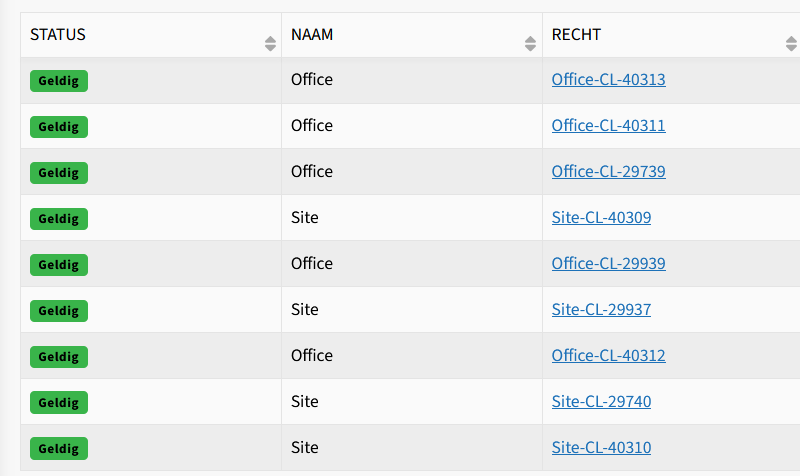
-
You can see the Consuming user group(s) by clicking the Entitlement(Recht). Because there can be multiple user groups connected to one entitlement, it is not easy to visualize in one column.
-
@Solibrians,
We noticed with the new server that we no longer have the ability to choose the preferred ‘license’ before starting Solibri. We have quite a few colleagues who work primarily in the Anywhere environment.Is it true that Solibri will now choose itself which version to open until all available seats (provided for a particular group) are used?
Why can we no longer decide which license we want/need to work with? This way, the licenses are used unnecessarily while a user only wants to look at the model.
-
Users can install newest Solibri version 25.3.2 from Solibri Center and there you have the product selector.
-
@C-Oldenburg That’s correct indeed. Unfortunately, we also no longer get the startup selection screen. We would really like to be able to make that choice ourselves again.
In addition, we’ve submitted a request to have a fallback scenario implemented. Some of our users are assigned both Site and Office. Currently, when they try to open Office but all licenses are in use, they’re redirected to Anywhere even though Site licenses are often still available.
For now, we’ve implemented a workaround using specific desktop shortcuts for the different versions.
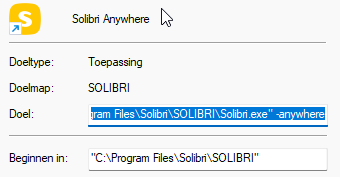
When you append -anywhere -site or -office to the target you are able to start the right version of Solibri.

Copyright © 2025 Solibri Inc. | Powered by NodeBB