
Returning error 'EXE4J_JAVA_HOME'.
-
Hi,
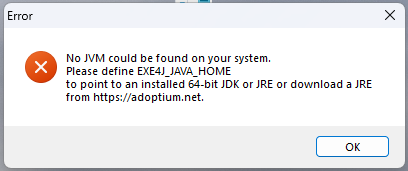
We now have had several users complaining that Solibri does not start anymore due to the error ‘EXE4J_JAVA_HOME’.
Contacted Solibri support but they are unable to help and tell us just to reinstall. Sometimes a de-installation does not even work and then we have to reinstall in a different directory. But we can’t go on like this and are not satisfied with the answer to just reinstall.
Anyone have any experience with this error? Any help would be really appreciated.
-
Thanks, Matti. Looking forward to receive the new version when it’s released.
-
The target for beta version is today :). The release will be in two weeks after that.
-
Hi @Matti , Did this fix make it into the beta release? I couldn’t find it mentioned in the release notes.
@D i c k-Steegman We’re experiencing the same issue — we deploy Solibri updates via Intune, and if Solibri is running during the update, users receive this error message. -
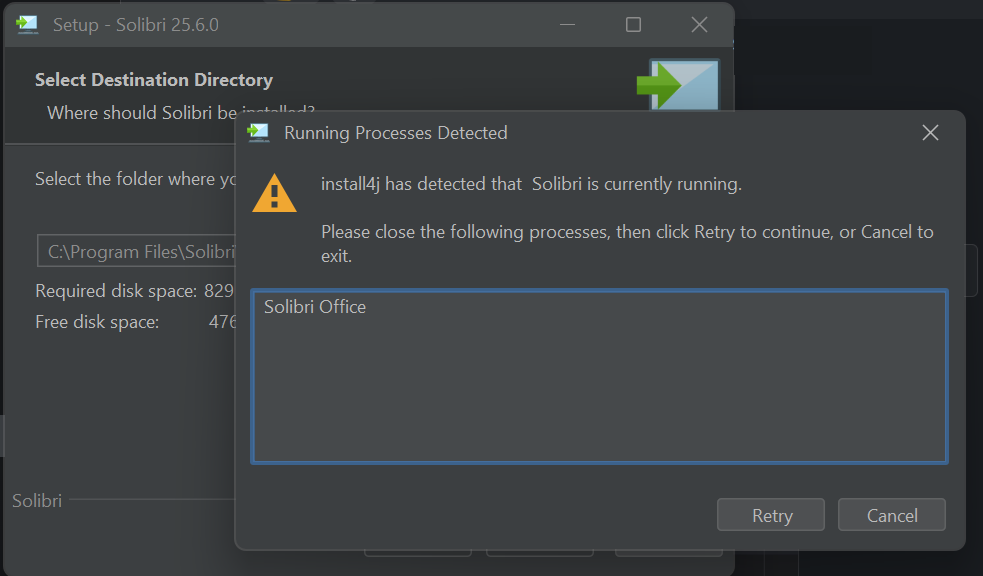
Yes, this fix was missing from release notes. The user will get this prompt when installing.
-
@Matti And how can the problem be solved with the current version? I don’t want to tell our customers that they now have to wait two weeks until the final update is released. Furthermore, Solibri can no longer be uninstalled; the exact same error occurs.
What is the solution to this problem?
-
@Matti It’s only fixed when Solibri is installed manually. When we deploy the beta from Intune the same error occurs. Solibri just installs partially in the background when the current version of Solibri is running. Afterwards users get the same NO JVM could be found error.


Copyright © 2025 Solibri Inc. | Powered by NodeBB