
232 Manual Checking Rule Issue - Fake issue in Results
-
Hello everyone,
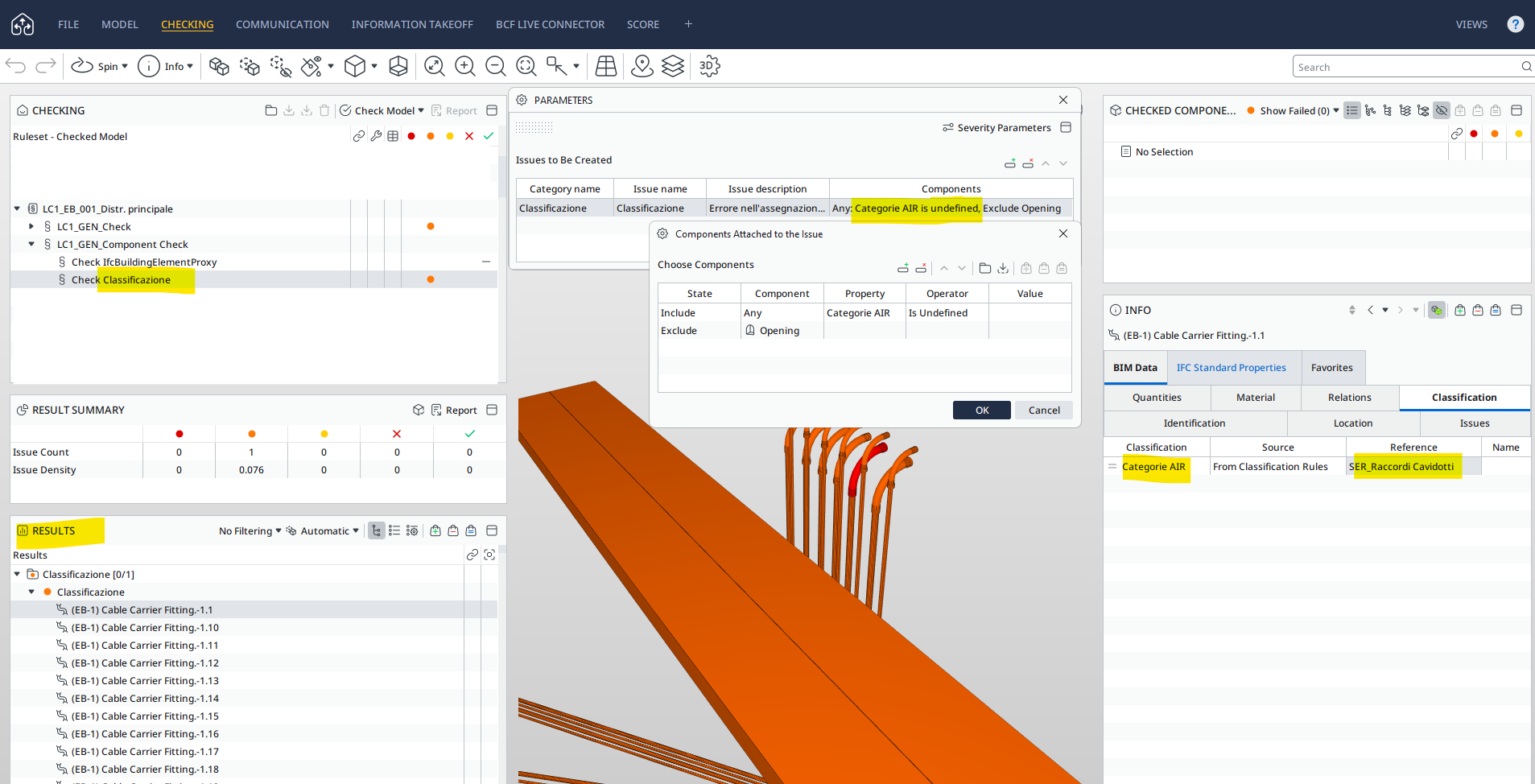
I’m experiencing a strange issue with Manual Rule SOL/232/1.1.After creating a classification (“Categorie AIR”) with the appropriate classification rules, I ran the “Check Classificazione” rule, which should display only the unclassified objects—this is to generate issues and prepare slides for a presentation.
As shown in the image, even though the object is now classified as “SER_Raccordi Cavidotti” and no elements appear in the Checked Components panel, it still shows up as an issue in the Results panel.
Could this be a bug in the software?
Note: In the previous IFC file, these elements were not correctly classified and were indeed a valid issue. It seems as if the Results panel is not clearing the previous issues.
-
I have experienced this behaviour as well. With the new IFC file, did you use the same SMC and simply update the model? If so, the Results panel may sometimes retain certain invalid results.
Could you try opening a fresh Solibri project with the new IFC and running the check again? -
Hi Hamzalaalaoui,
thank you for your reply.Yes, I used the same SMC file with the updated IFC.
I also tried with a new file and tried deleting and reloading the ruleset, and it worked correctly. So, it seems to be a software bug, which I hope will be resolved soon.Anyway, I changed the rule to check the classification SOL/230/1.1, hoping the issue was caused by the Manual Checking Rule.
-
I am experiencing a very similar issue so I start thinking this doesn’t only apply to the rule mentioned above.
In fact this seems to be of general nature.In my case I’m working on a ACC-connected Solibri-coordination model containing 30 models (aproximately 300k objects) I do need to rely on updating the single models on a regular basis. Starting a new fresh Solibri-project every 3 weeks isn’t an option.
Just as described above I experience that previous issues do remain in the results and the viewport stays the same even though the issue is resolved.
The number behind the result are giving me a clue that there actually are less issues than displayed in the viewport.
So I accidently discovered this work-around: since I was sure that certain issues where resolved I deleted the connected slides for the results. Without even re-running the check I suddendly see the correct clashes in the viewport.
This manual fixing is ruining my clash detection workflow from checking to presentation.
What is more this is by far not sustainable to follow up on the 500+ongoing issues.Dear team at Solibri: Are you aware of this bug? When will this be fixed?
Is there anything we’re doing wrong?

Copyright © 2025 Solibri Inc. | Powered by NodeBB