
Solibri center Company Extensions
-
I have this same problem with new users. They don’t see the extensions in Solibri like the old users who had the extensions already assigned when Solibri Solution Center was up and cant find way to extensions to appear to new users.
I have contacted Solibri support in this matter, but they have now yet answered.
-
Hello!
Thanks for reporting this. We’re working on a solution as we speak, and are aiming to have this resolved by next week. Stay tuned!
Kind regards,
Toni
-
Hi @tonigyllenberg any news or eta when this issues will be fixed?
-
@Mvandenbrink said in Solibri center Company Extensions:
Hi @tonigyllenberg any news or eta when this issues will be fixed?
Hello!
We are planning the deployment today after hours. Tomorrow morning the change will be in place.
-
Hi @tonigyllenberg, company extensions are available for installation for the “new” users. Unfortunately, another issue has come up: in the Open Role window, the resources are not showing. Do you have any idea how this can be resolved?
New users:

Old users:

-
@Mvandenbrink Have you restarted Solibri after installing the extension? If not, please try restarting it and see if that resolves the issue. If the problem persists, kindly share the logs for further analysis.
-
Hi @vasu We restarted Solibri after installing the extensions and also tried reinstalling the application, but without success. After inspecting the runtime log I found this warning about the Extensions.
2025-09-15 10:01:20.251+0200 [main] WARN c.solibri.saf.core.ExtensionHandler - [COMPANY EXTENSION] v2 is not licensed to the user 2025-09-15 10:01:20.262+0200 [main] WARN c.solibri.saf.core.ExtensionHandler - [COMPANY EXTENSION] is not licensed to the user -
@tonigyllenberg Hi Toni! I think recently added users still doesnt see Solibri Company Extensions only the Puplic Extensions on the extensions list. So the problem is still there in my point of view.
Solibri support answered me (5.9.2025): “Our team is looking at this issue and at the moment the site subscription users are mainly affected by this.”
EDIT --> Nevermind, now it works as it should be. This post can be ignored.
Regards, Esa
-
Hi @vasu and @tonigyllenberg, this issue is still ongoing. Users can now install the extensions, but they are unable to select them due to the missing Resources tab. We discovered that assigning an Office license instead of a Site license resolves the issue, which indicates that something in the new license center is still not functioning correctly. Currently, all Site users are missing the Resources tab when trying to open a Role.
-
@Mvandenbrink said in Solibri center Company Extensions:
Hi @vasu and @tonigyllenberg, this issue is still ongoing. Users can now install the extensions, but they are unable to select them due to the missing Resources tab. We discovered that assigning an Office license instead of a Site license resolves the issue, which indicates that something in the new license center is still not functioning correctly. Currently, all Site users are missing the Resources tab when trying to open a Role.
Hello! Apologies for the inconvenience this is causing. I will reach out via email and setup a call to diagnose this in more detail.
-
Is de Company Extension not only available In Solibri Office?
https://www.solibri.com/nl/producten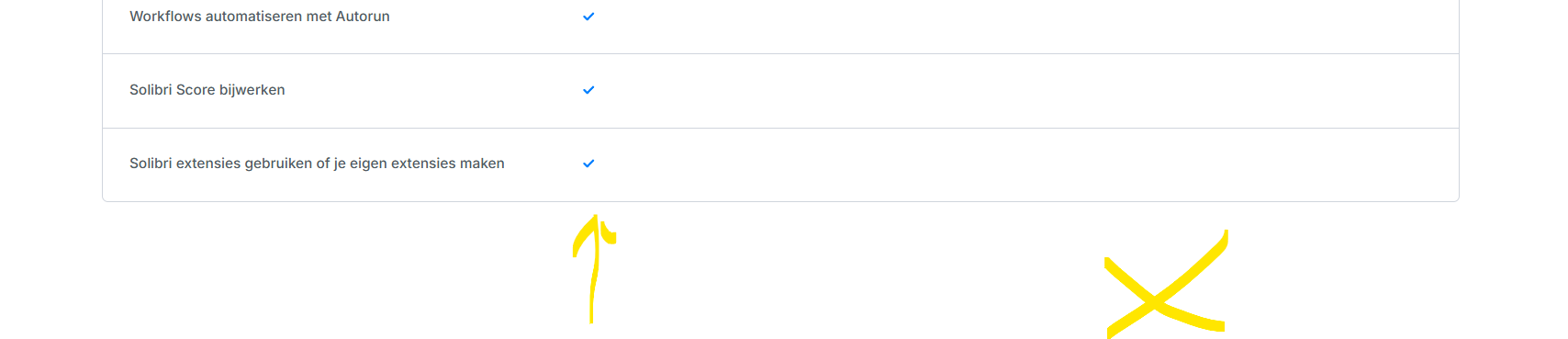
Met vriendelijke groet,
Harmen JorritsmaBIM regisseur Van Wijnen Amsterdam
Diemerhof 32 | 1112 XN Diemen | KvK 32129744020 -36 44 000 | 06-83 15 66 88 | LinkedIn | www.vanwijnen.nl
Volg ons op Facebook en Twitter -
@Harmen-Jorritsma said in Solibri center Company Extensions:
Is de Company Extension not only available In Solibri Office?
https://www.solibri.com/nl/productenGenerally speaking yes, this is how it has been communicated. However, the setup gets a little bit more complex when we speak about e.g. a Solibri Office license holder who is using Site.


Copyright © 2025 Solibri Inc. | Powered by NodeBB