
Issue if anything changes in specific elements
-
Hello, I’d like to know if this is a way to “watch” specific set of elements?
Similar to “monitor” function in Revit, solibri would watch set of elements and in they are changed in a new model update would create an issue.
I’d like to at least watch a geometry position changes.Example - in ventilation model everyone agrees that diffusers are in the right place. However, ducs will be modified. How to check changes in the same model if one set of elements are dynamic and another set is frozen?
I could theoretically separate everything to different IFC models, but that created many exports and extreme amount of files in large projects.
How to check if “frozen” elements have been modified using regular update models feature?
-
You could try Model Comparison rule 206.
Open two revision of the same IFC (Note: file names cannot be equal)
Parametrize to check only the “frozen” components.
If you have a lot of models, I recommend to automate check using Autorun: https://solibri.github.io/Developer-Platform/latest/autorun.html
You could use AI to generate a python script that checks and reports the “frozen” components with modifications.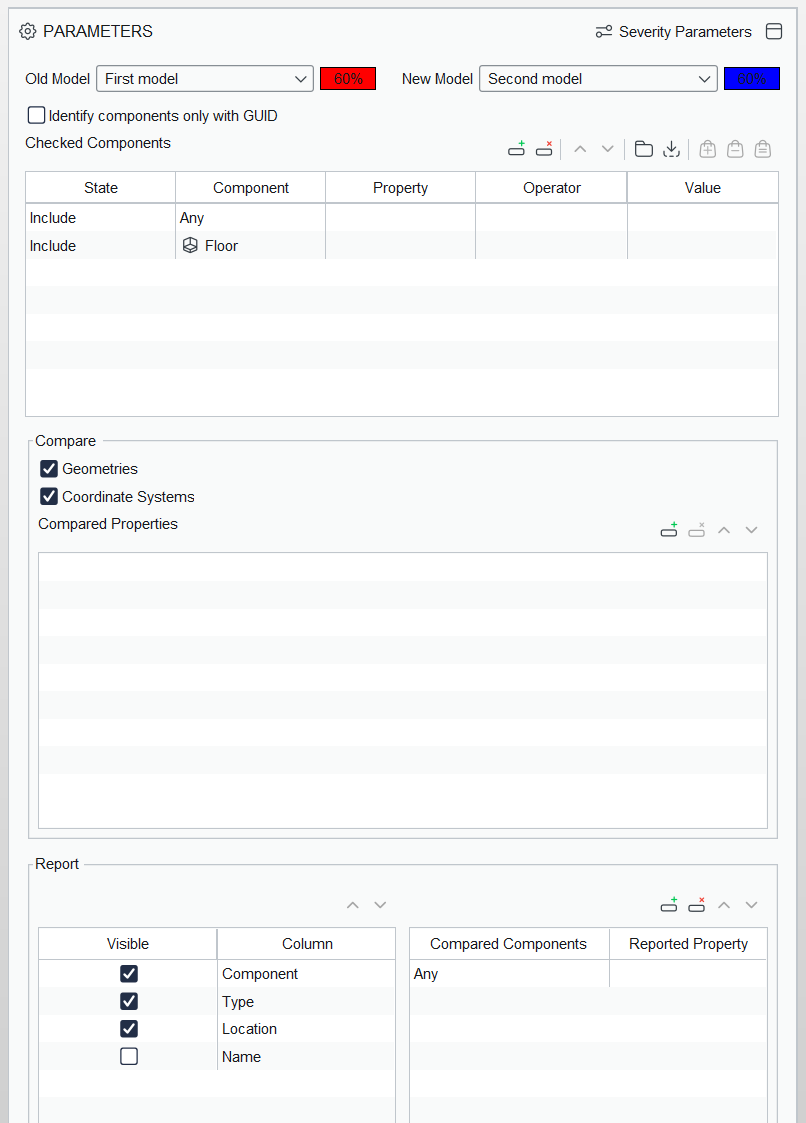
-
Another possibility:
- Select which data needs to stay the same
- Create an ITO listing these
- Make Autorun to create the ITO report
- Use AI generated python script to compare the Excel report file with previous report
Then compare Excel file with previous using a python script.
-
Great tip. My colleagues and I were thinking that I could take off xyz coordinates for frozen elements and plug the list to the parameters checking rule. That kind of works well if only several aspects are frozen.
The problem I see with compare tool is that quite a lot of manual works is involved. It would be great if it could be just another enabled rule without loading side models

Copyright © 2025 Solibri Inc. | Powered by NodeBB