
Point Cloud - Model Check
-
Hello Solibrians,
For a BIM use case, I need to check the ifc model against a point cloud (.e57) and document the differences.
Is there a way I can do this with Solibri? I have used Solibri for the model check until now and would like to continue doing so.
This BIM use case is becoming increasingly important.I would apreciate any help and support from users that have experience with checking comparing point clouds with the model.
Thank you very much in advance
-
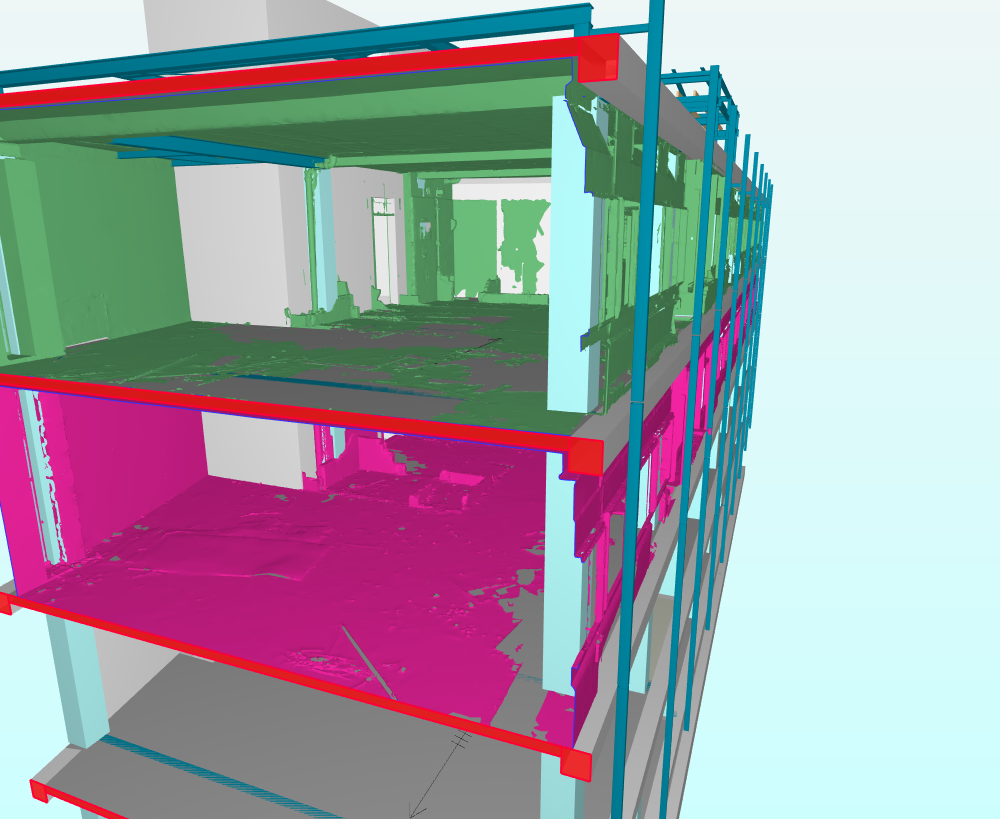
Hi, it’s not possible to import the pointcloud into Solibri. Perhaps you could ask the creator of the point cloud if they can export it to an IFC mesh file. I had this experience on a project. To keep the file size low, we had the point cloud exported to IFC Mesh per floor.
The IFC mesh is a normal .ifc file, but follows the contours of the point cloud.
Of course, another option is to merge the point cloud and the IFC of the project in the free BIMcollab Zoom viewer. IFC and point cloud must be aligned with each other.
The image shows a combination of an IFC from the structural engineer and the point cloud as an IFC mesh in Solibri.
-
Thank you very much for your reply.
I tried merging the IFC and the point cloud in BIM collab ZOOM, but I guess the point cloud is too big.Did the creator export the IFC Mesh File per floor or did you do it yourself? If so, what Software did you use?
Thanx again for your help
-
The creator of the point cloud and the IFC mesh exported them per floor. I don’t know what software they used. They also positioned the point cloud relative to the IFC.
-
Thank you very much @carlovanminde. Your input was very helpful.
-
you’re welcome
-
Point cloud support (e57, las and laz) as well as point cloud checks are now available for beta testing in Solibri!
https://society.solibri.com/topic/3591/solibri-26-6-0-is-available-for-beta-testing?_=1781154260520

Copyright © 2025 Solibri Inc. | Powered by NodeBB