
MacOS 26.2 /Mac mini M4 - exporting PDF reports causes Solibri to freeze
-
Hi,
When trying to export PDF reports from Solibri on a Mac mini M4 running macOS Tahoe 26.2, Solibri freezes, and the progress bar in the bottom shows “Creating reports” but nothing is created.
I´ve tried several different fonts and character-sets in the report settings but I just can´t get it to work.
Exporting to any other format works just fine.Any help is greatly appreciated!
Kind regards, Espen
Mac mini M4 16GB Ram
macOS Tahoe 26.2
Solibri Office 26.4.1.108:
License Type: Floating
Vendor: Solibri, Inc.
Patents: US 9,639,516 B2
Build Number: 26.4.1.108
Timestamp: 2026-04-21
Application Path: /Applications/Solibri/Operating System: Mac OS X 26.2 x86_64
Java Version: 21.0.10 64-bit
Java Virtual Machine: OpenJDK 64-Bit Server VM 21.0.10+7-LTS
Java Max Memory: 8192M
Used Memory: 195MMode: Normal Mode
Display Adapter Vendor: Apple
Display Adapter: Apple M4
3D Interface: OpenGL
Supported OpenGL Version: 2.1 Metal - 90.5
Optimized Rendering: Not Supported* -
Hello!
Please report this to [email protected]
Remember to include your log files, we might be able to see what the root cause is by doing some digging.
-
@eh_noreger I don’t know if this is related, but we have a lot of support cases where we have to tell our customers that they need to change the character set in Solibri on macOS to Windows-1252 - after that, everything works again. I’m not sure if this setting will help with your problem, though—but it certainly can’t hurt to give it a try

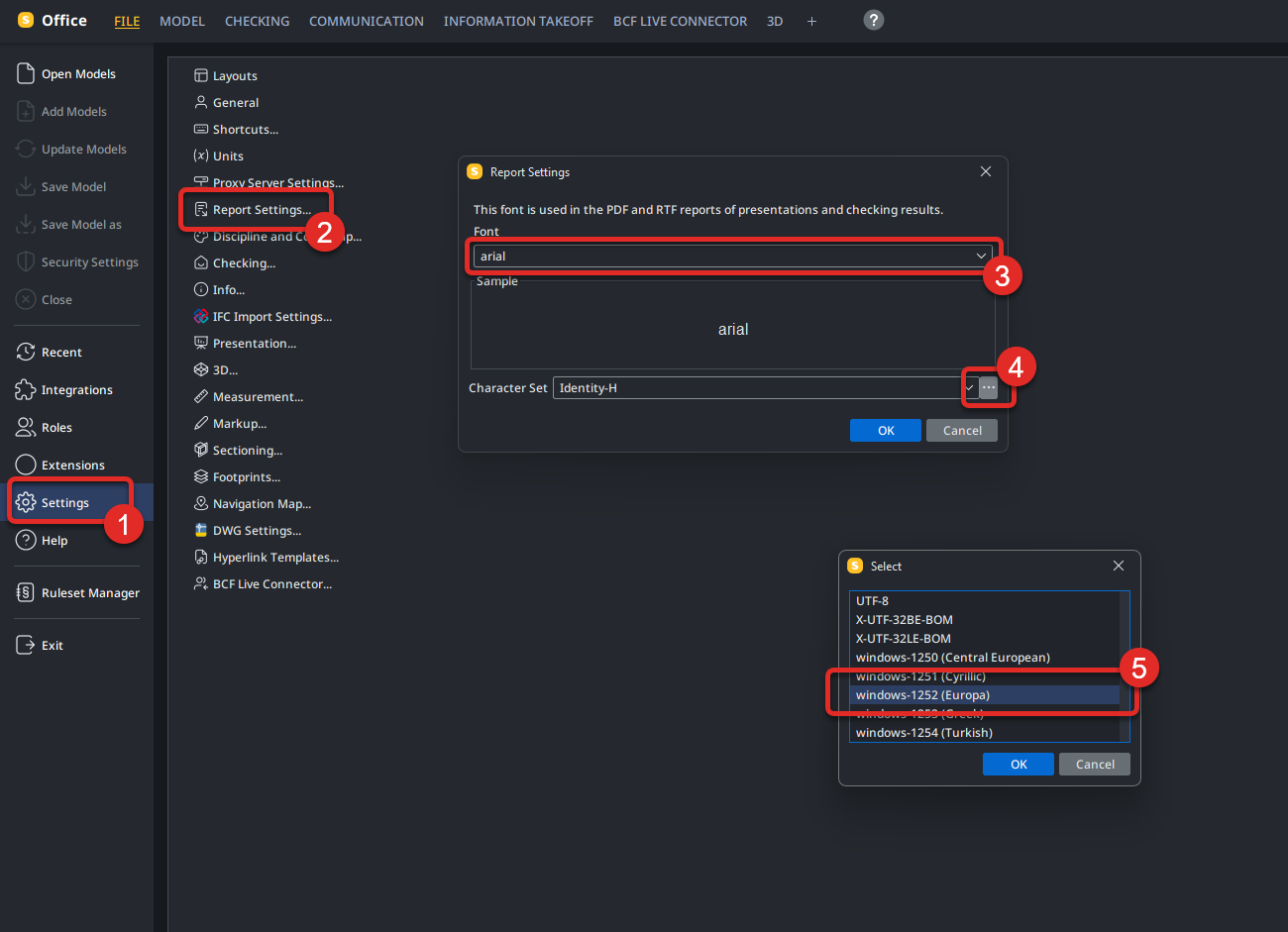
I don’t know why this is the case or why this setting causes problems every time. Perhaps Solibri itself can help explain why this setting always has to be changed on Mac?
@tonigyllenberg Can you help me with this? Why do Mac users always have to change the character set in order to export a report?
-
@tonigyllenberg Hi Toni. Thanks, I´ll do that.
-
@Mario Hi Mario. Thanks for the tip! I tried it but unfortunately it didn´t work on my machine. Strange thing is that after changing the character set to Windows-1252 and saving the file, it reverts back to “Identity-H”. Anyway, I´ll send .smc and log files to support and see what they figure out.



Copyright © 2025 Solibri Inc. | Powered by NodeBB