
Solibri installation path is different with the newest update (26.4.1), why?
-
Hi there,
As the title reads, the installation path is different with the newest update (26.4.1) resulting in 2 installations of Solibri at the same time.
When a new update comes out, does the 26.4.1 version gets removed from the system or something else…?
I would like to have some information about this before pushing the current update out company wide.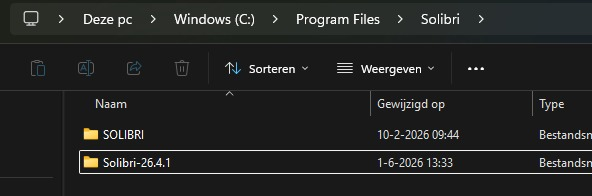
-
@Ricardo said in Solibri installation path is different with the newest update (26.4.1), why?:
Hi there,
As the title reads, the installation path is different with the newest update (26.4.1) resulting in 2 installations of Solibri at the same time.
When a new update comes out, does the 26.4.1 version gets removed from the system or something else…?
I would like to have some information about this before pushing the current update out company wide.Hello @Ricardo!
Shortly after 26.4.0 release, we got a lot of negative feedback from Anywhere users that had overwritten their previous installation and lost access. We made this change with 26.4.1 to try and help users prevent accidentally overwriting their existing Anywhere installation, simply by changing the default selection to not overwrite the existing one, and then adding a more descriptive installation folder. There is no other technical reason for the change except this.
If you want to overwrite the existing installations, simply select Yes to overwrite during the installation process.
This is also shortly mentioned at the bottom of the 26.4.1 Release notes.
Kind regards,
Toni


Copyright © 2025 Solibri Inc. | Powered by NodeBB