Skip to content
  • Categories
Collapse
Solibri Society Forum
  1. Home
  2. General Discussion
  3. Allowed Property Values - Concatenated values from multiple lists

Allowed Property Values - Concatenated values from multiple lists

Scheduled Pinned Locked Moved General Discussion
8 Posts 4 Posters 1.5k Views
  • Oldest to Newest
  • Newest to Oldest
  • Most Votes
Log in to reply
This topic has been deleted. Only users with topic management privileges can see it.
  • osharpO Offline
    osharpO Offline
    osharp
    wrote on last edited by osharp
    #1

    hi,

    Is there a way to check property values comprised of concatenated value lists?

    e.g I have an Asset ID field which is comprised of 3 parts: (1) _ (2) _ (3)

    (1) Location ID
    (2) Asset Type ID
    (3) 3-digit Serial

    1 & 2 have predefined value lists that i would like to pull from Excel, whilst 3 should just match ???

    regards,

    Owen Sharp
    Principal Digital Engineer

    Laing O’Rourke Australia
    Level 21 | 100 Mount Street | North Sydney NSW 2060
    www.laingorourke.com.au

    1 Reply Last reply
    0
    • ? Offline
      ? Offline
      A Former User
      wrote on last edited by
      #2

      Hi Owen,

      I’d reccommend you look at classifications as your first step, the use a ruleset to check elements have acceptable classifications.

      Key to this is the use of hotkeys (honestly can’t remember the correct name), these are:

      ? = Any Character, this can be used to check for codes of cerain lengths

      • = any value, this can be used for checking that prefixed values are present

      So, you could check the the ID has the right structure: __*

      And if you have multiple location codes, you could have a classsifcation setup to look for each variant in the format:
      LOC_*

      And your 3-digit serial might use *_??? with possible *_1?? iterations for predetermined series.

      Another advantage of the classifications is that you should be able to quickly update these using excel files!

      Hope this helps.

      Simo_ZS 1 Reply Last reply
      1
      • osharpO Offline
        osharpO Offline
        osharp
        wrote on last edited by
        #3

        hi Max,

        Thanks for the help … i’m generally a fan of using Classifications to work around various issues, although they can start to slow down model updates so i’d prefer things to be done in rules where possible. I’m OK on checking the structure or syntax of the overall ID is correct, but using classifications to check the value lists i can’t see a way around having to create a classification for every combo of Location ID and Asset Type ID?

        = a lot of rules, although no issue to generate using Excel. Will give it a try

        regards,

        Owen Sharp
        Principal Digital Engineer

        Laing O’Rourke Australia
        Level 21 | 100 Mount Street | North Sydney NSW 2060
        www.laingorourke.com.au

        1 Reply Last reply
        0
        • osharpO Offline
          osharpO Offline
          osharp
          wrote on last edited by
          #4

          nevermind … separate classifications for Location and Type will do the job. Think i should have extended the holidays! 😬

          regards,

          Owen Sharp
          Principal Digital Engineer

          Laing O’Rourke Australia
          Level 21 | 100 Mount Street | North Sydney NSW 2060
          www.laingorourke.com.au

          1 Reply Last reply
          0
          • ? Offline
            ? Offline
            A Former User
            wrote on last edited by
            #5

            Agreed, classifications can slow load up and updating of models if you have to many in one model.

            However, if you use them the rulesets will run in a breeze. And you’ll have a quick and easy way to colour code your models.

            Whereas a rules only approach will involve checking all the values a classificaiton would do, but you’d have to wait every time you run the rules.

            Depends how you want to spend your holidays 👍

            1 Reply Last reply
            0
            • Simo_ZS Offline
              Simo_ZS Offline
              Simo_Z
              replied to A Former User on last edited by
              #6

              Hello, everyone,

              do you know if there is a list of “hotkeys” (*,?,ecc.) somewhere?

              Thank you very much

              Best regards
              Simone

              1 Reply Last reply
              0
              • MattiM Offline
                MattiM Offline
                Matti Solibrians
                wrote on last edited by Matti
                #7

                @Simo_Z said in Allowed Property Values - Concatenated values from multiple lists:

                do you know if there is a list of "

                star (*) and question mark (?) are the only special characters used by Solibri matcher at the moment.

                • star (*) = any character zero or more times
                • question mark (?) = any character once

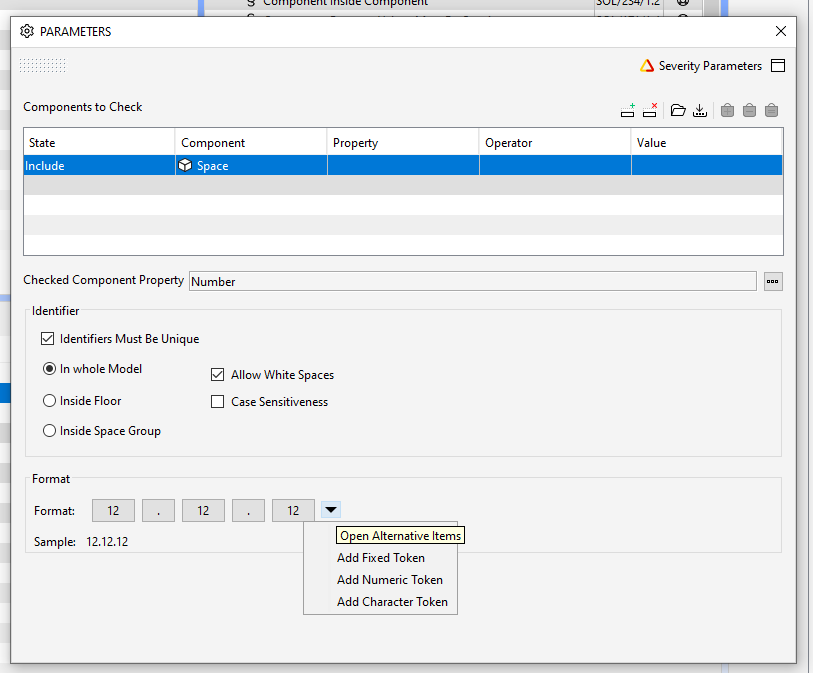
                You could also try rule #21 which offers custom pattern checking for ID numbers:

                • Checking for valid ID
                • Checking for uniqueness
                • Checking for consecutive numbers

                04003ea3-c6d5-4785-be5e-76f6ec2e2c39-image.png

                Simo_ZS 1 Reply Last reply
                1
                • Simo_ZS Offline
                  Simo_ZS Offline
                  Simo_Z
                  replied to Matti on last edited by
                  #8

                  Thanks very much @Matti-Kannala!

                  1 Reply Last reply
                  0

                  Copyright © 2025 Solibri Inc. | Powered by NodeBB

                  • Login

                  • Don't have an account? Register

                  • Login or register to search.
                  • First post
                    Last post
                  0
                  • Categories