
Utilizing surrounding space information on ITOs
-
Hi,
I’m wondering if it is possible to utilize space information when calculating the quantities of some other component, such as objects or furniture? Can we sort the components by the space it is located in?
In this case, I would like to calculate the quantity of curtain rail in each space. In some spaces, there is no curtain rail at all but in others, there might be one or multiple rails. I am not able to ask for an information update on the IFC model to include the space information directly to the curtain rail.
Of course, the same comes with objects that are not located in the same model as the space object, such as lightning fixtures and so on (the component is in the electrical model and the space object is in the architectural model). In these cases, the information about spaces can not be included directly in the component data.
Regards, Antti
-
Hi Antti,
It is possible to make an ITO which shows per space elements that are “inside” that space.
Start with the spaces and use the nearest space option under Relations as a column in your ITO.
You can even specify to only look at specific entities like furniture.For this to work you have to have a model with a simple space structure with no overlapping spaces… otherwise it gets complicated.
Hope this helps,
If not, I will be happy to share some screenshots.
Kind regards,
Jeroen
-
-
Thanks for the replies!
I ween quite busy lately, but now I’m back with this problem. I checked that link and it was helpful for me to get started.
In my case, there is a lot of different spaces overlapping, such as gross areas etc. I managed to exclude them by modifying the classification.
I got the spaces listed and their furniture listed below the spaces (the curtain rails are furniture in this model). Now the problem is that in some spaces contain a lot of furniture (like 100 pieces). Is there any way to filter what furniture elements are included (by classification or something like that) since at this point, I’m only interested in the curtain rails (in most spaces there are no curtains or just maybe 1 or 2 elements out of 10 to 100) and this is quite messy with all the elements included?
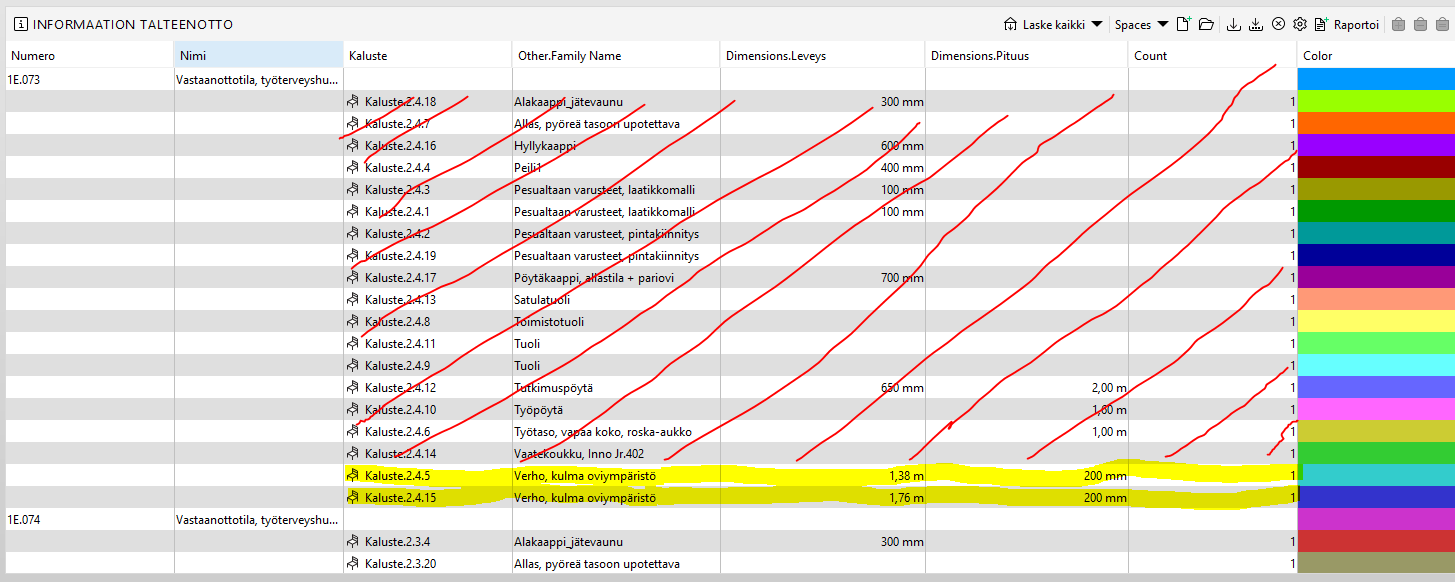
Thanks in advance,
Antti


Copyright © 2025 Solibri Inc. | Powered by NodeBB