Skip to content
  • Categories
Collapse
Solibri Society Forum
  1. Home
  2. General Discussion
  3. Classification Based on property set existing

Classification Based on property set existing

Scheduled Pinned Locked Moved General Discussion
8 Posts 3 Posters 1.4k Views
  • Oldest to Newest
  • Newest to Oldest
  • Most Votes
Log in to reply
This topic has been deleted. Only users with topic management privileges can see it.
  • J Offline
    J Offline
    Jim.persson
    wrote on last edited by
    #1

    Hi

    I´m just wondering if it´s possible to create a Classification Pased only on a Property set existing. Diffrent name on property set in same IFC file

    1 Reply Last reply
    0
    • JeroenKoomenJ Offline
      JeroenKoomenJ Offline
      JeroenKoomen
      wrote on last edited by
      #2

      Can you share some more info. Maybe a screeshot? I do not understand your question completely…

      http://www.linkedin.com/in/koomenjeroen
      https://www.bimloket.nl/BIMbasisILS

      1 Reply Last reply
      0
      • J Offline
        J Offline
        Jim.persson
        wrote on last edited by
        #3

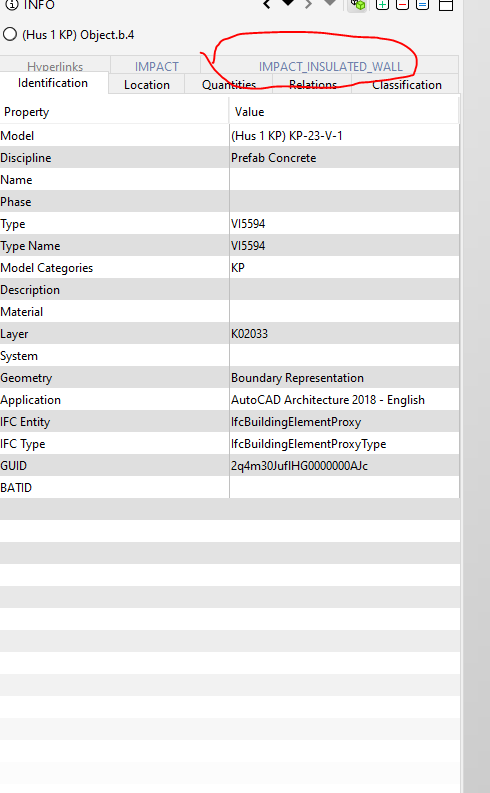
        Object A has the marked property set.
        63f929c5-e2fc-445c-aaa3-779a0e7ce0a0-image.png

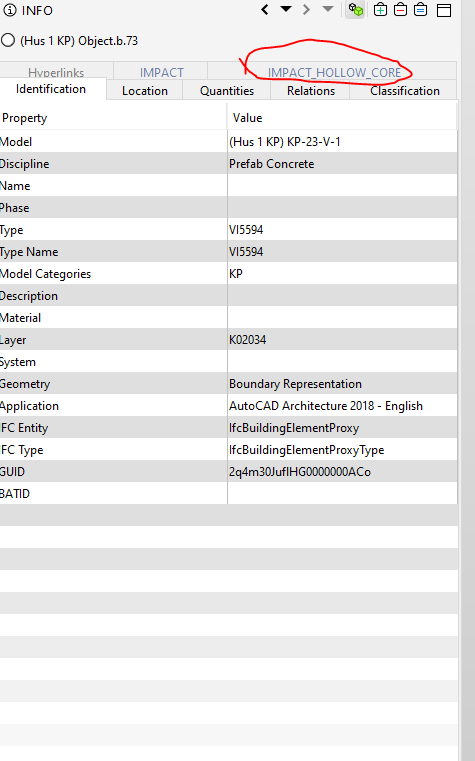
        Object B has another property set
        2851347a-80e4-4bc9-9cc0-8ed43f596081-image.png

        I would like to Define them trough a Classification only based on the property set name. Se below for example

        Impact_Insulated_wall= Wall

        IMpact_HOllW_CORE= HDF

        RicardoR 1 Reply Last reply
        0
        • RicardoR Offline
          RicardoR Offline
          Ricardo
          replied to Jim.persson on last edited by
          #4

          @Jim-persson

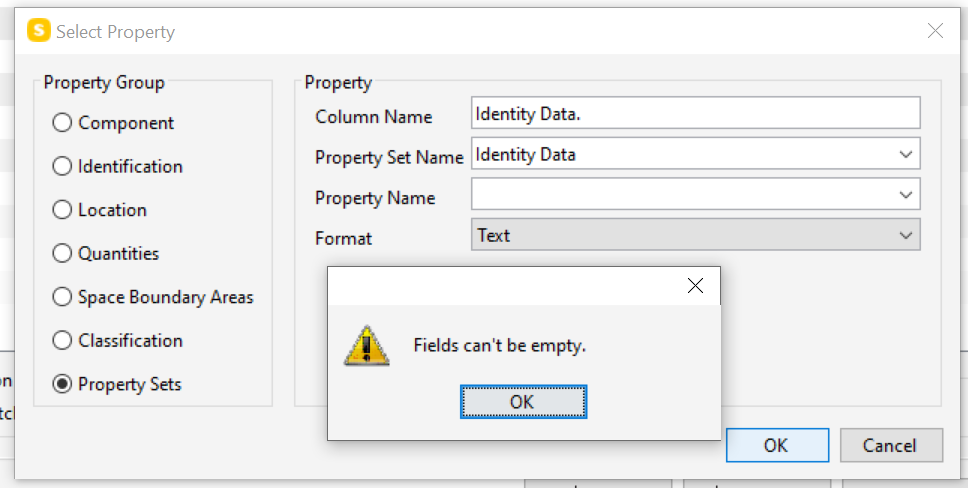
          When selecting a Property set in a classification, the ‘Property Name’ Field can not be empty. So, in your case I would suggest looking for a property that is always in that Property set. From that point, it should be setup like any other classification.
          b964c78e-0de0-43f5-a646-42230df1c073-image.png

          1 Reply Last reply
          0
          • J Offline
            J Offline
            Jim.persson
            wrote on last edited by
            #5

            The problem is that the information is not always the same from the software and that its not really consistant. WOuld be nice to have the feature in Solibri.
            But i´ll try with this work around.

            1 Reply Last reply
            0
            • JeroenKoomenJ Offline
              JeroenKoomenJ Offline
              JeroenKoomen
              wrote on last edited by
              #6

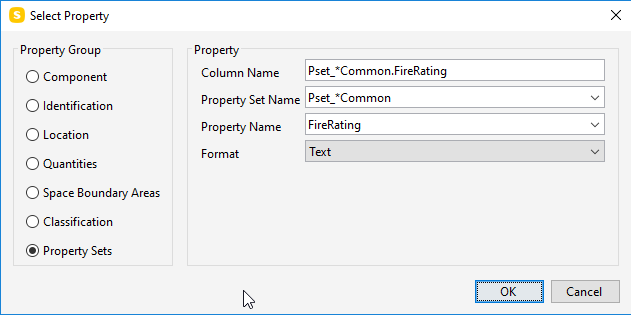
              You can use wildcards (*) in the Poperty Set Name.

              So it is possible to put there for example: IMPACT_*

              Then Solibri looks in both your highlighted Propertysets for the same Property.

              I do this all the time for example for the property FireRating, which is available under many Common Property Sets.

              if you use this
              5bf3c40a-3b03-4be5-a065-19eb00b3ed3b-image.png

              It wil look through all Propertysets like Pset_WallCommon, Pset_SlabCommon, Pset_WindowCommon etc.

              Hope that answers your question.

              http://www.linkedin.com/in/koomenjeroen
              https://www.bimloket.nl/BIMbasisILS

              1 Reply Last reply
              0
              • J Offline
                J Offline
                Jim.persson
                wrote on last edited by
                #7

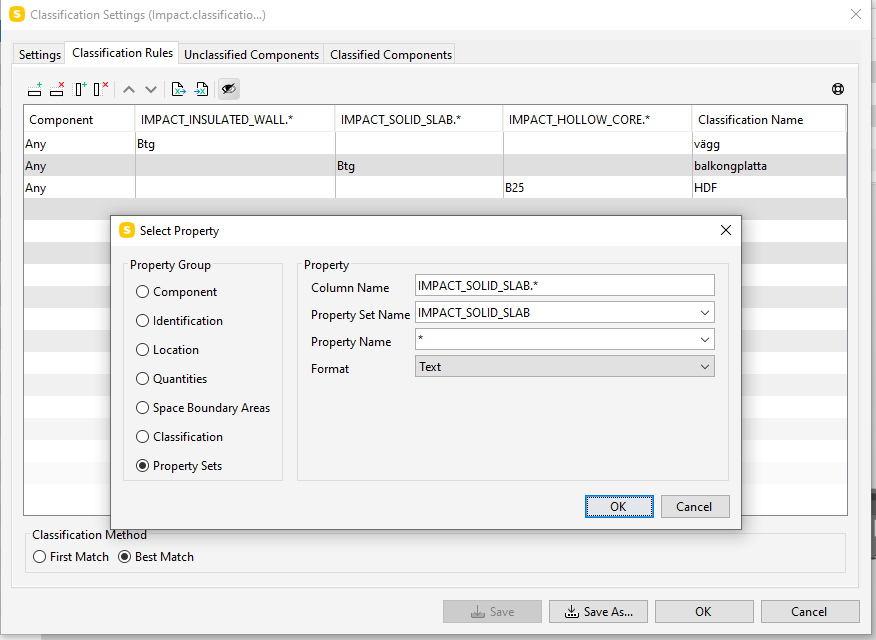
                That seem to work. the setting im using for now. Just picked a pramter that showed up in the dotted menu
                d9934d25-3278-4a03-b8c5-f495d505cb05-image.png

                1 Reply Last reply
                1
                • JeroenKoomenJ Offline
                  JeroenKoomenJ Offline
                  JeroenKoomen
                  wrote on last edited by
                  #8

                  If you want to combine all your columns in one you can use IMPACT_* as value for the Popery Set Name

                  http://www.linkedin.com/in/koomenjeroen
                  https://www.bimloket.nl/BIMbasisILS

                  1 Reply Last reply
                  0

                  Copyright © 2025 Solibri Inc. | Powered by NodeBB

                  • Login

                  • Don't have an account? Register

                  • Login or register to search.
                  • First post
                    Last post
                  0
                  • Categories