Skip to content
  • Categories
Collapse
Solibri Society Forum
  1. Home
  2. General Discussion
  3. Italic Font for Solibri-Properties / -Values

Italic Font for Solibri-Properties / -Values

Scheduled Pinned Locked Moved Solved General Discussion
4 Posts 3 Posters 1.5k Views
  • Oldest to Newest
  • Newest to Oldest
  • Most Votes
Log in to reply
This topic has been deleted. Only users with topic management privileges can see it.
  • T Offline
    T Offline
    thomaskarl
    wrote on last edited by
    #1

    Hi all.

    I’m sure this is a basic question for u experts, but…
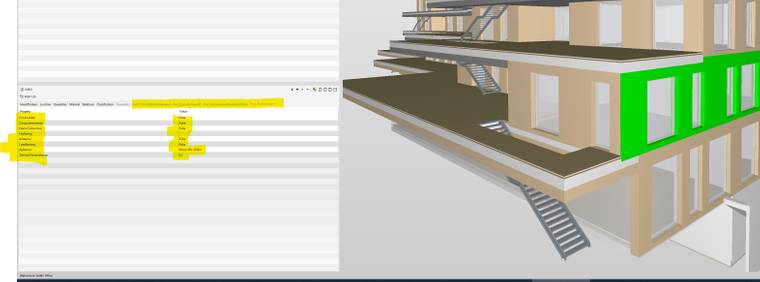
    What do IFC-properties and -values in italic font mean in Solibri?
    I hope u can help me.

    Thanks in advance.

    Best!
    Thomas

    LKS italic values.jpg

    1 Reply Last reply
    0
    • cpreidelC Offline
      cpreidelC Offline
      cpreidel
      wrote on last edited by
      #3

      Thanks @agroni for answering this one so quickly 😉

      For sake of completeness, let me post the answer right here:

      If a property is defined at the type level, then the propertyset’s name, property’s name and its value are shown in italics in the Info view.
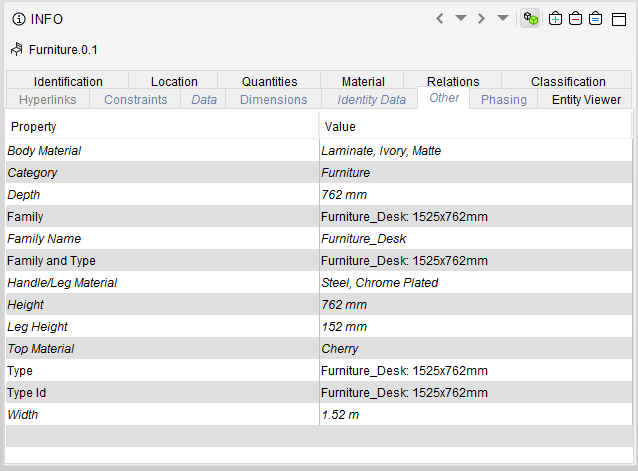
      9c8d619a-705a-459b-95bc-6d7c9bccd82e-image.png

      If a property is defined at type level but overridden at occurrence level, then the values from the occurrence level are shown in simple text whereas the value from the type instance is shown in italics, parentheses, and strike-through, in the Info view.
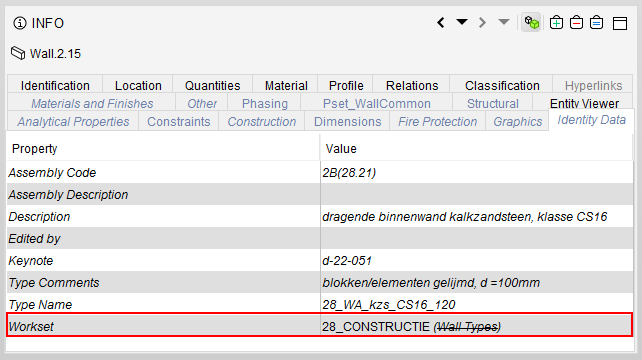
      c87dc54e-f02d-4065-982f-09118a68315b-image.png

      Cheers
      Cornelius

      1 Reply Last reply
      1
      • agroniA Offline
        agroniA Offline
        agroni
        wrote on last edited by
        #2

        It has to do with how you define these parameters in you BIM authoring tool. If you do it as a “Type”, then you get the Italic properties.
        Here is also an explanation about it

        AllesWirdGut Architecture
        www.awg.at

        1 Reply Last reply
        2
        • cpreidelC Offline
          cpreidelC Offline
          cpreidel
          wrote on last edited by
          #3

          Thanks @agroni for answering this one so quickly 😉

          For sake of completeness, let me post the answer right here:

          If a property is defined at the type level, then the propertyset’s name, property’s name and its value are shown in italics in the Info view.

          9c8d619a-705a-459b-95bc-6d7c9bccd82e-image.png

          If a property is defined at type level but overridden at occurrence level, then the values from the occurrence level are shown in simple text whereas the value from the type instance is shown in italics, parentheses, and strike-through, in the Info view.

          c87dc54e-f02d-4065-982f-09118a68315b-image.png

          Cheers
          Cornelius

          1 Reply Last reply
          1
          • T Offline
            T Offline
            thomaskarl
            wrote on last edited by
            #4

            Hello there!
            THX for the quick response.

            Best Thomas

            1 Reply Last reply
            0
            • JSNJ JSN referenced this topic on

            Copyright © 2025 Solibri Inc. | Powered by NodeBB

            • Login

            • Don't have an account? Register

            • Login or register to search.
            • First post
              Last post
            0
            • Categories