Skip to content
  • Categories
Collapse
Solibri Society Forum
  1. Home
  2. General Discussion
  3. Check the height of tiles related to spaces

Check the height of tiles related to spaces

Scheduled Pinned Locked Moved Solved General Discussion
6 Posts 2 Posters 1.1k Views
  • Oldest to Newest
  • Newest to Oldest
  • Most Votes
Log in to reply
This topic has been deleted. Only users with topic management privileges can see it.
  • mwhdejongM Offline
    mwhdejongM Offline
    mwhdejong
    wrote on last edited by mwhdejong
    #1

    Hi there!

    I would like to check in a model the height of wall tiles, but related to the spaces. For example, in a toilet the tiles must have a height between 1400+ and 1500+, but in the bathroom the wall tiles must have a minimum height of 2100+.

    When i look in the model the walls have relations with the spaces. But how to set this in an rule set, so the search in the model is correct. In SQL 230 the option is available ‘Relation’, but the Operator is only ‘Is Empty’ or ‘Is Not Empty’. I think i must use an other SQL rule to start with?

    Gr.!

    http://www.linkedin.com/in/mwhdejong

    1 Reply Last reply
    0
    • MattiM Offline
      MattiM Offline
      Matti Solibrians
      wrote on last edited by
      #5

      If it is not working the classify them manually.
      See this solution as example: https://society.solibri.com/topic/664/is-it-possible-to-sort-problems-by-rooms

      1 Reply Last reply
      0
      • MattiM Offline
        MattiM Offline
        Matti Solibrians
        wrote on last edited by Matti
        #2
        1. Classify wall tile objects by nearest space: 1400+, 1500+, 2100+
        2. Make three instances of rule #230 each classification name (1400+, 1500+, 2100+)

        If the “nearest space” classification doesn’t work well enough, then you can use ITO relation column to list tile walls to three groups and then manually classify them.

        1 Reply Last reply
        0
        • mwhdejongM Offline
          mwhdejongM Offline
          mwhdejong
          wrote on last edited by
          #3

          Thanks for the quick response @Matti-Kannala!

          The wall tiles have a relation with the toilet space. But when i would like make a classification i can’t select a relation to this space.
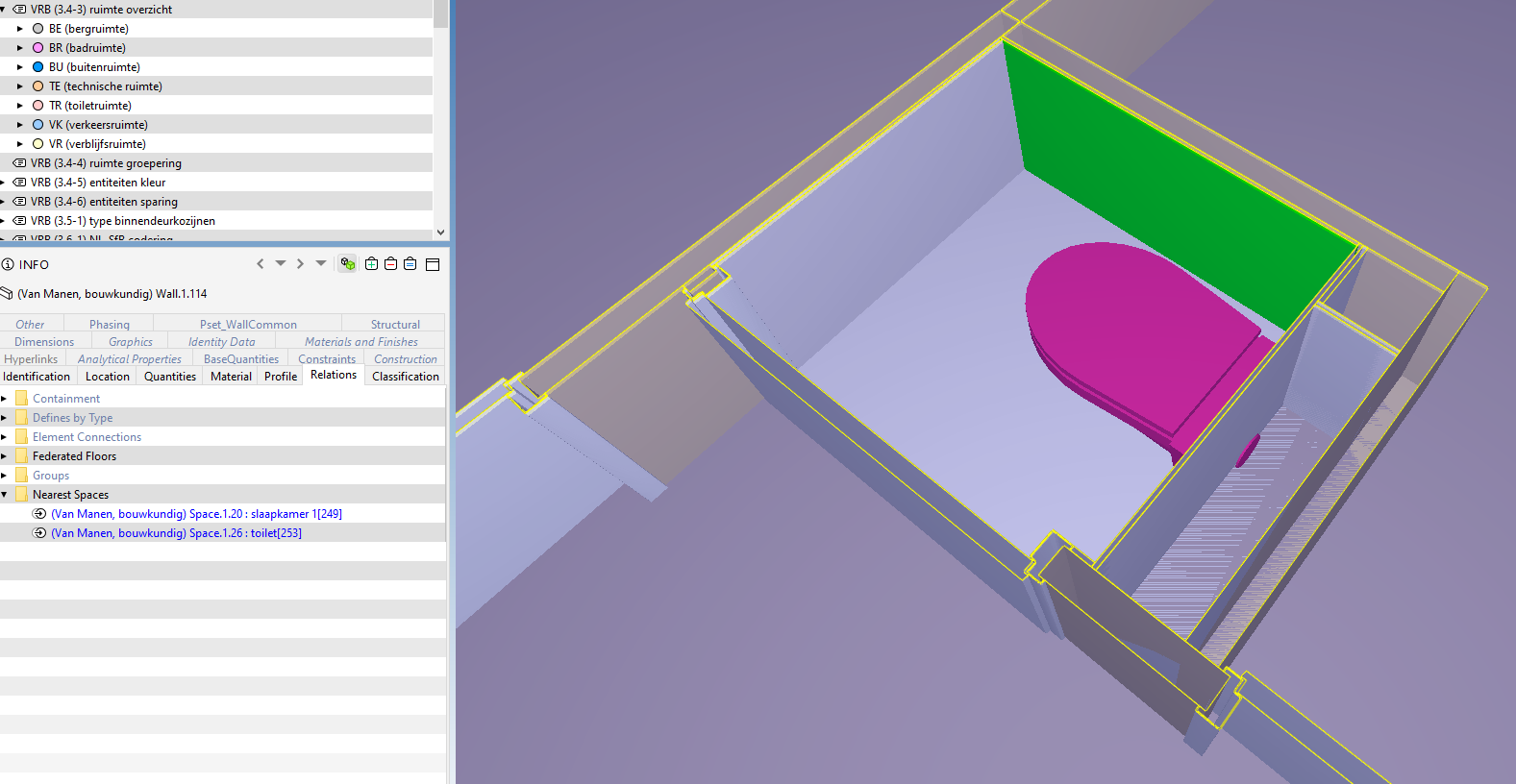
          VRB_Knipsel-01.png

          Image: Relation with nearest space ‘toilet’.
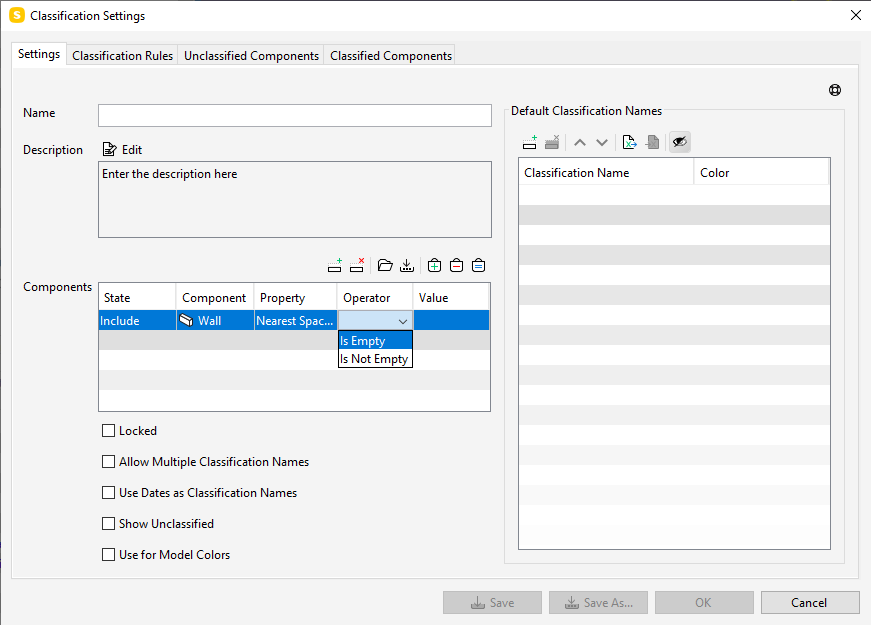
          VRB_Knipsel-02.png

          Image: In the operator only the option ‘Is Empty’ or ‘Is Not Empty’ is available.

          http://www.linkedin.com/in/mwhdejong

          1 Reply Last reply
          0
          • MattiM Offline
            MattiM Offline
            Matti Solibrians
            wrote on last edited by
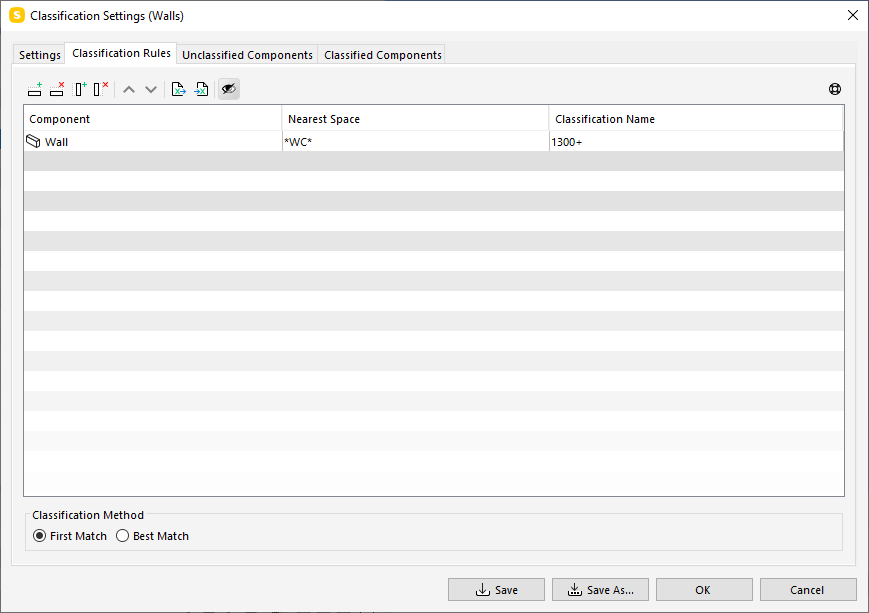
            #4

            Try this:
            9a08c33f-d7cc-40c1-9db4-82ae68fe542b-image.png

            1 Reply Last reply
            0
            • MattiM Offline
              MattiM Offline
              Matti Solibrians
              wrote on last edited by
              #5

              If it is not working the classify them manually.
              See this solution as example: https://society.solibri.com/topic/664/is-it-possible-to-sort-problems-by-rooms

              1 Reply Last reply
              0
              • mwhdejongM Offline
                mwhdejongM Offline
                mwhdejong
                wrote on last edited by
                #6

                Great @Matti-Kannala! That’s work fine!

                I was using the Property Group ‘Relations’, that’s the problem… When i’m using the Property Group ‘Location’ > ‘Nearest Space’ i can check the model on the property ‘Top Elevation’ with the correct value. Fixed! 👍

                http://www.linkedin.com/in/mwhdejong

                1 Reply Last reply
                2

                Copyright © 2025 Solibri Inc. | Powered by NodeBB

                • Login

                • Don't have an account? Register

                • Login or register to search.
                • First post
                  Last post
                0
                • Categories