
How do you handle Issues in Solibri?
-
Hi Agroni,
I always advise my clients to use option 3. Only if on a higher level the issue is the same you can combine the issues on level 2 or 1.
Never use option 4. This option will result in only one element imbedded in your issue. The receiving party of the issue can look for the problem and analyse the issue better if an Issue has all the elements incorporated in an issue.For the problem you describe with an update: See the way you check as a demand your have for the model. When the earlier issue is resolved but during the process new issues occur on the same topic this stays a problem and is still an issue. You could add the description of the check in the issue description to let the receiving party know what to do to solve all the problems.
Hope you will find my information useful.
k.r.
Denise -
@agroni I create the issues on level 3.
@JeroenKoomen can you explain your workflow on level 4 in an example? -
@cminde
Sorry that i was not clear. I also make slides on level 3.
What I do: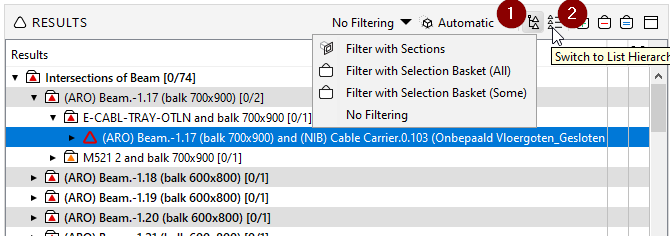
1 start in Category hierarchy / select first issue on level 3 / set elements connected to that issue to selection basket
2 switch to List Hierarchy / Filter with selection basket / check if there are other issues with the selected elements
if there are other issues and they are similar then select those issues as well and make 1 slide of these issues.Then switch back to Category Hierachy and look at next issue on level 3.
Hope this make sense… I do this because otherwise you have make a slide of an issue and later on you get other issues connection that same element and then it is difficult to combine that issue to the slide that you have allready made…
-
@JeroenKoomen Thanks! I have tested the workflow and works pretty good.
-
I create issues in a similar way as @Jeroen Koomen but using a different workflow.
Starting on the Category Hierarchy, I select category of issues (level 1). That would be „Intersection of Beam“ in Jeroens example. Working in a single-storey model, the 3D window would show me all issues oft that category.
Like Jeroen Koomen, I switch to List Hierarchy, select the objects I want to group in the 3D window and filter with Selection Basket. Then I have a list of issues in the results window and I create a slide oft them.
In the next step, I go back to Category Hierarchy and select the category again (level 1).
In the checking window, I click on „Hide Rejected Results“.

The 3D window again shows all issues oft that category without the issues I already made slides of.
Now, I go on with selecting the objects in the 3D window and so on and so on……The idea is basically the same as Jeroens: I want to avoid that I come across an issue of an element that I already made a slide of and have to combine them.
Additionally, in this workflow I am able to combine similar issues that are near to each other without sharing the same elements. -
That is interesting @Daniel-D Thx for sharing.
-
Thanx @JeroenKoomen @Dbos @Daniel-D for sharing this with everyone here. I see that more or less everyone has the same approach (so far) at creating issues at the level 3 of the results, wether it is from a basket a filtering a selection in 3D.
I personally also do a selection in a 3D window and filter the results to create a slide. It works fine for me until I have to deal with the next issues. If new components are going to be listed as faulty, then they are going to be listed in the same first slide.
From a management point of view is not quite ideal since you cannot actually can follow if the homework has be done and what is the progressWorking with online solutions such as BIMcollab or generally BCF Files, there is a conflict with the ID Number. With your approach this ID does not make much sense since, this one slide is going to be carried throughout the whole project development phase…. Until finally it will be closed. This happens if you create issues at 1st, 2nd or even 3rd level in the results.
So from what I understand here, you work with one presentation during the whole project development? You stay with one slide and just update the components according to the results? What about tracking of issue management in BIMcollab?I got an advice to create issues in the 4th level (grouping components). It is really a hard nut to swallow…
TriPoint GmbH
www.tri-point.at -
@agroni said in How do you handle Issues in Solibri?:
Thanx @JeroenKoomen @Dbos @Daniel-D for sharing this with everyone here. I see that more or less everyone has the same approach (so far) at creating issues at the level 3 of the results, wether it is from a basket a filtering a selection in 3D.
I personally also do a selection in a 3D window and filter the results to create a slide. It works fine for me until I have to deal with the next issues. If new components are going to be listed as faulty, then they are going to be listed in the same first slide.
From a management point of view is not quite ideal since you cannot actually can follow if the homework has be done and what is the progressWorking with online solutions such as BIMcollab or generally BCF Files, there is a conflict with the ID Number. With your approach this ID does not make much sense since, this one slide is going to be carried throughout the whole project development phase…. Until finally it will be closed. This happens if you create issues at 1st, 2nd or even 3rd level in the results.
So from what I understand here, you work with one presentation during the whole project development? You stay with one slide and just update the components according to the results? What about tracking of issue management in BIMcollab?I got an advice to create issues in the 4th level (grouping components). It is really a hard nut to swallow…
We use multiple presentations in Solibri in which we ‘filter’ the issues. For example, we use several presentations divided per design phase, but we also have a presentation just for the issues that are closed. This makes it more managable for ourself, but also easier to synchronize to BIMcollab.
Issues can easily moved between presentations with ctrl x / ctrl v.
You could do the same for issues that are assigned to a specific person or company, by filtering when syncing from BIMcollab.I personally use level 3 for most of the time, but it depends on the issue. If it is about data that is missing in the complete model, I see myself using higher levels most of the time. But when it is more specific about geometry, I tend to use level 3 for example.
About tracking management in BIMcollab, that is where I would like to see improvement between Solibri/BIMcollab. We currently manual add a number in the title of the issue. Not ideal, but I don’t know a better solution…
-
thank you all for your replies. It has been a pleasure reading all your posts and see how you handle issues in solibri. But one thing that I have noticed, is that everyone is using the tool with a specific workaround because there is somewhere somewhat not working correctly. This is something that I have also been struggling in the last weeks/months.
comming back to the topic I would like to reference a suggestion for the @Solibrians and all of you here, that I made a month ago. I believe it enconpasses all the above descriptions and offers a direction for a solution. If you agree on that, your support would be helpful… and offcourse we can discuss additional enhancements…
-
@Ricardo said in How do you handle Issues in Solibri?:
We use multiple presentations in Solibri in which we ‘filter’ the issues. For example, we use several presentations divided per design phase, but we also have a presentation just for the issues that are closed. This makes it more managable for ourself, but also easier to synchronize to BIMcollab.
Issues can easily moved between presentations with ctrl x / ctrl v.
You could do the same for issues that are assigned to a specific person or company, by filtering when syncing from BIMcollab.Could you elaborate this a bit more? I am just guessing but it seems like you have 1 master-presentation which is always updated from your checking results but then how are you ‘filtering’ by issue details? Also, when you manually cut/paste them from one presentation to another, how are you going to keep them up-to-date as then you cannot update them anymore with checking results … or is this filtering and sorting all done via the bimcollab workaround?
Actually what I am looking for is a simple workflow where I can have various presentations (with the possibilities to update) for different disciplines, but it seems not so easy to achive this in a userfriendly way … or am I missing something fundamental?





Copyright © 2025 Solibri Inc. | Powered by NodeBB