Skip to content
  • Categories
Collapse
Solibri Society Forum
  1. Home
  2. General Discussion
  3. Ruleset Exclusions

Ruleset Exclusions

Scheduled Pinned Locked Moved Unsolved General Discussion
6 Posts 3 Posters 1.0k Views
  • Oldest to Newest
  • Newest to Oldest
  • Most Votes
Log in to reply
This topic has been deleted. Only users with topic management privileges can see it.
  • D Offline
    D Offline
    dothedew
    wrote on last edited by
    #1

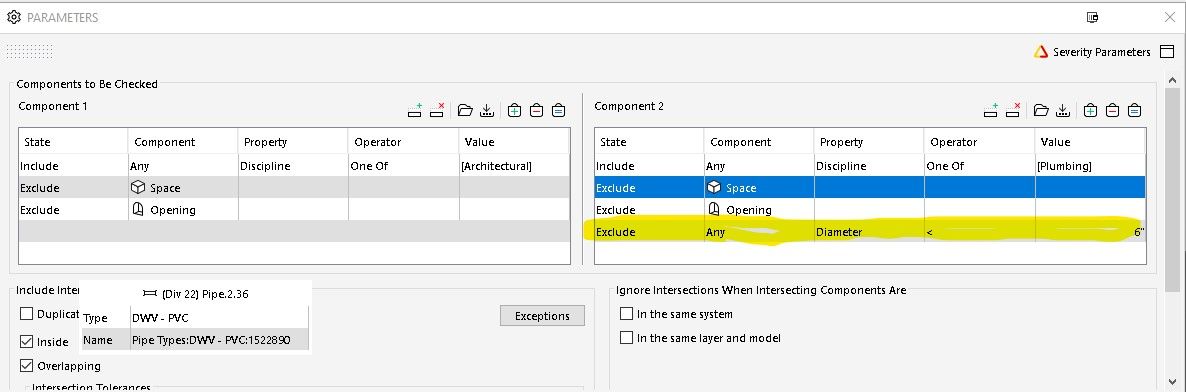
    I am trying to modify a rule that excludes any plumbing pipe or fitting diameter less than 6"
    I added a line that has these parameters:
    Exclude|Any|Diameter|<|6"
    Exclude any diameter less than 6"
    But I still get clashes on pipes smaller than 6"
    Arch-Plbg RuleSet.jpg

    1 Reply Last reply
    0
    • L Offline
      L Offline
      lasse.lindqvist
      wrote on last edited by
      #2

      Hi. Can you share the model and do those pipes all have diameter calculated when you check their information in Solibri, or are their diameter left empty?

      1 Reply Last reply
      0
      • D Offline
        D Offline
        dothedew
        wrote on last edited by
        #3

        Unfortunately I can’t share this particular model due to US Dept of Defense regulations.
        Could you tell me where to look for the diameter per your comment: “do those pipes all have diameter calculated when you check their information in Solibri, or are their diameter left empty”

        1 Reply Last reply
        0
        • D Offline
          D Offline
          dothedew
          wrote on last edited by
          #4

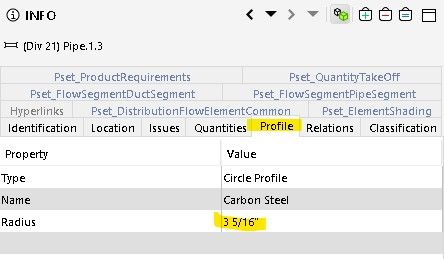
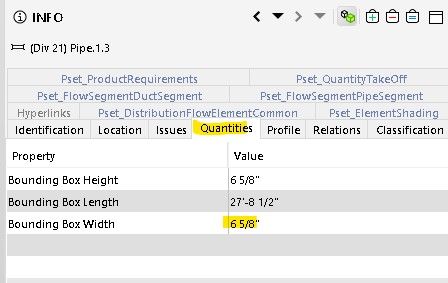
          This is the closest thing I see to diameter of pipe.
          See the two screen shots attached.Profile.jpg
          Quantity.jpg

          1 Reply Last reply
          0
          • L Offline
            L Offline
            lasse.lindqvist
            wrote on last edited by
            #5

            So the Diameter property cannot be used to filter these, since they don’t have it defined. It is not calculated for all components automatically.

            I looked this at the codebase and it seems that only Columns can have the Diameter property defined and for them it comes from the IFC profile and geometry.

            So because the Beams do not have the Diameter defined, it cannot be used to filter them.

            So what to use instead:
            You could use the profile information, but it sadly isn’t available in the classification column definitions.
            If the bounding box width is close enough, you can use that.
            The last alternative is to use Custom Information API (https://society.solibri.com/topic/563/information-api) to read the information from the profile or calculate it from the geometry and use that. It requires some Java programming skills, though.

            MattiM 1 Reply Last reply
            0
            • MattiM Offline
              MattiM Offline
              Matti Solibrians
              replied to lasse.lindqvist on last edited by
              #6

              @dothedew

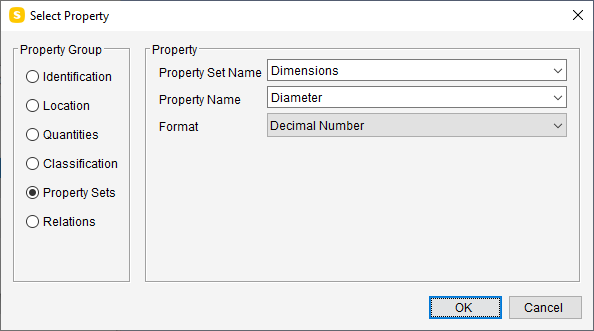
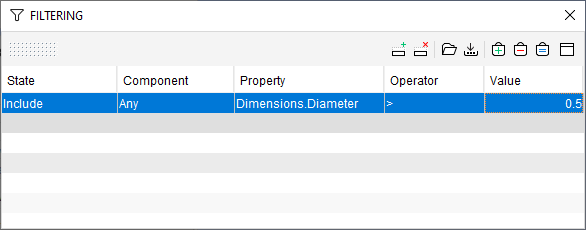
              If the pipes are having property sets with diameter that should work in your case.

              a93edf59-6635-4e33-bc24-f7c19d174dcd-image.png

              a4b5812b-dc87-4262-9e8f-7f47a74b04d6-image.png

              1 Reply Last reply
              1

              Copyright © 2025 Solibri Inc. | Powered by NodeBB

              • Login

              • Don't have an account? Register

              • Login or register to search.
              • First post
                Last post
              0
              • Categories