
Compare volumes between models
-
Hi all,
I am relatively new to Solibri and I am trying to compare the Architectural Model (based on the old drawings) and the Existing model (as measured by a point cloud and afterwards modelled) of a project, both IFC-files. We have measured the whole building to find the differences between the old drawings (1960s) and the current situation.
My ideal comparison would be to:
define model 1, 2 and all the concrete elements.
compare the both
have an overview with issues visualized with the “difference volume”.I have tried the following:
Created 2 filters for either model to filter the components to compare
Used rule 234 and apply both filters.
The result is not very satisfying. Only the components connected to an issue are compared to each other. Since both models are build up differently (Measured model does not include all the internal components, for example the floor as one big element instead of the different elements they are build up of), it is very hard to interpret the results.My question is: is my ideal comparison possible, and how? Does anyone have tips?
Thanks,
Niek -
Hi Niek,
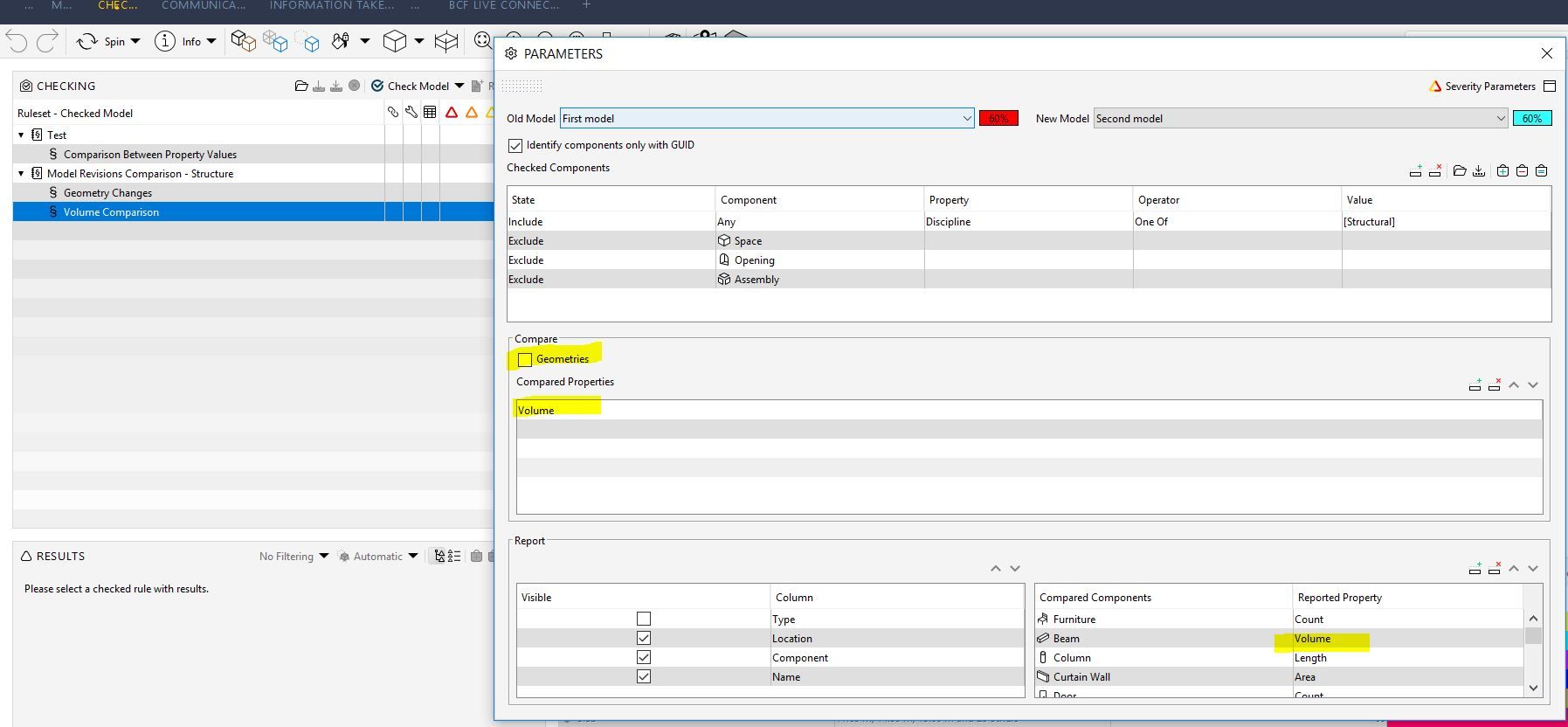
You can use the Comparison Rule 231 to check differences between just the volumes of elements, you can then untick the GUID to check elements with similar Type, Location and Geometry, I’m not completely sure on how this works but worth a shot,
Un tick “geometries” and add “volume” to the compared property. This will then only report on volume differences of elements.
Copyright © 2025 Solibri Inc. | Powered by NodeBB