Skip to content
  • Categories
Collapse
Solibri Society Forum
  1. Home
  2. General Discussion
  3. Set Tolerances for Results Returned in Comparison Rule 231 for Volume Difference

Set Tolerances for Results Returned in Comparison Rule 231 for Volume Difference

Scheduled Pinned Locked Moved General Discussion
3 Posts 3 Posters 644 Views
  • Oldest to Newest
  • Newest to Oldest
  • Most Votes
Log in to reply
This topic has been deleted. Only users with topic management privileges can see it.
  • S Offline
    S Offline
    scorney
    wrote on last edited by
    #1

    I’m doing a model comparison check but would like to only see the results which are above a certain volume, is there a way to do this? Or could it be done through the API?

    Thanks,

    1 Reply Last reply
    0
    • T Offline
      T Offline
      TRS_LUD
      wrote on last edited by
      #2

      i´ve got a similar question:
      i would like to compare space area and required space area with a certain tolerance.
      i figured that rule 231 might be the best choice to do that, but i cannot find a way to set a tolerance to ignore some issues, where the difference of space and required space is e.g. less than 1%.

      please see the attached picture below. the rule is working so far and replying issues when NUF_soll and Area are not equal. Now I want to get issues below a certain difference ignored.

      Is there a way to implement that in Rule 231, or in any other way?
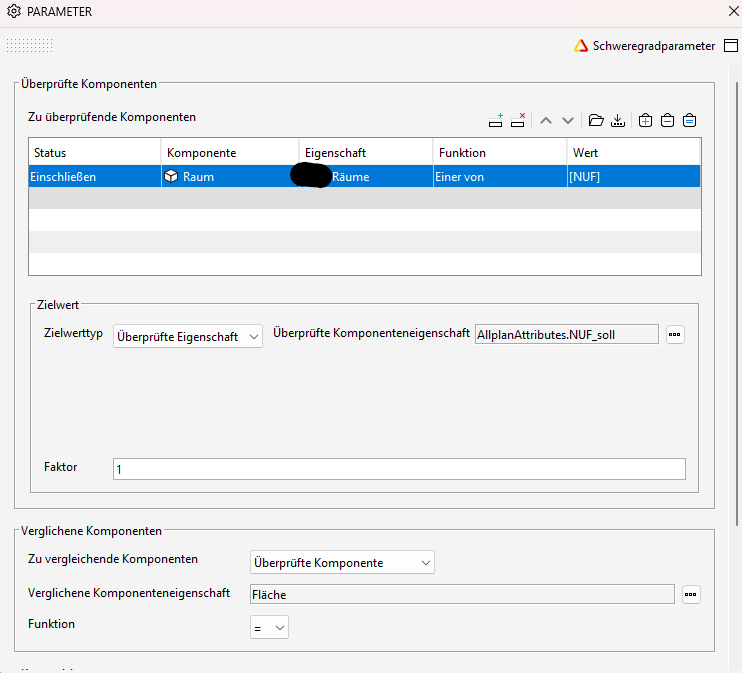
      Screenshot 2023-08-03 121544.png

      1 Reply Last reply
      0
      • P Offline
        P Offline
        Pasi Paasiala Solibrians
        wrote on last edited by
        #3

        @scorney What do you mean by volume here? Would you only want to check components that are larger than a given volume?

        1 Reply Last reply
        0

        Copyright © 2025 Solibri Inc. | Powered by NodeBB

        • Login

        • Don't have an account? Register

        • Login or register to search.
        • First post
          Last post
        0
        • Categories