Skip to content
  • Categories
Collapse
Solibri Society Forum
  1. Home
  2. General Discussion
  3. BUG in Solibri 9.12 - Gatekeeper Rules

BUG in Solibri 9.12 - Gatekeeper Rules

Scheduled Pinned Locked Moved General Discussion
10 Posts 4 Posters 2.2k Views
  • Oldest to Newest
  • Newest to Oldest
  • Most Votes
Log in to reply
This topic has been deleted. Only users with topic management privileges can see it.
  • marchiM Offline
    marchiM Offline
    marchi
    wrote on last edited by
    #1

    There seems to be a new BUG in the latest version regarding Gatekeeper rules - something that has worked flawlessly before.

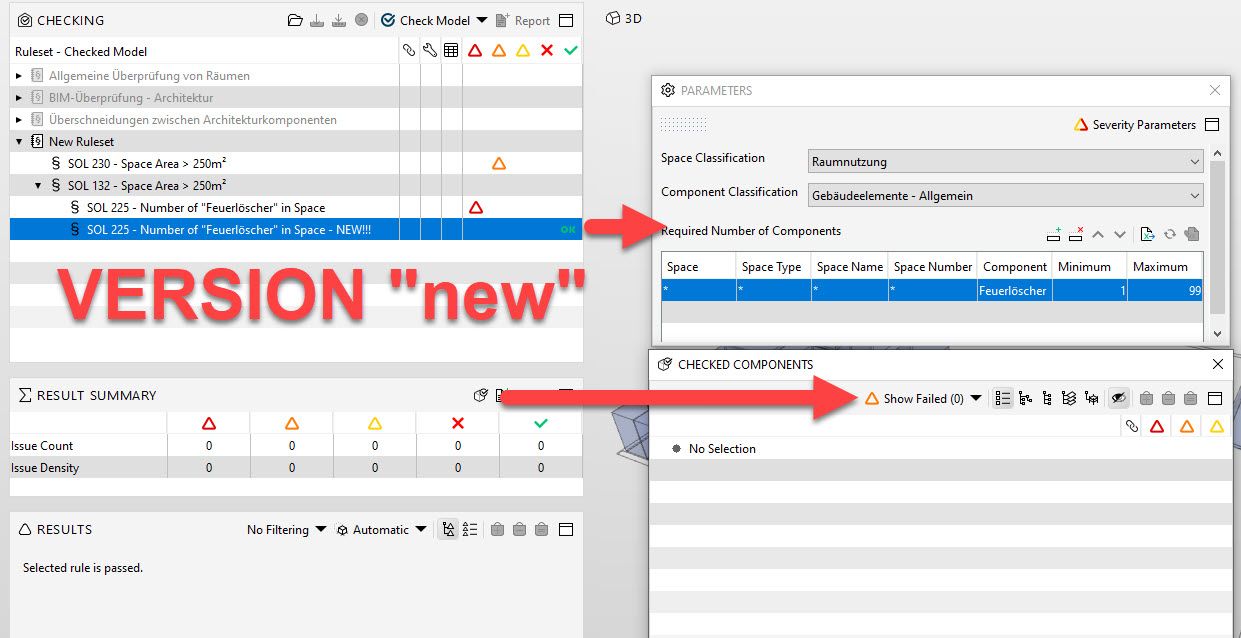
    there seems to be a difference where you create and check the rule:
    If you create a Rule as a standalone and check it, then the results are somehow memorized. If you move this rule under a Gatekeeper rule, the rule shows unfiltered results… and vice versa.

    if you move them on the same level you end up with two identical rules that show different results.

    in following image it is shown that same rule SOL 225 will then show different results:
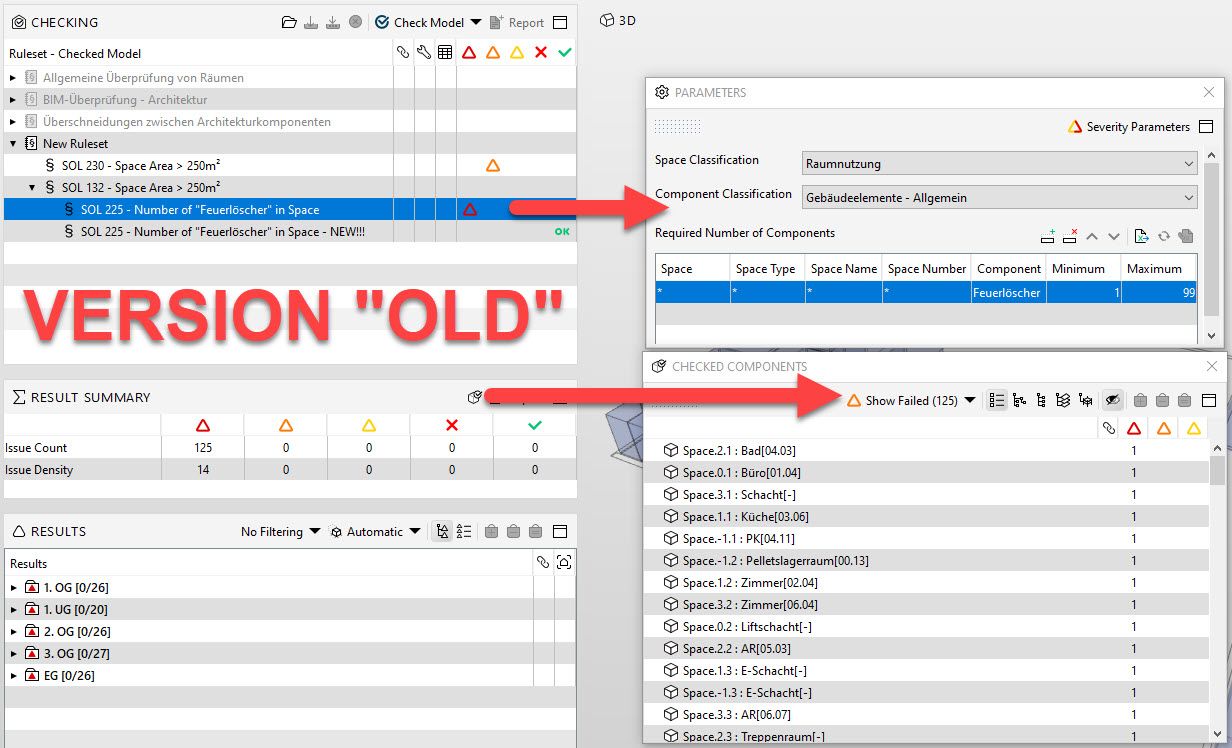
    sol support 05.jpg
    sol support 06.jpg

    1 Reply Last reply
    2
    • cpreidelC Offline
      cpreidelC Offline
      cpreidel
      wrote on last edited by
      #2

      Thanks @marchi, for letting us know about this problem!

      Could you provide this SMC file or ruleset for testing and send it to [email protected]?

      Thanks!

      1 Reply Last reply
      0
      • marchiM Offline
        marchiM Offline
        marchi
        wrote on last edited by
        #3

        here is an example:
        I tried to check if all the Spaces that are over 250m² have a “Feuerlöscher”(Fire extinguisher) - as this is a standard check in our Trainings and has worked many times before.

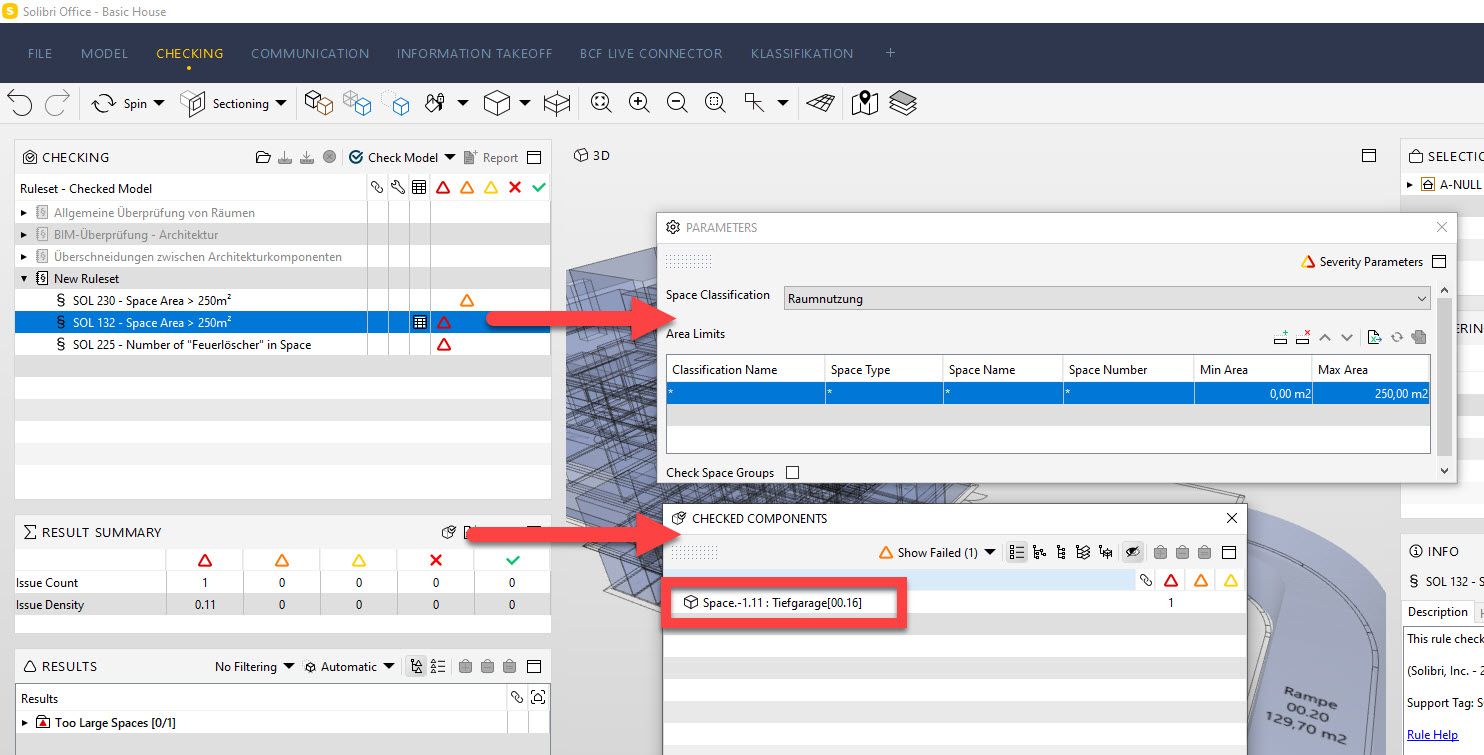
        1. I create SOL132 to check for Spaces above 250m²…and CHECK (results 1 Failed - “Tiefgarage”)
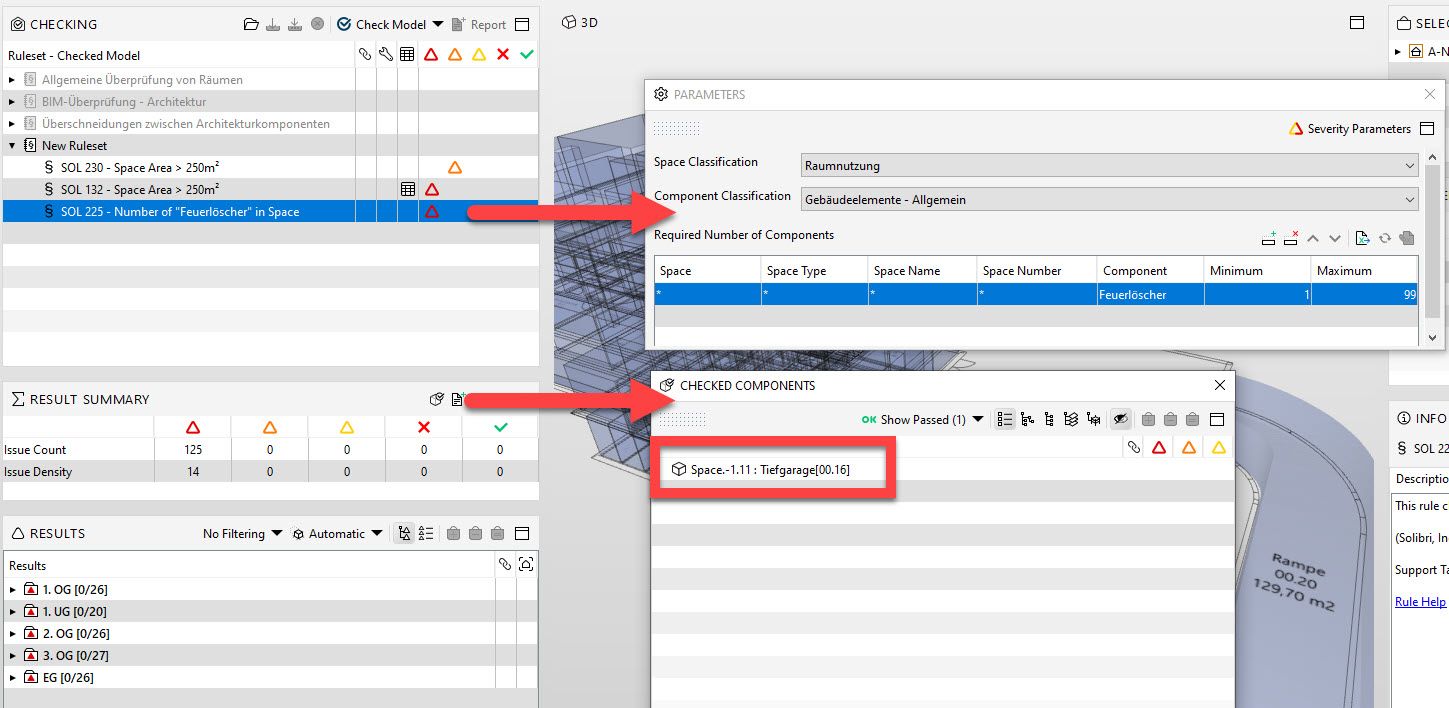
        2. I create SOL225 to check for “Feuerlöscher” in Spaces…and CHECK (results 1 Passed - “Tiefgarage”)
        3. I connect SOL132 and SOL225, while SOL132 acting as Gatekeeper with “Check only failed Components”…and CHECK (results should have been OK, but I get many failed components)

        Here are some pictures:

        1. I create SOL132 to check for Spaces above 250m²…and CHECK (results 1 Failed - “Tiefgarage”)
          sol support 01.jpg

        2. I create SOL225 to check for “Feuerlöscher” in Spaces…and CHECK (results 1 Passed - “Tiefgarage”)
          sol support 02.jpg

        3. I connect SOL132 and SOL225, while SOL132 acting as Gatekeeper with “Check only failed Components”.
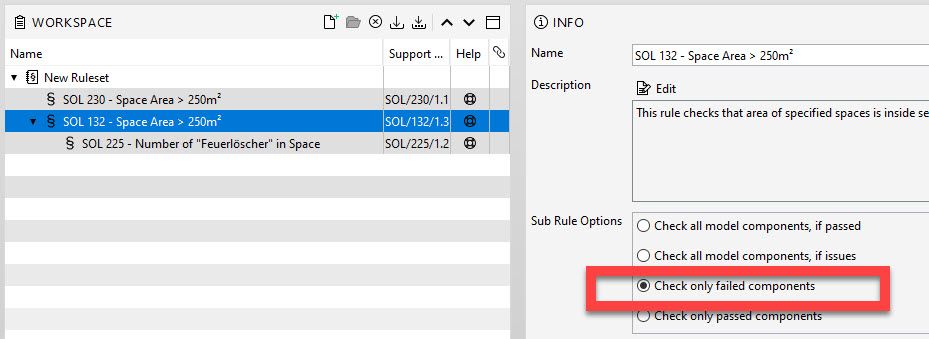
          sol support 03.jpg

        …and CHECK (results should have been OK, but I get many failed components)
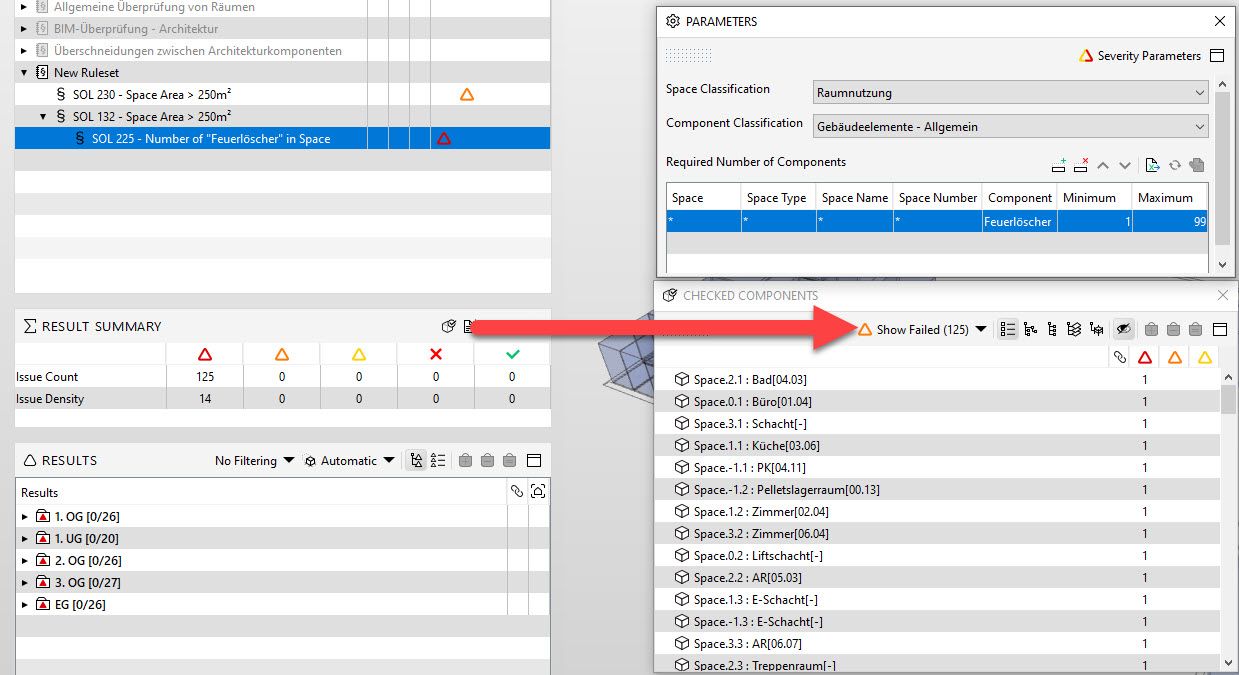
        sol support 04.jpg

        1 Reply Last reply
        0
        • marchiM Offline
          marchiM Offline
          marchi
          wrote on last edited by
          #4

          This is quite an OLD Problem (6 months) that still has not been addressed in the current release 9.12.5.
          It is a serious problem dragging old results in the gatekeeper rules and vice versa.

          here again an image illustrating the problem and the SMC file:
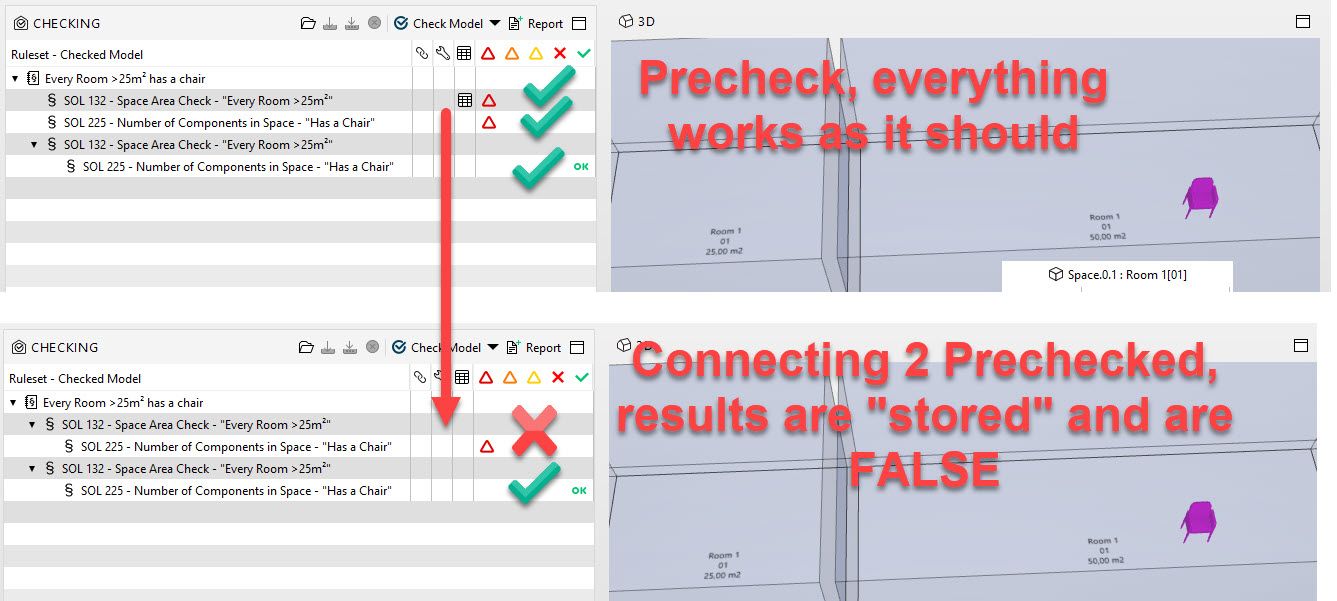
          Gatekeeper 01.jpg gatekeeper.smc

          1 Reply Last reply
          2
          • JSNJ Offline
            JSNJ Offline
            JSN
            wrote on last edited by
            #5

            Not sure if this the same issue but Gatekeeper is still a big black box full of surprises.

            I have two identical rules performing as a gatekeeper - actually the second one is just a test copy of the original one.

            b962045e-5e48-4498-99aa-f85e3f21a5c9-grafik.png

            However, I only get results for one of the twins.

            While checking is still active I get the following status infos …

            70fec50b-8d45-44f5-a574-d336aaad17d6-grafik.png

            and when it’s done the first one vanishes of course. So if I would not have the copy I won’t get any results here. Again I am not sure if this is only happening when some adjustments in the ruleset manager are done while checking, but it is highly irritating.

            marchiM 1 Reply Last reply
            0
            • marchiM Offline
              marchiM Offline
              marchi
              replied to JSN on last edited by
              #6

              @jsn
              hi jsn, yes, the old problem with stored results is still persistent in 9.12.8

              i always find it helpful if I “force” a new check. you can perform this by:
              1st - clicling on check selected first (have to select some elements)
              2nd - check model

              then it should lose the connection to the “stored” results and you should have identical results in both rules.

              hopefully it helps. best of luck.

              1 Reply Last reply
              0
              • JSNJ Offline
                JSNJ Offline
                JSN
                wrote on last edited by
                #7

                @marchi said in BUG in Solibri 9.12 - Gatekeeper Rules:

                then it should lose the connection to the “stored” results and you should have identical results in both rules.

                Thx, unfortunately this was not really working for me, the confusion just got bigger. I am so sick of that “little workarounds” which you have to know to make the tool working accordingly.

                I have elaborated this topic and its effects also here if you are interessted:
                https://society.solibri.com/topic/1699/checking-summary-reports-unreliable/3?_=1641200635545

                1 Reply Last reply
                1
                • JSNJ JSN referenced this topic on
                • K Offline
                  K Offline
                  KOWA
                  wrote on last edited by
                  #8

                  Hello everyone, this is an old topic, but I am having similar issues. Do anyone have information if that problem was solved? Thank you in advance.

                  marchiM 1 Reply Last reply
                  0
                  • marchiM Offline
                    marchiM Offline
                    marchi
                    replied to KOWA on last edited by
                    #9

                    @KOWA
                    here is how I do it:

                    1. add elements to the selection box,
                    2. then check only “selected” (this should overwrite the previous status)
                    3. then check the whole model.

                    hope it helps

                    1 Reply Last reply
                    0
                    • K Offline
                      K Offline
                      KOWA
                      wrote on last edited by
                      #10

                      Ok, I will check it out. Thank you for quick response!

                      I am a bit surprised that it was not solved? Is it intended behavior?

                      1 Reply Last reply
                      0

                      Copyright © 2025 Solibri Inc. | Powered by NodeBB

                      • Login

                      • Don't have an account? Register

                      • Login or register to search.
                      • First post
                        Last post
                      0
                      • Categories