Skip to content
  • Categories
Collapse
Solibri Society Forum
  1. Home
  2. General Discussion
  3. BCF Live Connector | Cannot filter

BCF Live Connector | Cannot filter

Scheduled Pinned Locked Moved General Discussion
20 Posts 11 Posters 3.8k Views
  • Oldest to Newest
  • Newest to Oldest
  • Most Votes
Log in to reply
This topic has been deleted. Only users with topic management privileges can see it.
  • AnilA Offline
    AnilA Offline
    Anil Solibrians
    wrote on last edited by Anil
    #7

    Hi @twosk , would you be able to send the log folder (after zipping it) to [email protected]? You can find the log folder from the path: C:\Program Files\Solibri\SOLIBRI.

    Also, along with the log folder, please send us the filter map (.blcfilter) file. You can find the filter map file from the path: C:\Users\USERNAME\AppData\Roaming\Solibri\filtermap

    MattiM 1 Reply Last reply
    0
    • MattiM Offline
      MattiM Offline
      Matti Solibrians
      replied to Anil on last edited by
      #8

      @anil @twosk

      Make a backup and empty the folder:
      C:\Users\USERNAME\AppData\Roaming\Solibri\filtermap

      That folder contains the saved filters. Might be that the there is an invalid saved filter that causes the problem.

      gvbeersG 1 Reply Last reply
      0
      • gvbeersG Offline
        gvbeersG Offline
        gvbeers
        replied to Matti on last edited by
        #9

        This path should work for all users %appdata%\Solibri\filtermap

        G. van Beers
        Project coördinator BIM
        LinkedIn: https://www.linkedin.com/in/gvanbeers/

        1 Reply Last reply
        0
        • T Offline
          T Offline
          twosk
          wrote on last edited by
          #10

          @Anil @matti-kannala @gvbeers thank you, now filter works

          1 Reply Last reply
          0
          • S Offline
            S Offline
            Seba
            wrote on last edited by
            #11

            Hi,

            I have the same problem, and the the solution proposed by @Matti-Kannala, does not work for me. Is there anything else that can be done? I know it has worked before, and this week I noticed that it doesn’t work.

            1 Reply Last reply
            0
            • L Offline
              L Offline
              lraimo
              wrote on last edited by
              #12

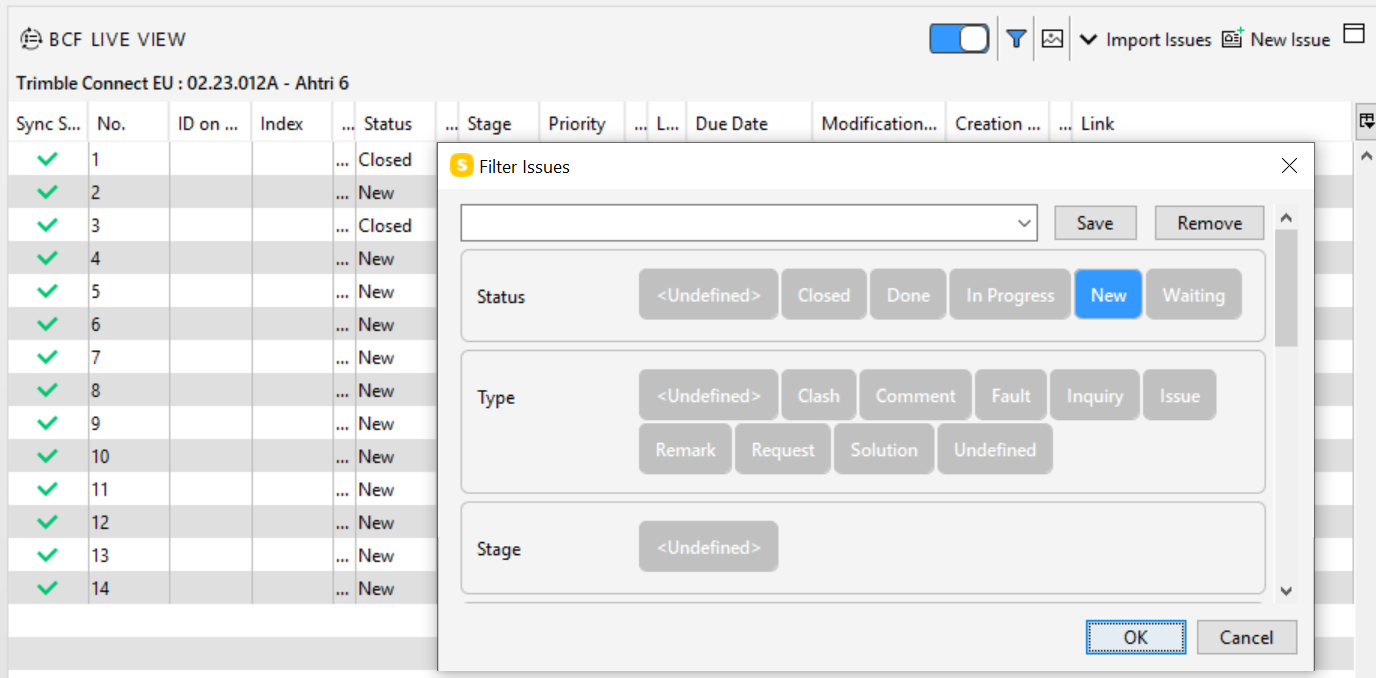
              Filter with Trimble Connect do not work
              04933d6d-bb0e-4c2f-9191-c001460f324f-image.png

              1 Reply Last reply
              3
              • W Offline
                W Offline
                Wing Mang
                wrote on last edited by
                #13

                I have the same problem too

                1 Reply Last reply
                0
                • L Offline
                  L Offline
                  lraimo
                  wrote on last edited by
                  #14

                  @Solibrians
                  Any updates on this matter?

                  1 Reply Last reply
                  0
                  • P Offline
                    P Offline
                    Pasi Paasiala Solibrians
                    wrote on last edited by
                    #15

                    If I remember correct, this is a Trimble Connect issue. They need to implement the filtering.

                    1 Reply Last reply
                    0
                    • L Offline
                      L Offline
                      lraimo
                      wrote on last edited by
                      #16

                      @Pasi-Paasiala
                      Is this missing from API? Because Trimble Connect Web has it.

                      811ac27a-9acc-45f7-8bdb-446b98dc73a5-image.png
                      More info https://docs.browser.connect.trimble.com/bcf-topics/topics-listing

                      1 Reply Last reply
                      0
                      • P Offline
                        P Offline
                        Pasi Paasiala Solibrians
                        wrote on last edited by
                        #17

                        @lraimo Trimble connect does not have this implemented in their implementation of BCF-API.

                        1 Reply Last reply
                        0
                        • L Offline
                          L Offline
                          lraimo
                          wrote on last edited by
                          #18

                          I have communicated this to Trimble.
                          @Solibrians Have you also communicated this to Trimble? Filtering is very important when project is big with hundreds or thousands of issues

                          1 Reply Last reply
                          0
                          • L Offline
                            L Offline
                            LariMatias
                            wrote on last edited by LariMatias
                            #19

                            I’ve communicated this to Trimble as well via their support ticket service or such.

                            Edit: Corrected grammar.

                            1 Reply Last reply
                            0
                            • T Offline
                              T Offline
                              twosk
                              wrote on last edited by
                              #20

                              I think this is not CDE , but solibri’s problem
                              1.At the moment filter works, but sometimes I can not import all selected issues, i need to mark it.
                              2.Imported slides contain wrong section and model selection. Exported views are correct in the CDE (dalux).
                              3.I have tried both dark and light UI and somewhat outcome regarding BCF live connector is different.

                              1 Reply Last reply
                              1

                              Copyright © 2025 Solibri Inc. | Powered by NodeBB

                              • Login

                              • Don't have an account? Register

                              • Login or register to search.
                              • First post
                                Last post
                              0
                              • Categories