
Trimble Connect BCF Live Connect model matching bug
-
I found a bug in the BCF live connection with Trimble Connect’s BCF Topics.
If on Trimble Connect folders there are more than 1 model having the same file name, e.g. modelA.ifc, in both Shared folder and WIP folder, when an issue is created in Solibri (with Shared modelA.ifc visible and some of its elements selected) then sync via live connection to Trimble, there is a big chance (I haven’t looked into Trimble Connect’s exact behaviour in this regard) that Trimble Connect may mistakenly match to the WIP modelA.ifc.
This bug explains why some elements selected and views in an issue cannot be synced to Trimble Connect’s BCF topics, which I reported this bug in another post:
https://society.solibri.com/post/10542 -
Thanks for the report.
The fix for this will be in the next release scheduled end of February.
- Solibri sends the File name based on the filename in IFC header.
- Trimble Connect maps the files based on the filename
- The next release will have option to choose:
- Use Filename (this works with TC)
- Use IFC header filename
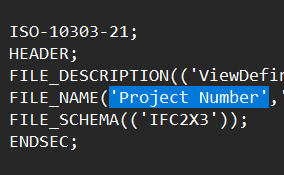
Workaround is to fix the filename with text editor to the IFC files to match the actual filename.
An example where the header has wrong filename:
-
Thanks @Matti-Kannala
I also noted this workaround in another post.This bug I found is that Solibri & Trimble Connect do not seem to take into account the file folder path when doing the file matching.
It is very common that we put 2 files with same file name & same FILE_NAME in different folders, e.g. WIP folder, SHARED folder, PUBLISHED folder, etc, but these files can have different versions of contents.
-
Hi @Matti-Kannala , about Trimble Connect as BCf server for Solibri, it is possible to have the Serve ID or Index value? Is this an option related to Solibri or Trimble development? Thanks!


Copyright © 2025 Solibri Inc. | Powered by NodeBB