
Join our Solibri Beta Group!
-
Dear Solibri users,
We are excited to tell you about our beta group at Solibri, where future beta licenses will be available. If you:
- want to access early versions of Solibri with the latest advances and features?
- are waiting for a specific bug fix?
- want to influence the development of Solibri by providing feedback on new features before they are released?
We invite you to join our exclusive Solibri Beta Testing program by sending us an email to [email protected].
What to expect in Beta Rounds
 Enhanced Features: introducing new functionalities and improvements that cater to the evolving needs of our users.
 Exclusive Access: As a beta tester, you will have early access to these new features, providing you with a unique opportunity to shape the future of Solibri products.
 Cycle: Whenever a new candidate installer for Solibri is ready, members of our Closed Beta Group get first access.
 Time Span: Typically a Beta round lasts two weeks; if there is a good reason for more intense testing it may take longer.
 Exclusive Licensing: All registered Beta testers are provided exclusively with a separate, single license in our dedicated beta environment for the time of the Beta round
 Feedback Channel: Your insights are crucial to us. Engaging in this beta phase connects you directly with our development team, allowing you to help refine and enhance. Encounter any bugs or inconsistencies? Report them directly in our dedicated Society section or directly in Solibri in our feedback survey, which you can find on the Solibri home screen.
How to Register
Action Required:
Secure your spot in the Beta Testing group by sending an email to [email protected] with the following details:- Name, Surname
- Company name
- Email address
- Society username
- Please let us also know if your organization is using SSO for logging in.
Prerequisites
- In possession of a Solibri licence
- Knowledge and experience in using Solibri
- and engagement to give us feedback, be it good or bad
We are looking forward to your active participation!
Paul and the whole Solibri Team -
 P Paul Linder pinned this topic on
-
P Paul Linder marked this topic as a regular topic on
-
Hi @Paul-Linder,
after registering for the new beta group, will we receive a confirmation email? How do we know if we are part of the new group? -
Hello @paola-bronzo , the registered participants will receive a message from us this week with further instructions
-
Hello @Paul-Linder, did you sent the message last week?
-
@Mvandenbrink the invitations were sent out with a slight delay this week. If you have not received one, please contact us again
-
@Paul-Linder I’ve got the invitation this week. Accepted the invitation and was able to install and use the beta.
-
@BvanDalsum I have sent you the instructions in this case by e-mail. Please let me know if it has worked
-
@lraimo Invitation has been sent
-
-
@BvanDalsum it is rule #245. This resource comes along with the Beta installer
-
Hi @Paul-Linder
I have a problem with the installation of Solibri Beta. I have follow all the steps you write down on the mail: I
have unistalled the old solibri beta versions and I create a new directory. I have completed the installation of the exe but when I run Solibri Beta, this window appears:
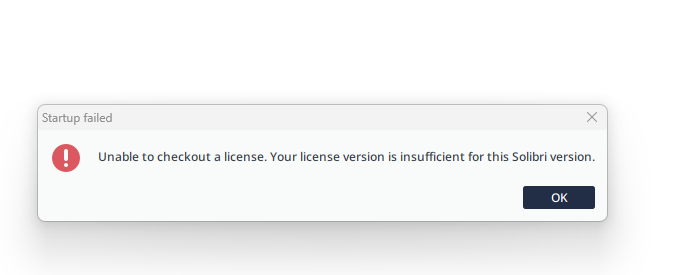
What can I do?
Thank you,
Viola -
Hi @violarenzoni, we did some changes in the background for your account. Please try it again and delete the folder C:\Users \ %userprofile%\ .solibri-beta
-
@Paul-Linder thank you, now it works!
-
-
Hello @Paul-Linder
I have the same error as post #6: I can install the beta version, but cannot sign-in.
Thanks for your help! -
Hello @Paul-Linder
I also have the same issue as post #6. I’ve installed the beta version, but unable to sign-in.
Are we supposed to use our Solibri Society username and password, or our credentials linked to our Solibri licence?
Thanks in advance for your assistance with this issue. -
@dgbtransport the access is now available. Much success with testing
-
Thank you, Paul. It was great chatting with you.




Copyright © 2025 Solibri Inc. | Powered by NodeBB