
Clash detection - ignoring ProvisionforVoid
-
Are you trying to exclude clashes from the results when having clash detection between Architecture and HVAC models? And you try to exclude the clashes where there is a void object in the very same place? In this case you just can’t exclude those void objects from the ruleset as written above, I believe.
I have bypassed this problem with the help of classification. This is how I usually do it: First, have clash detection between HVAC and void objects. Second, make a classification in which one manually classify the void clashing HVAC objects as “clashes voids” (you can manually classify object using selection basket). Finally, make a clash detection between Architecture model and HVAC models and exclude the HVAC objects that are classified as “clashes voids”.
To put it simply, the idea is to have void objects and HVAC clash and then take these clashed objects out of the ruleset that detects clashes between Architecture and HVAC models.
I can provide pictures for you to make it more understandable if you want, just let me know. This is not fully automatic process and I would like to hear better solutions as well.
-
So my solution was, to use the “Fire Stopping Identity Rule” from the extension BIM Coordination +, here is a page where you can read how it functions: https://help.solibri.com/hc/en-us/articles/11926739630615-Fire-Stopping-Identity-Rule#UUID-fd5be8a9-272d-731b-b71d-360e0c952e3c
-
Just use a gatekeeper.
https://help.solibri.com/hc/en-us/articles/4415773412247-Using-Gatekeeper-Rules-to-Filter-Components-into-Sub-Rules
First clash HVAC with opening, then in the subrule check passed components and clash them with the architectural components -
I’ve been trying to achieve this, but not successful. Individually the rules I’ve created (HVAC vs opening and HVAC vs architectural components) seem to be working well. But how to achieve the result, where I can find only the clashes between HVAC and architectural, that don’t have opening defined? Now, to be clear, the model I’m using, does have problems (clashes without openings) with it.
I’ve tried:
-HVAC vs architectural as parent rule, check passed components (result: HVAC components that do clash openings)
-HVAC vs opening as parent rule, check passed components (no results)
-HVAC vs architectural as parent rule, check non-passed components (result: some HVAC components that do clash openings)
-HVAC vs opening as parent rule, check non-passed components (no results)I wouls say that using a gatekeeper rule doesn’t give wanted results. Or I just can’t figure out how to do it.
-
@LariMatias
I’m also a Finnish user, and would be interested in your solution, if you can provide more information! -
I’ve tried the gatekeeper / parent rule solution some time ago with no success, but I will need to check Alex’s link.
Anyway, here is a loose guide for how I do it:
- I check HVAC which is inside the hole reservation objects / openings with Solibri common rule SOL/234/1.2 (in the parameter of the ruleset I use an automated classification to determine the objects for the check, but you can use certain models for example to determine the HVAC components and hole reservation components):
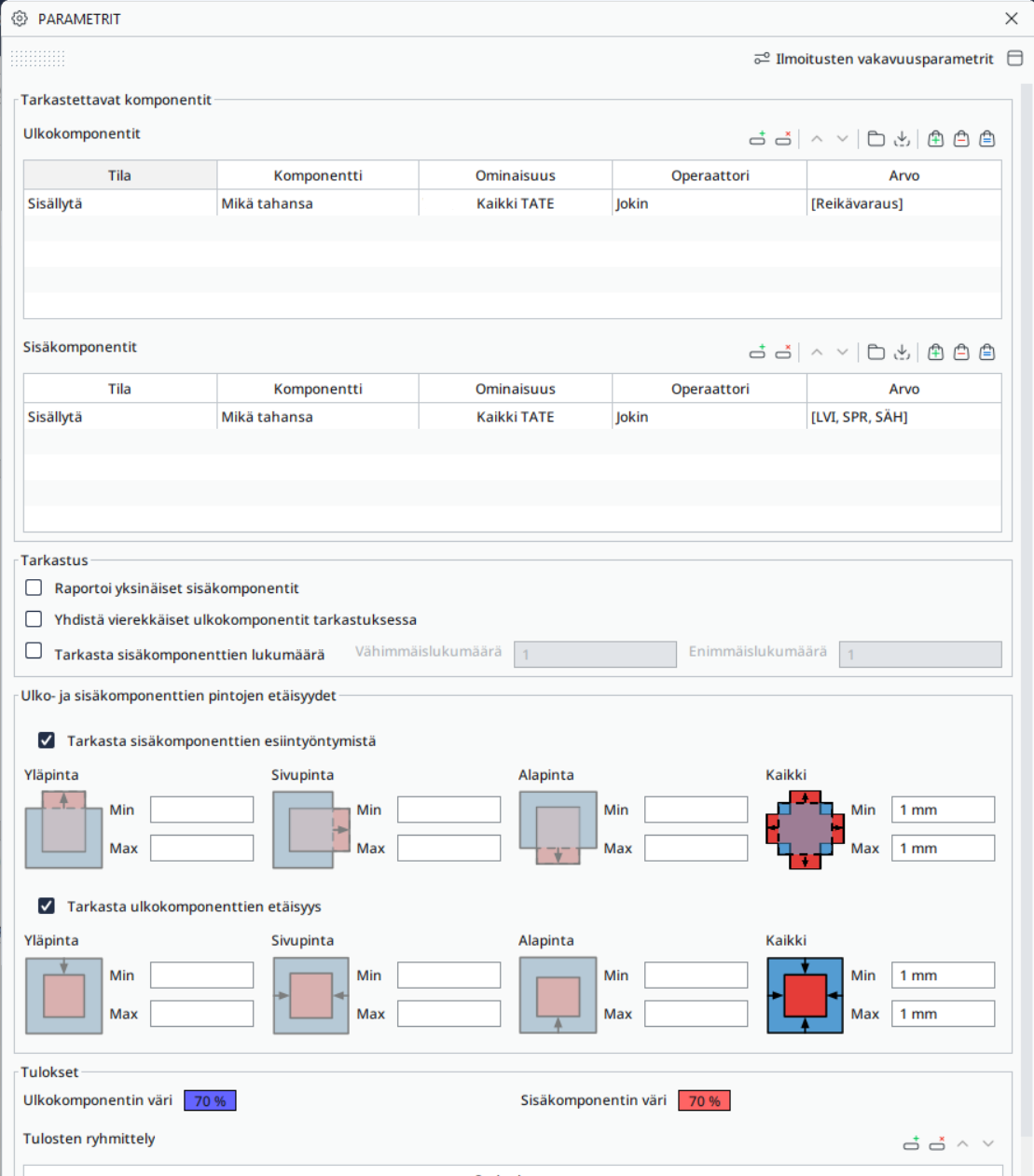
The result brings me every HVAC component that is somehow inside a hole resevation / an opening. It also brings me all the hole reservations.
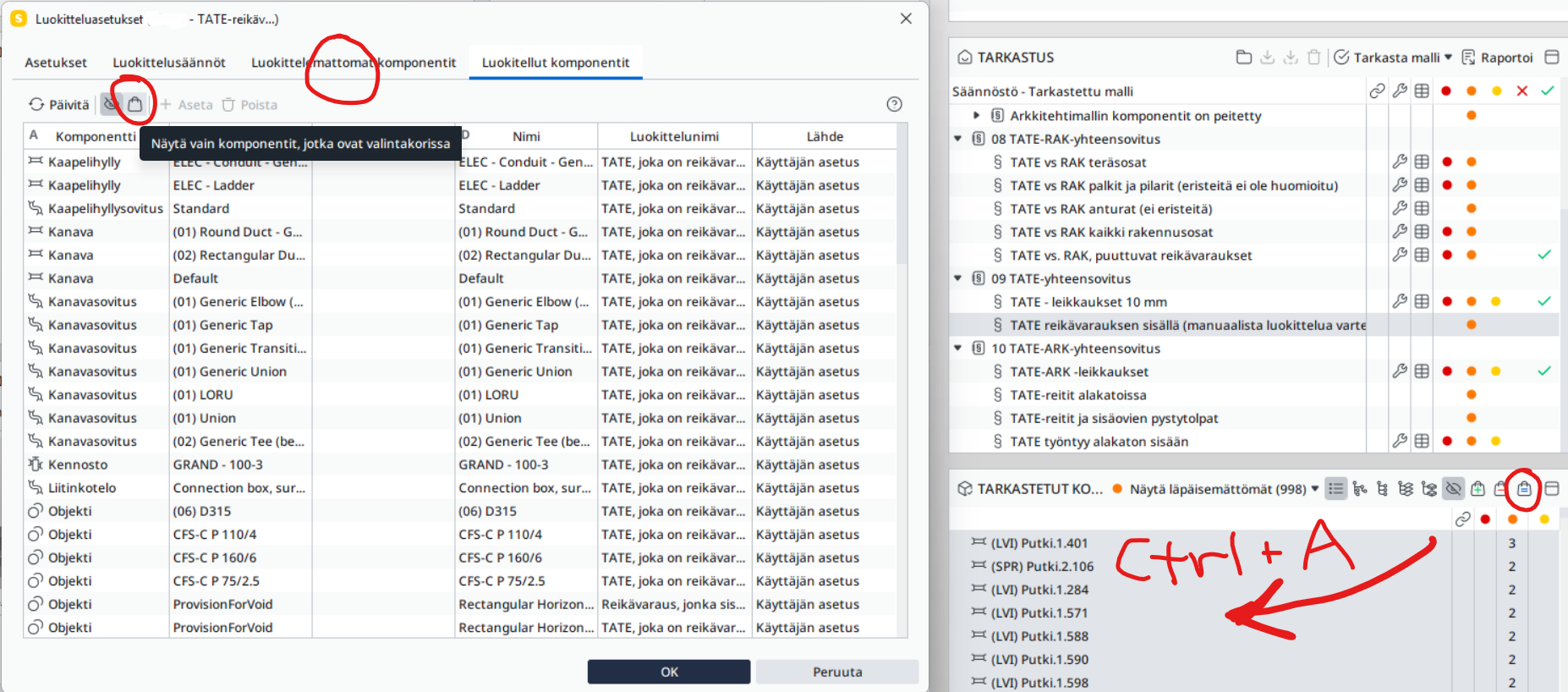
- I create a manual classification from the results of the former clash detection. I insert “TATE, joka on reikävarauksen sisällä” for the HVAC components (and “Reikävaraus, jonka sisällä on TATE” for the hole resevation components).
(This is the trickiest part, I think:) To do that I manipulate the “selection basket” to include only the HVAC components by choosing all the uncleared components from the clash detection and then subtract all hole reservations with model tree. Then I manually set them the right classification. The picture here shows the results of the classified components but you should firstly use the unclassified components tab and the option to show only components that are in the selection basket:
- Now I should have a classification for the HVAC components that are located inside hole reservations / openings. I can then subtract them from the clash detection (SOL/1/5.1) between structural/architectural components and HVAC components:
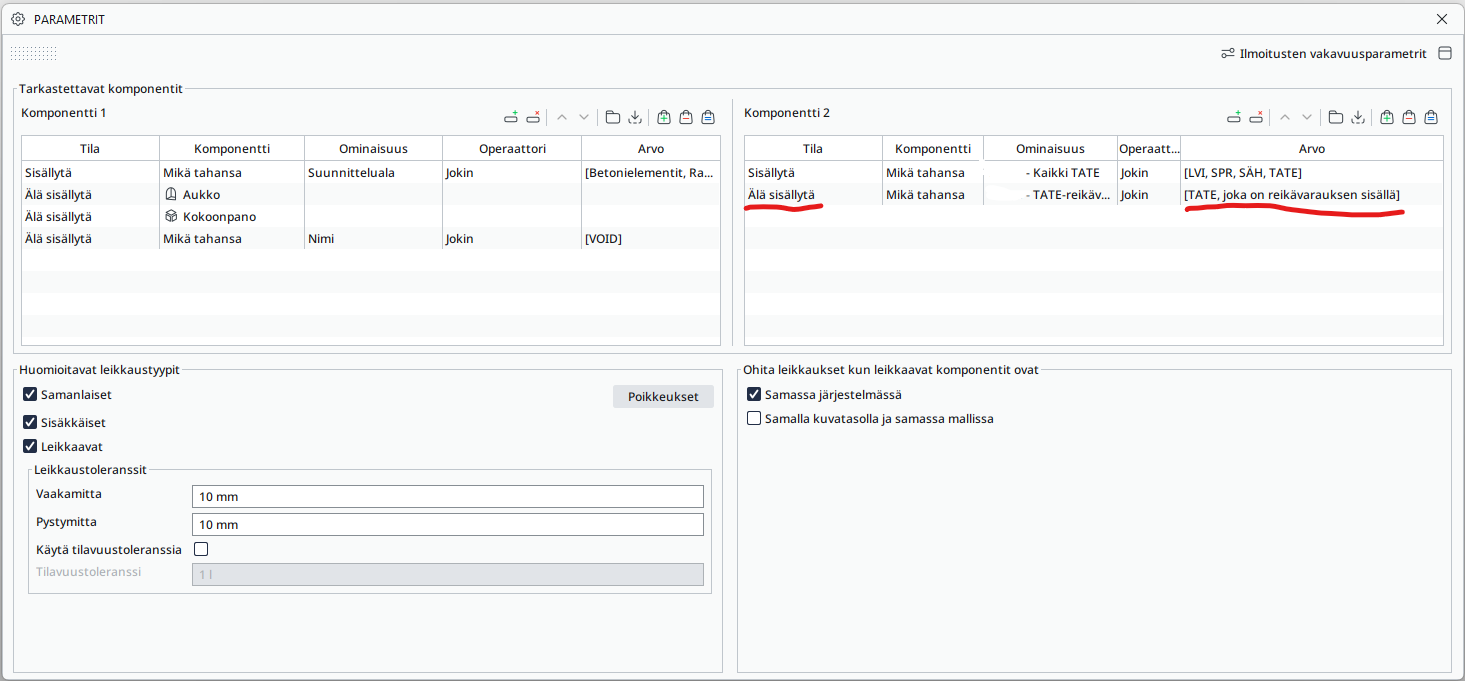
Hope you find some logic in this and let me know if there something missing, I try to explain better then.
EDIT: Grammar + added some extra information to the 2nd part.
- I check HVAC which is inside the hole reservation objects / openings with Solibri common rule SOL/234/1.2 (in the parameter of the ruleset I use an automated classification to determine the objects for the check, but you can use certain models for example to determine the HVAC components and hole reservation components):
-
@Protiimi_Johanna said in Clash detection - ignoring ProvisionforVoid:
-HVAC vs opening as parent rule, check passed components (no results)
This is indeed how I use it. The “openings” are modelled provisions for void as IfcBuildingElementProxy though, not IfcOpeningElements. Of course it is important that the PFV are in the right filter, as the components passed by the gatekeeper to the subrule are those from the left filter. Thus HVAC needs to be on the left.
@LariMatias said in Clash detection - ignoring ProvisionforVoid:
I’ve tried the gatekeeper / parent rule solution some time ago with no success
I’d be interested to know what the issue was.
It is true that we don’t verify the placement of HVAC within the PFV, this is done by another subsequent rule which doesn’t work perfectly.We have seen custom rules from some Solibri resellers that might yield better results, but weren’t able to test them in detail as of today. I’ll post some more information when we’ll get to it.
-
I don’t get it. I started over, but I can’t make it work.
-
Gatekeeper rule:

Sub-rule:
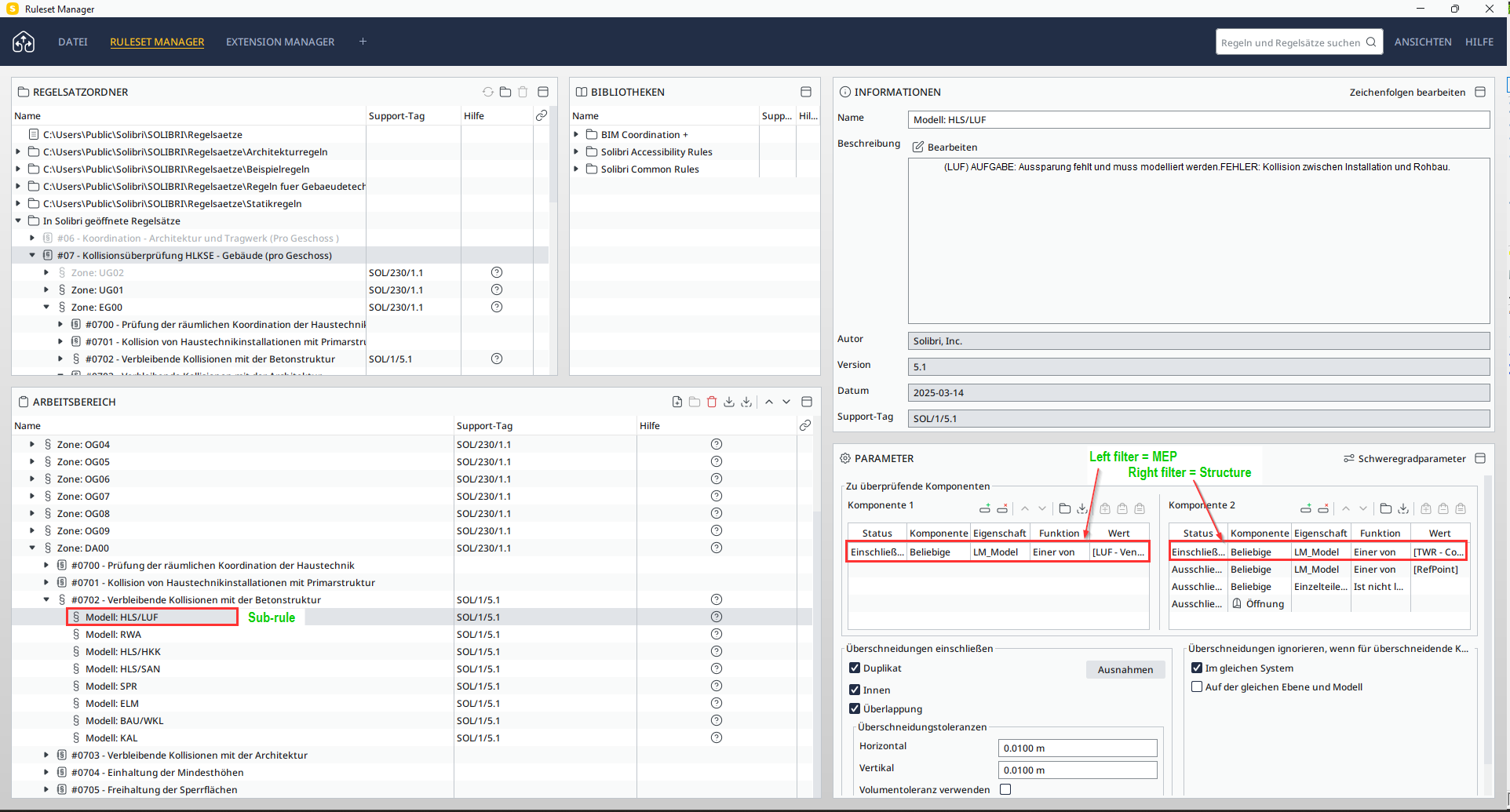
Note that we could have all MEP disciplines in one sub-rule, but we preferred having one sub-rule per MEP-discipline.RESULT:
Step 1: all MEP components that do not clash with a Provision for Void are passed to the sub-rule
Step 2: from those passed components, we select one specific discipline per sub-rule and check for clashes with the structure.Limitations: the MEP components could clash with the PFV without being centered, and without having the correct distance. This is checked in a separate rule down the road.
Our rule #0702 (this includes Gatekeeper + subrule) merely checks if there is a PFV request for each MEP component clashing with a structural component. The other rule will check the dimensions of the PFV.Does that help @Protiimi_Johanna ?
-
@sarahhielscher I think that’s the one we quickly tested.
If I remember correctly, we felt that the prerequisites might be a bit too restrictive in our case - but I’m still interested to dig further.EDIT: here’s the link https://help.solibri.com/hc/en-us/articles/15129074179351-Update-Log-for-BIM-Coordination-Extension
-
P Protiimi_Johanna referenced this topic on
-
@Alex-J Thanks for the tips! I tried it now with simple enough setup and got it working! So, as a result, I have HVAC+E that clashes with STR where there is no ProvisionForVoid at “exact” same location.
I think my problem earlier was, that I had PfVs included somewhere in clash rule they were not supppose to be.
Also, I edited the gatekeeper rule the way that it doesn’t check for clashes but rather component inside another: HVAC+E components as inner components and PfV as outer components. I don’t know if it’s any different but maybe it’s a bit more adjustable than clash checking.
-
@LariMatias said in Clash detection - ignoring ProvisionforVoid:
Also, I edited the gatekeeper rule the way that it doesn’t check for clashes but rather component inside another: HVAC+E components as inner components and PfV as outer components. I don’t know if it’s any different but maybe it’s a bit more adjustable than clash checking.
Is that working well? I always assumed that if the pipe was longer than the wall (and PFV) thickness, this would not work. The orientation of the PFV, specifically cubic ones seems to be to complex to take into account… I’d happy to have some more feedback!
@EloyRD sorry for the late reply, I haven’t dived into rule administration for some time now, I’ll try to find some time soon. But basically yes, we have the same difficulties to find a rule that gives consistent results. We probably tried out at least 6 different ways… I think the custom rules mentioned above by @sarahhielscher are using a better JavaScript code, you might be interested to try them out. Here’s the link: https://help.solibri.com/hc/en-us/articles/29123641190807-Fire-Stopping-Advanced-Identity-Rule
-
@Alex-J Now I had finally time to return to this rule. Turns out the problem was that I had the MEP as the component 2 (the wrong side). I had never thought that the positioning of the checked components is significant.
Thanks a lot, now I (once again) feel like I can do anything!


Copyright © 2025 Solibri Inc. | Powered by NodeBB