Skip to content
  • Categories
Collapse
Solibri Society Forum
  1. Home
  2. General Discussion
  3. How to tidy up grids and plans in view

How to tidy up grids and plans in view

Scheduled Pinned Locked Moved General Discussion
2 Posts 2 Posters 645 Views
  • Oldest to Newest
  • Newest to Oldest
  • Most Votes
Log in to reply
This topic has been deleted. Only users with topic management privileges can see it.
  • D Offline
    D Offline
    dgenc
    wrote on last edited by
    #1

    Hi All!

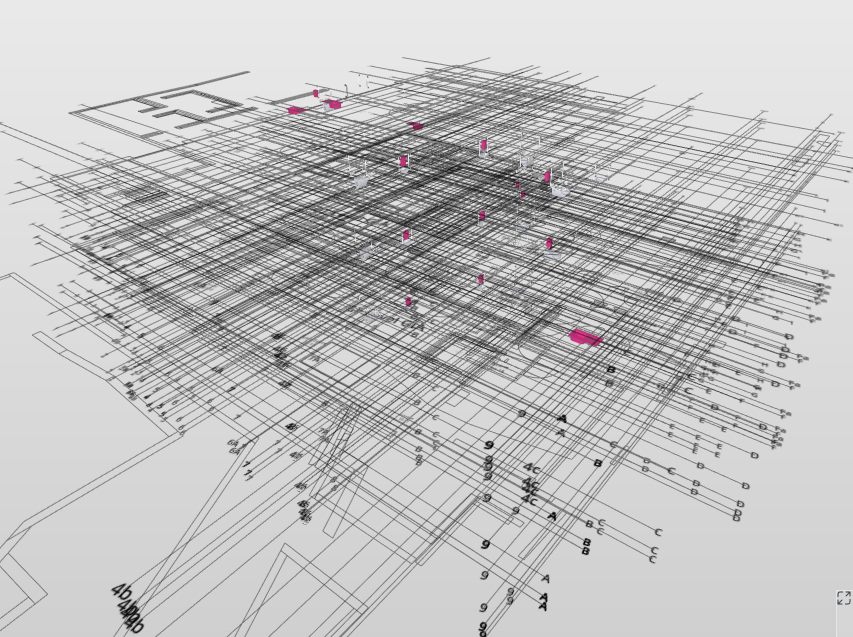
    I can’t figure out why every time I do a clash detection and load my models in, the grids and plans are a total mess (see image below). When this happens I tend to switch them off from all views and from the clash result slides, and I ideally would like to have them in as they can be very useful.
    How do you make sure those are tidy and you don’t end up with duplicates for each one?
    Any advice would be very much appreciated!
    0ee00f9b-5fda-4de9-9acf-ff53183aa4c9-image.png

    1 Reply Last reply
    0
    • JeroenKoomenJ Offline
      JeroenKoomenJ Offline
      JeroenKoomen
      wrote on last edited by
      #2

      See also this post: https://society.solibri.com/topic/2244/how-grids-work-in-solibri?_=1739890462811

      If one IFC has a grid… Solibri will project this grid on every level that is in your smc.
      So if you have a lot of models… with different levels with different heights… and only one has an IFC grid… then you get somelthing like your picture.

      You can make an ITO of the levels to check different levels and heights…

      http://www.linkedin.com/in/koomenjeroen
      https://www.bimloket.nl/BIMbasisILS

      1 Reply Last reply
      0

      Copyright © 2025 Solibri Inc. | Powered by NodeBB

      • Login

      • Don't have an account? Register

      • Login or register to search.
      • First post
        Last post
      0
      • Categories