
.xls saving option removed from ITO exports. Cant use macro templates as the ito export cant be saved with macros.
-
Hi,
It is still possible to use an .xls file as an ITO template. However, when the ITO export is saved, the only available format is .xlsx.
This creates a problem for templates that contain macros. Our .xls templates use macros for calculations and sorting, but these macros cannot be retained when the exported file is saved as .xlsx. As a result, the exported file becomes corrupt and unusable.
We therefore need one of the following options to be supported:
Allow ITO exports to be saved as .xls, as before, or
Add support for saving ITO exports as .xlsm so that macros can be retained.Without either of these options, our macro-based templates are effectively unusable, creating a significant amount of additional manual work.
Please restore .xls export support or, preferably, add .xlsm as a supported export format.
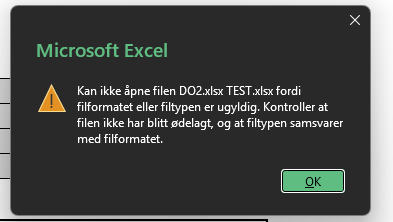
(error translate to:
Excel cannot open the file ‘D02.xlsx TEST.xlsx’ because the file format or file extension is not valid. Verify that the file has not been corrupted and that the file extension matches the format of the file.
) -
Thanks for feedback.
-
I noticed the same issue of @ThomasiBB . Will be fixed in the next release?
-
-
 M Matti marked this topic as a question on
-
M Matti has marked this topic as solved on
-
M Matti unlocked this topic on

Copyright © 2025 Solibri Inc. | Powered by NodeBB