
Adding rvt. models in Solibri
-
I have been using the functionality of adding rvt file directly into Solibri and have run through some limitations and issues. Below is a report on the result when using files from Revit 2024 and Revit 2026.
-
Loading rvt. files into solibri, on avarage it’s taking about an 2 hours for a “medium” size project files to be uploaded. The files included the Architect model, Structural model and 2 MEP models (General building services & sprinkler model). The 2 hour time frame for uploading is still far better than taking 8 hours or more to export all these models manually to IFC.
-
The smc. file size grew from 500Mb to 1.5Gb when using the Revit files.
-
Model categories and hierchy works as expected.
-
Movement within the model viewer (orbit, pan and sectioning) was noticibly slower than when using IFCs. Screen freezes up quiet often
-
The classification of components works fine but all previously saved classification files are incompatible as they used IFC defined parameters such as; Layer and Name (found under the Bim Data -> identification tab).
-
ITOs are limited as not all native revit parameters are present from the rvt. file. Most of the missing parameters come from the MEP models. The categories of services modelled were MEP Fabrication components and generic MEP components. Both instances had the parameters for insulation thickness, Insulation material and Part material. These parameters were availiable when using regular generic MEP components but not for MEP Fabrication.
-
Placement of IFCs and rvt. files were in the same location. By default, it used the shared coordinates of the files.
-
Almost all MEP components in both MEP Fabrication and regular components are black, making it almost impossible to tell what the geometry actually is. Only when classifying it and applying an actual color that it then becomes visually identifiable.
To summarize, the main issues are: mapping revit parameters into solibri from MEP fabrication components & default visibility of services (black) making it difficult to pick out components and creating classifications.
-
-
Thanks @Cedric-Macleod for the feedback so far. We’ll take this all into account while developing towards the beta. One thing I wanted to ask about was the performance once the initial rvt file is imported, how does the smc file behave when opened/closed?
-
Hi Tony. It takes a little longer to open and close than when using IFCs. Another issue I have faced is: using the “save as” funcion. The application greys out and it then gets stuck. Hence, when using our smc template file, I must save it using the file explorer into the new project location. Then, I can add the models and save the smc file.
-
Hi,
I’d also like to share a few observations.- During my testing, I noticed that RVT files generally require more time to open than IFC files. For example, a 6 MB RVT file took approximately 6 minutes to load. While the performance remains acceptable, there may still be room for optimization.
- It would be useful if the Application field displayed the Revit version used to create the model.
- It would also be helpful to better understand how Solibri interprets Revit components, as the IfcEntity field appears to be empty for RVT models
- After saving the file, Solibri sometimes had difficulty closing when clicking the X in the top-right corner. On other occasions, Solibri closed unexpectedly.
- Some components, especially MEP components, appear completely black in the 3D view, which can make it difficult to visually recognize the object.
- Finally, as a minor UI enhancement, it would be nice if the Recent Models view displayed a Revit icon next to .RVT files, making them easier to distinguish from IFC models at a glance
-
The loading process takes a very long time.
In the Revit file, I cannot see the IFC parameters that are visible when viewing the same Revit model in ACC.
As a result, we are unable to use anything we have created based on the Open BIM principle.
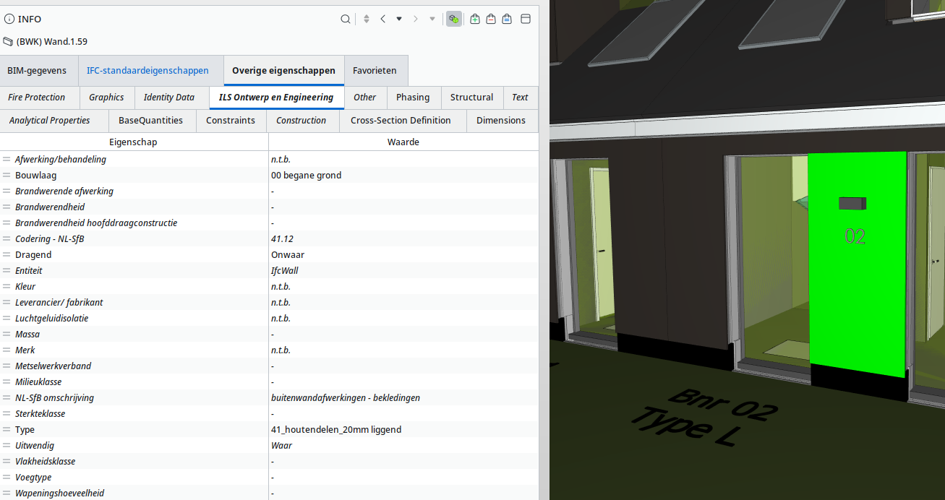
Alternatively, even when the data is present, the property set is structured differently, which causes existing classifications to fail; in my test, the data appeared under “Text,” whereas in the IFC file (as viewed in Solibri), it is located under the “ILS Design and Engineering” tab. But also under text in he IFC
Furthermore, the “Assembly Code” is missing from the Revit model; these are native parameters that are not being read from the Revit file.It should be clearly indicated in the “Info” section that the file is a Revit model.
Saving and subsequently opening the file is quite fast, and a 900 MB Revit model is reduced to 228 MB.
I applied a simple, general clash detection rule, which resulted in the identification of clashes.
-
@Harmen-Jorritsma would you have the possibility to share some screenshots or perhaps even a simple rvt file to indicate the issue with IFC parameters and data?
-
Hi, I’m new to Solibri and was excited to try version 26.9.1 Premium because I understood that it supports opening Revit (.rvt) files directly without exporting to IFC first.
However, I can’t find .rvt in the supported file formats. I only see .ifc, .smc, .smct, .smv, .zip, .ifczip, .dwg, .pdf, .e57, .las and .laz.
Is there something I need to enable to open RVT files directly, or is this feature not yet available?
-
Hello @Mari!
Revit support is currently in pre-beta and is not yet launched publicly. Pre-beta is of course available to customers as well, so if you are interested in testing out before the launch (Beta Dec 1 and launch Dec 15), please send over a message to [email protected] to join. We’d love to hear your feedback!
Kind regards,
Toni
-
@tonigyllenberg Thanks
-
@tonigyllenberg
IFC with Text
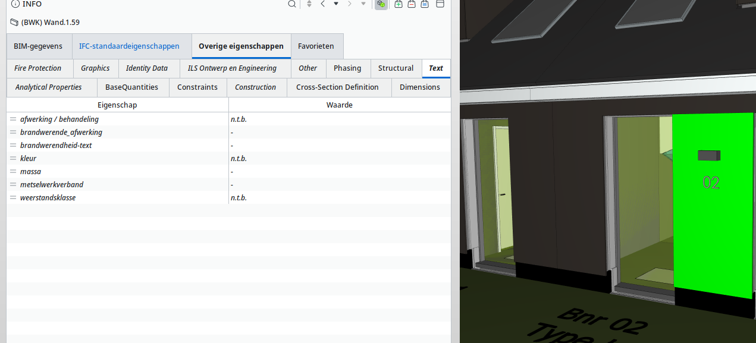
IFC with extra IFC parameter, custum propertyset ILS Ontwerp en Engineering
Revit with Text but without Custum Pset
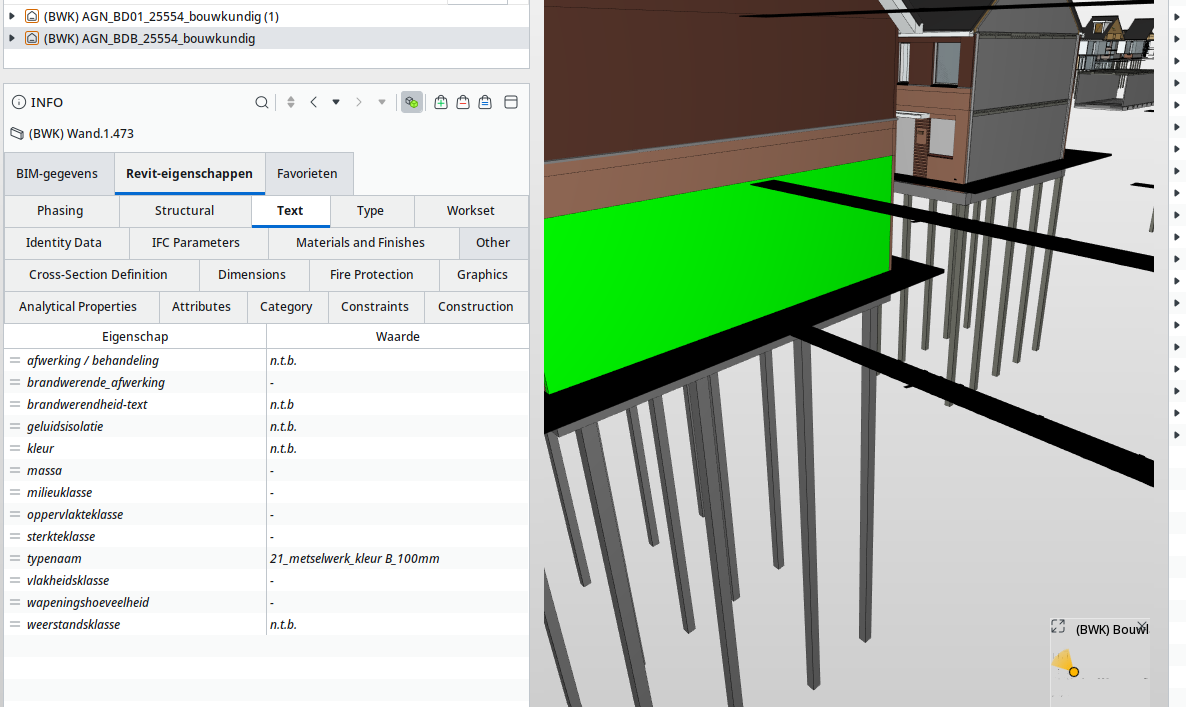
We only see TEXT in Revit, and no PSet (PSet_Wall_Common) or custom PSet.
Because of this, we’re missing part of the requested information. Also, we’ve now set everything up on the PSet or Custom PSet and not on Text set, so almost no classifications are working anymore. -
Thanks @Harmen-Jorritsma. We are currently working on providing custom category and custom propertyset mapping upon initial import of rvt files in Solibri.
We have also addressed the coloring of MEP objects, as well as the recent model view and saved smc file size bloating. Beta is targeted in one weeks time, so stay tuned!



Copyright © 2025 Solibri Inc. | Powered by NodeBB