Skip to content
  • Categories
Collapse
Solibri Society Forum
  1. Home
  2. Comments & Feedback
  3. Tech Talks
  4. Appearrance of IfcWindow in Solibri

Appearrance of IfcWindow in Solibri

Scheduled Pinned Locked Moved Solved Tech Talks
12 Posts 6 Posters 2.8k Views
  • Oldest to Newest
  • Newest to Oldest
  • Most Votes
Log in to reply
This topic has been deleted. Only users with topic management privileges can see it.
  • JeroenKoomenJ Offline
    JeroenKoomenJ Offline
    JeroenKoomen
    wrote on last edited by JeroenKoomen
    #1

    Hi,

    Why is Solibri changing the appearance of IFcWindows and making them transparant?

    On linked-in there was a post on this… with lots of people saying Solibri is manipulating the IFC:
    (Sorry in Dutch).
    https://www.linkedin.com/posts/robindeurloo_revit-bim-ifc-activity-6623688081964843008-Fhbo

    Below an image of a wall with windows. Glasspanel / windowframes are seperate and both modelled as IfcWindow.
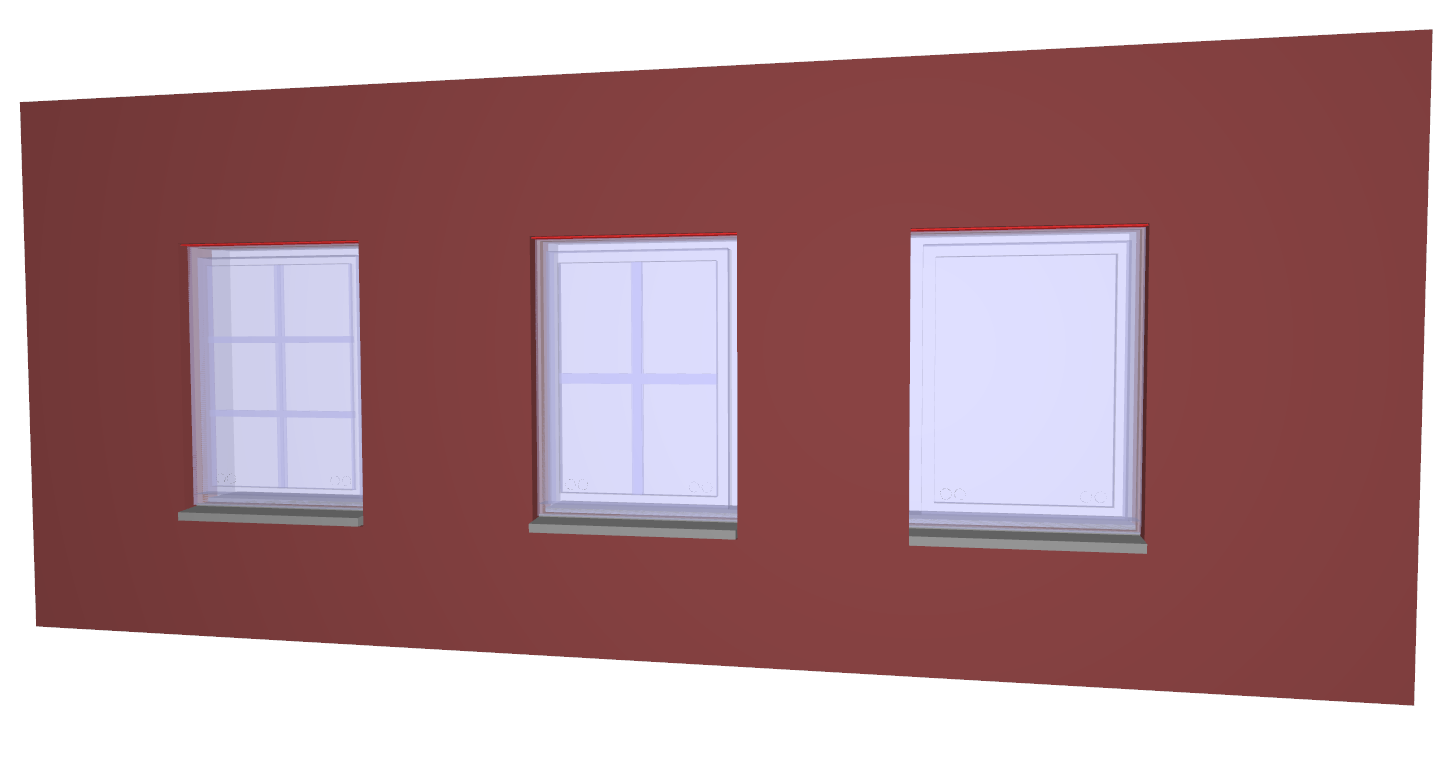
    9046b6a4-d034-4fe1-bbe4-552c204b7dd9-image.png

    Both the windowframes as the panels become transparant in Solibri. In other IFC viewers (for example BIM Vision) this is not happening. See picture in BIM Vision below.
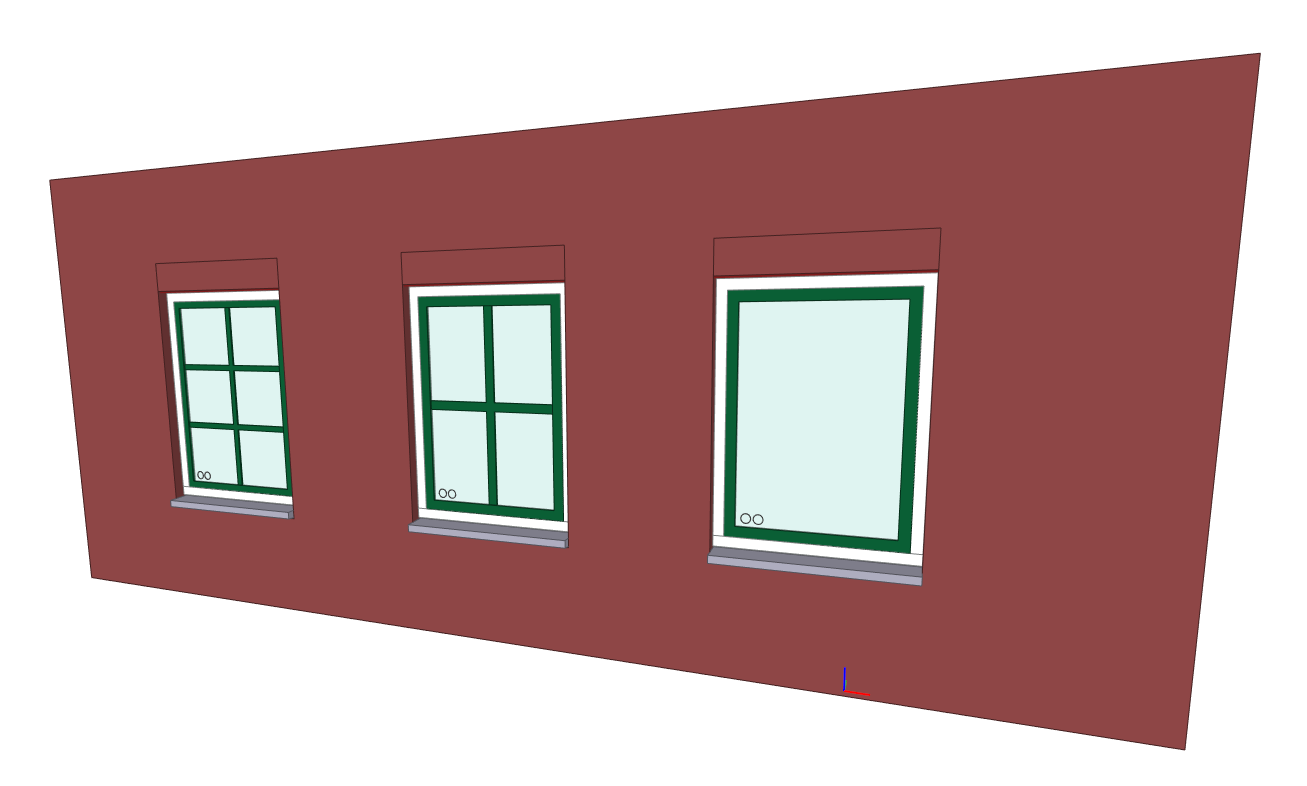
    1852c292-0092-4f9b-ba7c-930c8ee82c1f-image.png

    After a lot of testing it turns out:

    • If a IfcWindow has a material which is transparant, Solibri takes over the colour / tranparancy

    • If a IfcWindow has a material that has no tranparency, Solibri will make it blue with transparancy

    I think this is not helpful but am interested what other people think.

    Also the IFC file attached.
    window IFC.ifc

    http://www.linkedin.com/in/koomenjeroen
    https://www.bimloket.nl/BIMbasisILS

    1 Reply Last reply
    0
    • JeroenKoomenJ Offline
      JeroenKoomenJ Offline
      JeroenKoomen
      wrote on last edited by
      #2

      @Matti-Kannala @Pasi-Paasiala
      Is it on purpose that Solibri is doing this?

      http://www.linkedin.com/in/koomenjeroen
      https://www.bimloket.nl/BIMbasisILS

      MattiM 1 Reply Last reply
      0
      • MattiM Offline
        MattiM Offline
        Matti Solibrians
        replied to JeroenKoomen on last edited by
        #3

        @JeroenKoomen

        This looks like a bug. We will check why it is happening.

        1 Reply Last reply
        0
        • JeroenKoomenJ Offline
          JeroenKoomenJ Offline
          JeroenKoomen
          wrote on last edited by
          #4

          Thanks! @Matti-Kannala

          http://www.linkedin.com/in/koomenjeroen
          https://www.bimloket.nl/BIMbasisILS

          1 Reply Last reply
          0
          • Y Offline
            Y Offline
            Yumi Yogi
            wrote on last edited by
            #5

            Hi there,
            I’ve encounterd a similar problem as Mr. JeroenKoomen.
             
            Please look at the image below. This is the 3D display in Solibri 9.10.5.
            It looks transparent window. It is very confusing for me.
            Though no explicit transparency material settings for windows in Archicad22, Solibri displays them as a transparent window component.
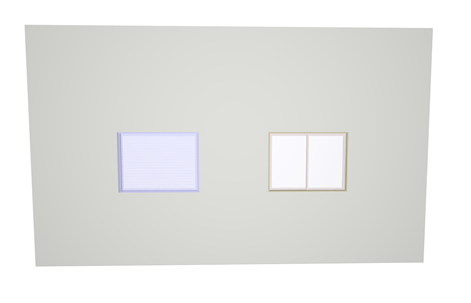
            13e1c9ae-9928-4abc-9c0a-1d97ceac2fb5-image.png
            See also the Archicad22 settings.

            3c02dc98-7564-4888-ac21-588017292998-image.png
            Please check it out, the attached IFC export from ArchiCAD22.
            test_model.ifc

            Best regards,
             
            Yuumi

            1 Reply Last reply
            0
            • MattiM Offline
              MattiM Offline
              Matti Solibrians
              wrote on last edited by Matti
              #6

              Solibri currently skips opaque (non transparent) IFC colors for window objects.
              This is happening for the both models.

              This was done by purpose. Earlier the IFC colors of window object were often wrong and that is why this feature has been there. This is very easy to change by removing this feature.

              We decided to change this to the next release. This is how it looks in Solibri without skipping the window color:
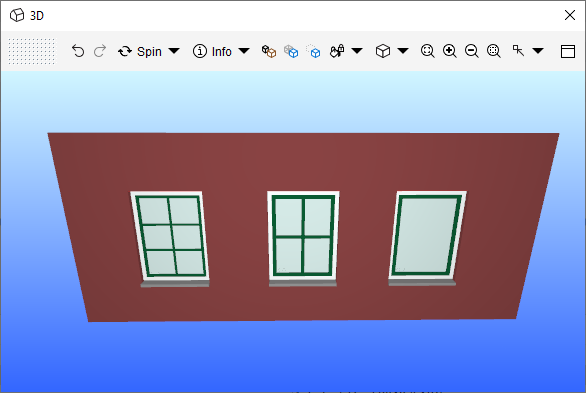
              41f45d72-4921-420b-841a-f3ee9850eec0-image.png
              For some reason the IFC model has the window frames as separate window objects (e.g. green frames)
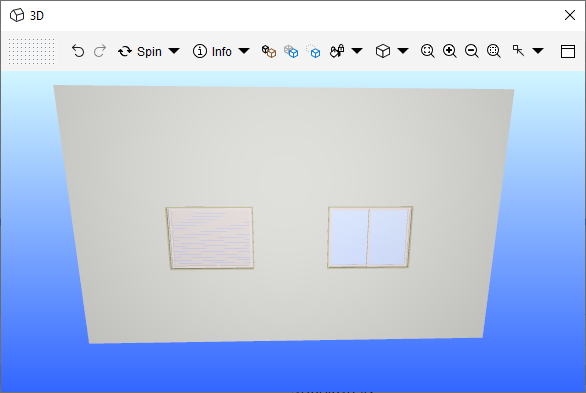
              4d2f8384-35cc-4740-a043-f953c391830f-image.png

              1 Reply Last reply
              0
              • JeroenKoomenJ Offline
                JeroenKoomenJ Offline
                JeroenKoomen
                wrote on last edited by
                #7

                @Matti-Kannala

                Do I understand correctly that you are going to remove this feature in the next release?
                Would be great!

                Thanks

                http://www.linkedin.com/in/koomenjeroen
                https://www.bimloket.nl/BIMbasisILS

                MattiM 1 Reply Last reply
                0
                • MattiM Offline
                  MattiM Offline
                  Matti Solibrians
                  replied to JeroenKoomen on last edited by
                  #8

                  @JeroenKoomen

                  Yes
                  If the user wants to have transparent windows, it will be still possible with the classification colors or the color maps.

                  A 1 Reply Last reply
                  1
                  • Y Offline
                    Y Offline
                    Yumi Yogi
                    wrote on last edited by
                    #9

                    @Matti-Kannala
                    Everything is clear to me. Thank you very much.

                    1 Reply Last reply
                    0
                    • RicardoR Offline
                      RicardoR Offline
                      Ricardo
                      wrote on last edited by
                      #10

                      Are there more people who are again/still experiencing transparant windows in Solibri?

                      d3e5e0b9-63e0-4774-9c03-164f71621f91-image.png

                      R 1 Reply Last reply
                      1
                      • R Offline
                        R Offline
                        Ronald van Emst
                        replied to Ricardo on last edited by
                        #11

                        @ricardo Isn’t this a curtain wall?
                        check material.

                        1 Reply Last reply
                        0
                        • A Offline
                          A Offline
                          Anees Alomar
                          replied to Matti on last edited by
                          #12

                          Hi @matti-kannala,

                          where could I find this feature to turn it off?
                          It is frustrating to know after one year of having this issue that it is coming from Solibri, not from the exporting software.

                          Looking forward to your reply!
                          Thanks

                          1 Reply Last reply
                          0

                          Copyright © 2025 Solibri Inc. | Powered by NodeBB

                          • Login

                          • Don't have an account? Register

                          • Login or register to search.
                          • First post
                            Last post
                          0
                          • Categories