Skip to content
  • Categories
Collapse
Solibri Society Forum
  1. Home
  2. Comments & Feedback
  3. Tech Talks
  4. Incomplete menus

Incomplete menus

Scheduled Pinned Locked Moved Tech Talks
3 Posts 2 Posters 581 Views
  • Oldest to Newest
  • Newest to Oldest
  • Most Votes
Log in to reply
This topic has been deleted. Only users with topic management privileges can see it.
  • adrianobalduinoA Offline
    adrianobalduinoA Offline
    adrianobalduino
    wrote on last edited by adrianobalduino
    #1

    Sometimes when I open Solibri I get incomplete menus like this:

    screen.png .

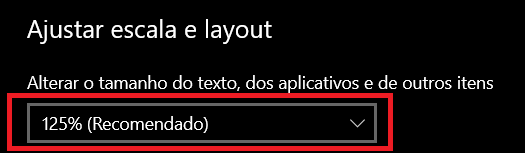
    I realized that behavior when I change the size of apps in Windows 10 to more than 100%.
    windows.png

    1 Reply Last reply
    1
    • S Offline
      S Offline
      Samb
      wrote on last edited by
      #2

      Hi @adrianobalduino

      Hope you already got an answer to your problem, if not: check this link .

      @Robbert-Evers published it on his linkedin.

      Hope it works for you!

      1 Reply Last reply
      0
      • adrianobalduinoA Offline
        adrianobalduinoA Offline
        adrianobalduino
        wrote on last edited by adrianobalduino
        #3

        Hi @Samb ! It solves the problem.
        I recorded a video to talk about this and some other tips in Solibri but it was recorded in Portuguese - Brazil.
        Even though it might help:
        https://www.youtube.com/watch?v=-ltLpEiEHQ0&t=20s

        1 Reply Last reply
        0

        Copyright © 2025 Solibri Inc. | Powered by NodeBB

        • Login

        • Don't have an account? Register

        • Login or register to search.
        • First post
          Last post
        0
        • Categories