Skip to content
  • Categories
Collapse
Solibri Society Forum
  1. Home
  2. Comments & Feedback
  3. Tech Talks
  4. .SMC file Read error

.SMC file Read error

Scheduled Pinned Locked Moved Tech Talks
29 Posts 8 Posters 9.2k Views
  • Oldest to Newest
  • Newest to Oldest
  • Most Votes
Log in to reply
This topic has been deleted. Only users with topic management privileges can see it.
  • tonigyllenbergT Online
    tonigyllenbergT Online
    tonigyllenberg Solibrians
    wrote on last edited by
    #3

    Hello @Ricardo

    Would you be able to send the log files to [email protected]? It would be beneficial to have the logs from the instance the project was last saved.

    Kind regards,

    Toni

    1 Reply Last reply
    0
    • agroniA Offline
      agroniA Offline
      agroni
      wrote on last edited by agroni
      #4

      any results so far?

      same the happened here!
      Yesterday I have updated to 9.10.6.23 and got the same message.
      I need urgent help because I need to file in a report until monday evening…

      I have installed ver. 9.10.0.129 and the same message is appearing. The newest Version of Solibri is not the case here.

      AllesWirdGut Architecture
      www.awg.at

      1 Reply Last reply
      0
      • tonigyllenbergT Online
        tonigyllenbergT Online
        tonigyllenberg Solibrians
        wrote on last edited by
        #5

        Hello @agroni,

        Usually these problems are not related to the Solibri version which the user is trying to open the files with, i.e. the same error message will arise with any Solibri version. These problems are typically related to an issue during saving, as Jeroen pointed out. Would you also be able to provide logs from the time the file was last saved and send them to [email protected]?

        Kind regards,

        Toni on behalf of the Solibri team

        agroniA 1 Reply Last reply
        0
        • L Offline
          L Offline
          lasse.lindqvist
          wrote on last edited by
          #6

          So

          java.io.EOFException: Unexpected end of ZLIB input stream
          

          is an indication that part of the file is missing from the filesystem. It also usually means there is nothing that can be done to recover it, unless you have the backup functionality in use and that the backup file is not corrupted.

          1 Reply Last reply
          0
          • RicardoR Offline
            RicardoR Offline
            Ricardo
            replied to JeroenKoomen on last edited by
            #7

            @JeroenKoomen said in .SMC file Read error:

            This looks like an End of File missing.

            Propably the file was not saved completely.
            Have a look at your back-up file. If that file is larger than the smc it is likely that it was not saved completely.

            This was indeed the case! Thanks. I changed the backup file to .SMC and that worked.

            @tonigyllenberg said in .SMC file Read error:

            Hello @Ricardo

            Would you be able to send the log files to [email protected]? It would be beneficial to have the logs from the instance the project was last saved.

            Kind regards,

            Toni

            Toni, unfortunately I can’t find a log-file in the folder where it should be located. Could it be possible that this file wasn’t made?

            @agroni said in .SMC file Read error:

            any results so far?

            same the happened here!
            Yesterday I have updated to 9.10.6.23 and got the same message.
            I need urgent help because I need to file in a report until monday evening…

            I have installed ver. 9.10.0.129 and the same message is appearing. The newest Version of Solibri is not the case here.

            Agroni, try changing the .BAK file to .SMC if that helps for you.

            1 Reply Last reply
            0
            • agroniA Offline
              agroniA Offline
              agroni
              replied to tonigyllenberg on last edited by
              #8

              Well, this is a total disaster…worse then CoronaVirus!
              I have looked for my SMC backup file, but cannot find it in the original folder! Reasons??? Is it also stored somewhere else?
              If I don’t find this backup file, I will loose only 6 days of work which might not be a lot… but… I will loose more then 70 documented issues! 😕

              AllesWirdGut Architecture
              www.awg.at

              1 Reply Last reply
              0
              • agroniA Offline
                agroniA Offline
                agroni
                wrote on last edited by
                #9

                btw… where can I find the log files?

                AllesWirdGut Architecture
                www.awg.at

                V 1 Reply Last reply
                0
                • V Offline
                  V Offline
                  vasu
                  replied to agroni on last edited by
                  #10

                  @agroni you can find log files under solibri installation folder.

                  Windows: C:\Program Files\Solibri\SOLIBRI\log
                  Mac: /Applications/Solibri/log

                  1 Reply Last reply
                  0
                  • JSNJ Offline
                    JSNJ Offline
                    JSN
                    wrote on last edited by
                    #11

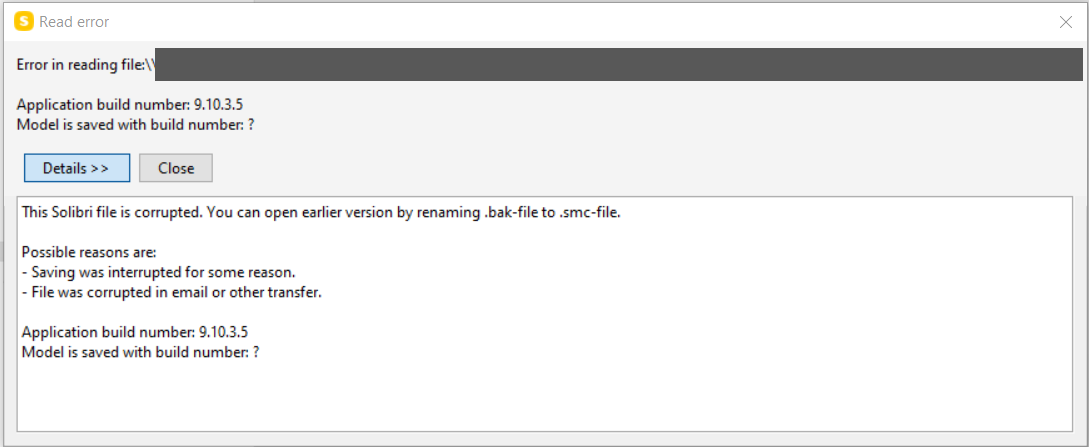
                    The same just happend here to a file today too, I have never had this issue before and therefore really doubt that this accumulated occurence of this problem right now is just a coincidence …

                    28ea226b-32f6-479e-8f37-56184df66755-image.png

                    1 Reply Last reply
                    0
                    • agroniA Offline
                      agroniA Offline
                      agroni
                      wrote on last edited by
                      #12

                      Dear @Solibrians,
                      more and more issues are appearing with this “new” phenomenon of not being able to open the previously saved files. This is not a strategy, that in my opinion Solibri should follow. Users will have tons of lost hours and if also maybe days if this will continue happening.

                      I understand if a crash happens during working, that a software can report errors. In this case the user should have the possibility to restore his data from an autosave (which is requst to Solibri to introduce: see also Autosave and Backup by @Tamas-Kurucso). But a total No Go is the scenario where a user consciously saves the file, goes to sleep and the next day he gets an error… and he drops the mug with hot coffey on the floor from his shock.

                      Therefore in my opinion, the Software should not allow saving a file, that it is not going to be able to open the next day!
                      I hope you agree on this one with me…

                      AllesWirdGut Architecture
                      www.awg.at

                      1 Reply Last reply
                      0
                      • tonigyllenbergT Online
                        tonigyllenbergT Online
                        tonigyllenberg Solibrians
                        wrote on last edited by
                        #13

                        Hello!

                        We are aware of the issue and are currently looking into it. This is precisely reason we ask for log files to get as many details as possible, so that our developers can pinpoint the issue at hand as fast as possible.

                        We agree that this behaviour is not acceptable. Currently, it seems that these issues stem from problems during file saving, and we are considering adding an additional save check and/or error message in case of any problems with saving, which will prompt the user to save the file again.

                        Kind regards,

                        Toni on behalf of the Solibri team

                        1 Reply Last reply
                        0
                        • JeroenKoomenJ Offline
                          JeroenKoomenJ Offline
                          JeroenKoomen
                          wrote on last edited by
                          #14

                          I also get this.

                          Attached my logs.runtime.log error.log gc.log output.log

                          http://www.linkedin.com/in/koomenjeroen
                          https://www.bimloket.nl/BIMbasisILS

                          JeroenKoomenJ 1 Reply Last reply
                          1
                          • JeroenKoomenJ Offline
                            JeroenKoomenJ Offline
                            JeroenKoomen
                            replied to JeroenKoomen on last edited by
                            #15

                            @JeroenKoomen said in .SMC file Read error:

                            I also get this.

                            Attached my logs.runtime.log error.log gc.log output.log

                            Maybe i was to quick… and this had to do with a slow network connection.
                            Copied to local and it opened… sorry to confuse you guys 🙂

                            http://www.linkedin.com/in/koomenjeroen
                            https://www.bimloket.nl/BIMbasisILS

                            1 Reply Last reply
                            0
                            • Tamas KurucsoT Offline
                              Tamas KurucsoT Offline
                              Tamas Kurucso
                              wrote on last edited by
                              #16

                              Hi, any progress in this topic? Same by me, from two backups one is also corrupted, so I have to repeat a lot of work. It is really annoying, in some cases it is not even possible to reconstruct, what have been done maybe several days before…

                              1 Reply Last reply
                              0
                              • Tamas KurucsoT Offline
                                Tamas KurucsoT Offline
                                Tamas Kurucso
                                wrote on last edited by
                                #17

                                The first time I’ve reported such a case was in october 2019…

                                1 Reply Last reply
                                0
                                • tonigyllenbergT Online
                                  tonigyllenbergT Online
                                  tonigyllenberg Solibrians
                                  wrote on last edited by
                                  #18

                                  Hello!

                                  We are currently working on a solution for this, which should be out in the next public release (9.10.8). The solution will improve the saving feature, and generally speaking, will check that the save has been fully completed. Please keep a look out for it in the release notes.

                                  Kind regards,

                                  Toni on behalf of the Solibri team

                                  agroniA 2 Replies Last reply
                                  1
                                  • Tamas KurucsoT Offline
                                    Tamas KurucsoT Offline
                                    Tamas Kurucso
                                    wrote on last edited by
                                    #19

                                    Thanks, that would be great:)

                                    1 Reply Last reply
                                    0
                                    • agroniA Offline
                                      agroniA Offline
                                      agroni
                                      replied to tonigyllenberg on last edited by agroni
                                      #20

                                      @tonigyllenberg said in .SMC file Read error:

                                      The solution will improve the saving feature

                                      Sounds promisin

                                      AllesWirdGut Architecture
                                      www.awg.at

                                      1 Reply Last reply
                                      0
                                      • agroniA Offline
                                        agroniA Offline
                                        agroni
                                        replied to tonigyllenberg on last edited by
                                        #21

                                        @tonigyllenberg said in .SMC file Read error:

                                        which should be out in the next public release (9.10.8).

                                        Hi Toni,
                                        Sorry for being a pain in the a**, but may I know when this public release is going to be launched?

                                        Again today I got this error message with another project. I opened the backup file and Solibri has no clue about my created issues/slides. I have lost 54 slides in Solibri which I have uploaded yesterday into BIMcollab.!!!
                                        Pffuhhhhh 😓

                                        AllesWirdGut Architecture
                                        www.awg.at

                                        RicardoR 1 Reply Last reply
                                        0
                                        • tonigyllenbergT Online
                                          tonigyllenbergT Online
                                          tonigyllenberg Solibrians
                                          wrote on last edited by
                                          #22

                                          Hello!

                                          The improvements for the saving feature have been published in the BETA release of 9.10.8, which is out today. Do note, that this will NOT have any effect on files which are already damaged or corrupted, however the fix is designed to prevent this from happening again.

                                          Please check the release notes here

                                          Kind regards,

                                          Toni on behalf of the Solibri team

                                          1 Reply Last reply
                                          0

                                          Copyright © 2025 Solibri Inc. | Powered by NodeBB

                                          • Login

                                          • Don't have an account? Register

                                          • Login or register to search.
                                          • First post
                                            Last post
                                          0
                                          • Categories