
Please implement relative paths as soon as possible.
-
Hello, thank you for your answer.
No, unfortunately we cannot use the server. We are in Berlin, it’s a bad network. VPN doesn’t hold by all clients and is never fast any way. Mainly because of the size of our CAD files we moved into Dropbox, it works rather well, there is a very efficient caching, somewhere.
If Solibri could resolve relative paths, most troubles would be solved.
All difficulties we experienced with Solibri were due to our attempts to share our settings. It is very difficult for the novice user to understand where things are stored.
-
I believe that a VPN is the best solution because you are technically in your office, even though physically outside of it. But to achieve this, as you say, internet and other things are critical to have the best possible connection to your office such as the bandwidth, internet speed, firewall, etc…
I have written an article in LinkedIn about finding different solutions in the Corona Situation.
One solution that could substitute your VPN and especially Dropbox is called SyncThing. It is open source, for free, uses TLS encryption also cryptographic authentication… and I am happely using it for a couple of months now (even before corona). It works very good. So you and your team mates could decide to install SyncThing on the same partition, to have the same path for the files and the syncing is done automatically.This relative path is not just the case of solibri, but in my knowlegde most of the software that I know. And off course we all got confronted by it when corona came…
-
Thank you Agroni, I am now looking into SyncThing. It looks indeed very promising!
Still, even in normal times I find Solibri particularly troublesome with paths and resources thereof.
I will try to describe below where we had/have difficulties. Mind, I just began with Solibri, so I am aware that I am still missing a lot.
I am grateful for hints and corrections.Premise: we are on Mac. Solibri is rather weird on Mac, is far better on PC.
-
Problems:
Resource Root Path defaults on Application:
Expected: standard behaviour. Starting values picked from Application, upon first launch Solibri sets up a User folder in Application Support (Mac) or AppData/Roaming (PC).
Wish: since a BIM exchange is by nature collaborative, a workgroup folder should be possible and override the User Folder (and obviously the Application Folder).
Comment: when I began, I was scared to edit anything because I was afraid of ruining the Application folder (and I did it, BTW).
-
Problems:
Resource Root Path is an absolute path. Roles files cannot be used by other team members when they are not on the same server:
Wish: Absolute Root Path defined in user’s preference, roles files are relative to the user defined path -> upon open, the file can be used by all team members, unregarded where they are.
-
Problems:
Resource Root Path, what goes in there?
Problem: Solibri’s Resource Root Path in Application covers the whole Solibri folder. There is no documentation (or I couldn’t find it, in spite of looking for it desperately) on what should be placed into an external Root folder. I guess: Rulesets, Roles etc. And within these, what? Only what we change or all we had in the Application folder? Any way they most times won’t load.
Example: we define an Resource Root Path on the server. We store a Classification file there in the folder Classifications. We add this classification file to a Role.
–> this file will never load. We can only load standard named files.Comment: I realized now, after trying for 7 months, that this might be possible if we had the Extension Manager. Or not? I beg the developer to confirm, and if yes, to add an alert informing the user of the limits of the Resource Root folder.
-
Problems:
Ruleset Manager: Editing Rulesets trial and error. Where are the rulesets?
Example: I [the unexperienced user] launch Solibri. I don’t have any model open. I have a Resource Root Folder set up copying parts from the Application folder, this is it’s content:
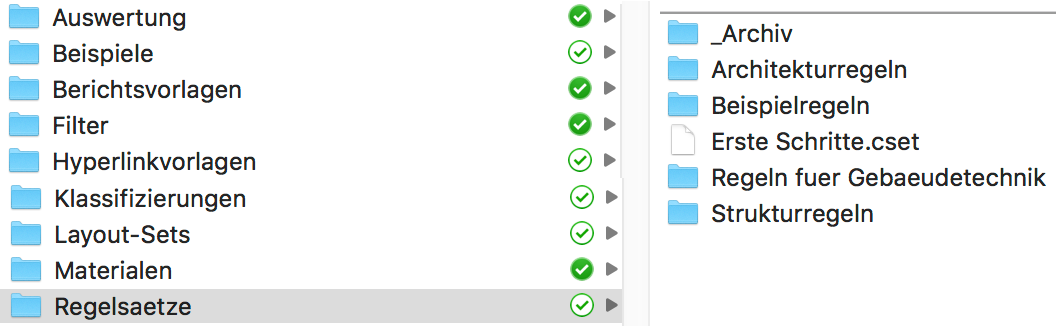
In Ruleset Manager I don’t see any subfolders:
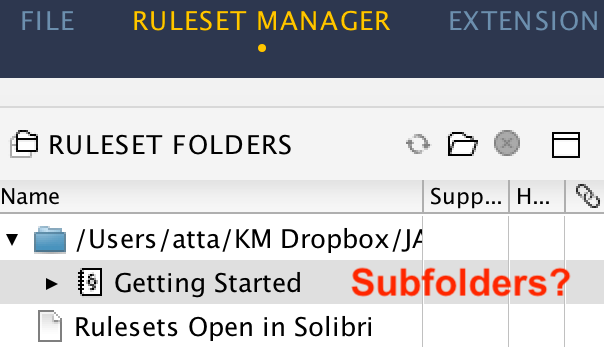
In order to see the subfolders, I must navigate the folders one by one.
Expected: upon clicking on the Rules Folder, all there included subfolders are pre-loaded.
-
Problems:
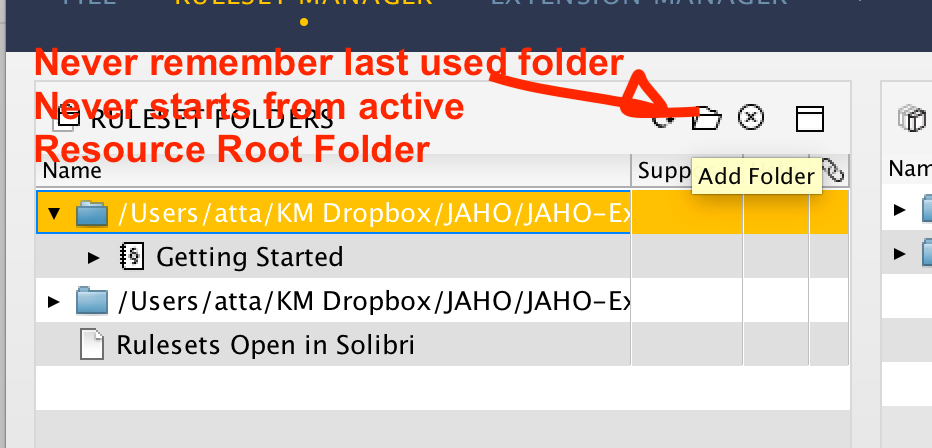
Ruleset Manager: Clicking on the folder icon always open the Application folder
Upon navigating for folders Solibri always ignore the user defined Resource Root Folder and goes back, again and again, to the Application folder.
Expected: we start either from the last chosen folder, or from the active Resource Root Folder.
-
Problems:
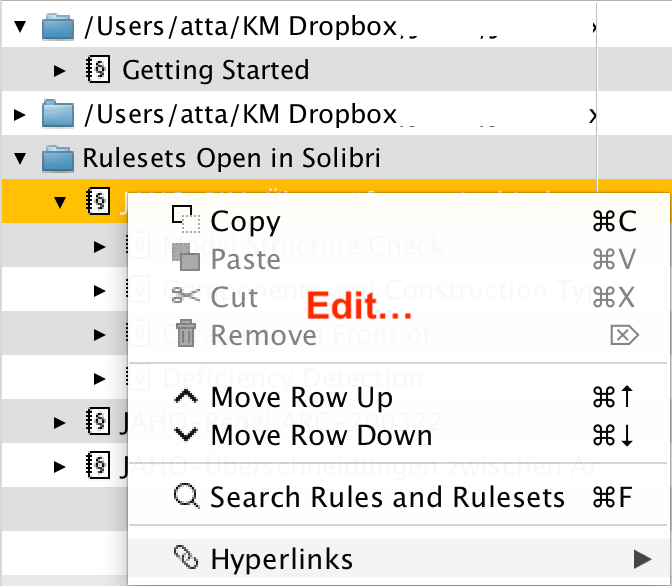
Ruleset Manager: “Edit” option in contextual menu?
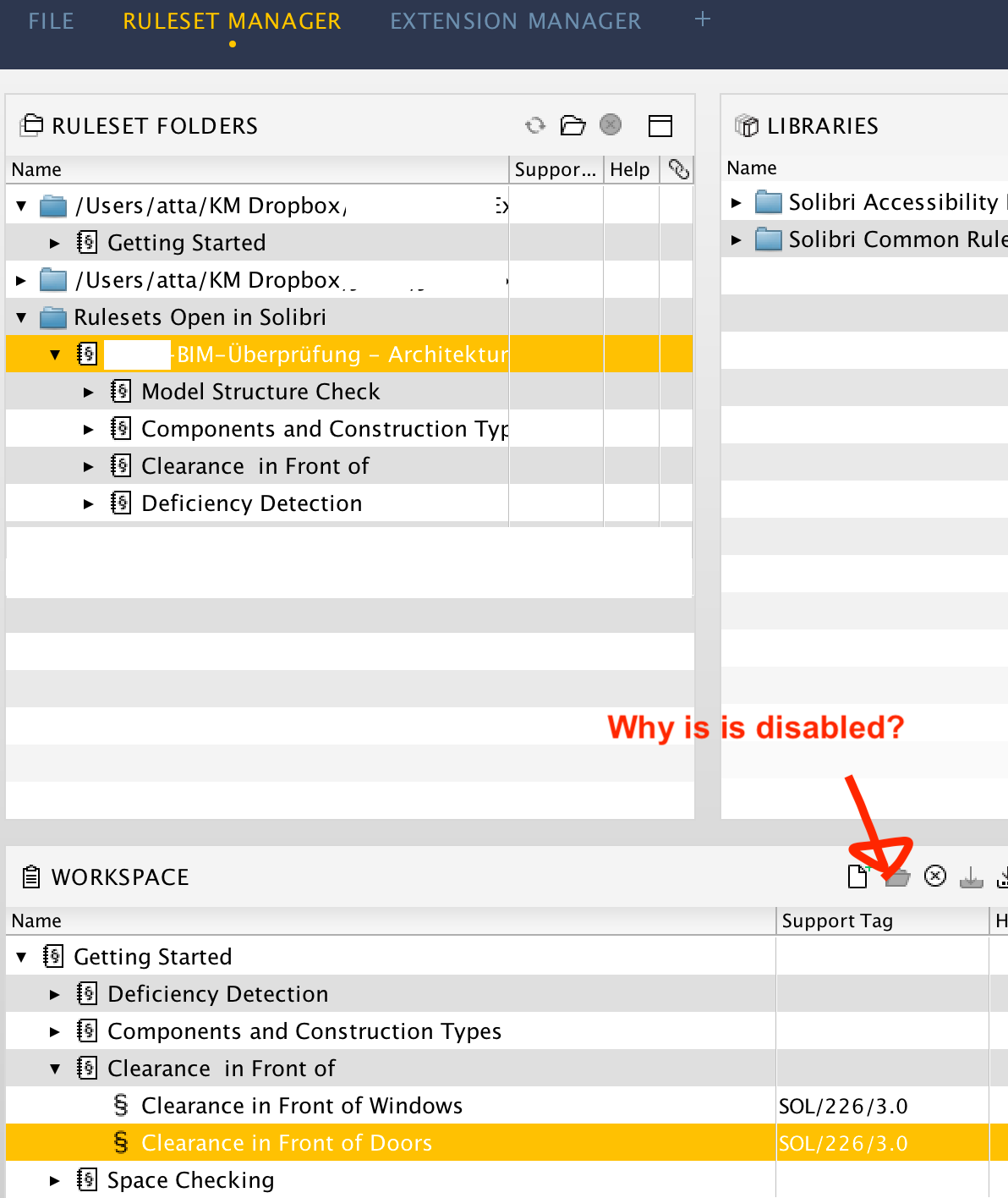
For editing a ruleset file, the user must click on a folder button, this opens the chosen ruleset file in the Workspace below.
For editing another ruleset one must click on another button, a cross one, to remove the previous selection from the workspace, then again click on that folder button.
If you don’t remove the previous selection, the folder button is disabled. For a long time I quit and restarted Solibri just to be able to edit another ruleset!
This is quite counterintuitive. Why a folder button? Why removing and re-adding?
Expected: “Edit” option in the contextual menu. This could open the selected ruleset in the workspace, closing any eventually open ones. Prompting for saving any changes.
-
Problems:
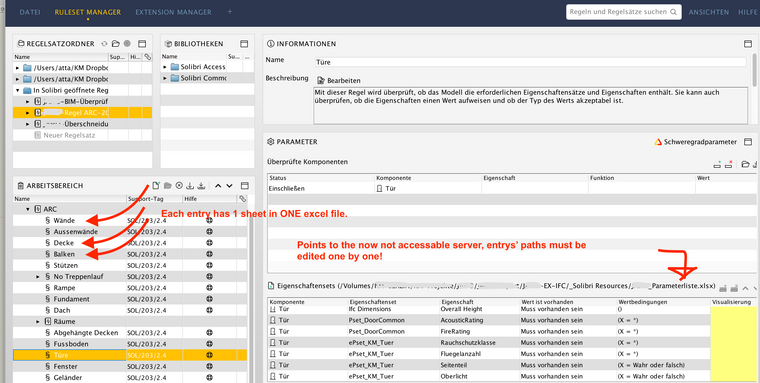
Ruleset Manager: rules loaded through excel files store path as absolute
We have a rather extensive list of parameters to be fulfilled. We store them in 1 Excel file, 1 sheet for each ifc entity.
But now that the path to the server has changed, the path is invalid: each element must be edited singularly. This is rather maddening.
This is particularly annoying also because Solibri doesn’t remember the last chosen folder or its own Resource Root Folder.
And since we are suddenly on Dropbox, everyone of us has a different path! So we are not in the position to edit the parameter list any longer.
Expected: path to one file can be changed in one place. The path is relative.
-
Hi!
Good suggestion. As a workaround for the time being, and many other use cases, may I suggest how our office has worked with Dropbox for a number of years. To overcome the shortcomings on absolute paths in several applications, we have the Dropbox-folder set up as specific virtual hard drive letter (say ‘D:’ for Dropbox).This is something of a hack, and if you are relying on any special Dropbox features (such as reserving a file) those will not be available via the ‘faux’ hard drive, but in basic use it’s pretty workable. In Windows we’ve done this as an internal network share on the computer- I’m not sure how exactly it’s been managed by our mac users, but they do have the same setup. Of course an actual dedicated physical drive or partition would also function the same.
-
Hello!
Solibri now supports relative file paths for model update dialog. Please try out the beta and let us know how it looks!
https://society.solibri.com/topic/3478/solibri-25-12-0-is-now-available-for-beta-testing





Copyright © 2025 Solibri Inc. | Powered by NodeBB