
Issues duplicated with BCF Live and BIMcollab
-
@debeek said in Issues duplicated with BCF Live and BIMcollab:
Hello @tonigyllenberg , several users do have problems with the Live connector and synchronization to BIMcollab.
We did have contact with Kubus and they told us that there is a bug in the BCF Live Connector, which causes these problems:Kind regards,
Dennis Beeke
I had the same issues at the beginning. Be very careful with sync. I always sync manually. Go under solibri settings and disable the automatic sync. During sync process do not change anything on the issues. After the sync always save the modell. Disable the sync tab on bcf live. Afterwards enable the sync button.
And maybe it is best, when you define timeframes where every discipline is allowed to sync issues…
Best
Chris -
@debeek said in Issues duplicated with BCF Live and BIMcollab:
Thanks @chris, the manually sync is the way we always do.
Regards,
Dennis
Had the same issue than you, when i changed something during the sync process… Maybe this also occur when to much people sync at the same time.
At the beginning i was really unhappy with the BCF live. But now, it works really well

-
These issues with duplicated items also happen when automatic sync is turned off. Happend to us a few times since the beginning of BCF Live Connector. These issues also messes up the statistics of BIMcollab because you are unable to delete these duplicated items.
-
@mvandenbrink said in Issues duplicated with BCF Live and BIMcollab:
These issues with duplicated items also happen when automatic sync is turned off. Happend to us a few times since the beginning of BCF Live Connector. These issues also messes up the statistics of BIMcollab because you are unable to delete these duplicated items.
i could delete this issues…
-
@chris said in Issues duplicated with BCF Live and BIMcollab:
i could delete this issues…
Could you describe how you got the duplicate items/issues deleted? We contacted Kubus but they told us it wasn’t possible at this moment.
-
@chris said in Issues duplicated with BCF Live and BIMcollab:
i could delete this issues…
@mvandenbrink said in Issues duplicated with BCF Live and BIMcollab:
Could you describe how you got the duplicate items/issues deleted? We contacted Kubus but they told us it wasn’t possible at this moment.
That would be indeed interestingto hear!
-
@jsn said in Issues duplicated with BCF Live and BIMcollab:
@chris said in Issues duplicated with BCF Live and BIMcollab:
i could delete this issues…
@mvandenbrink said in Issues duplicated with BCF Live and BIMcollab:
Could you describe how you got the duplicate items/issues deleted? We contacted Kubus but they told us it wasn’t possible at this moment.
That would be indeed interestingto hear!
Okay you are right. i closed the issue and not deleted it. Sorry… And of course it affect the statistic.
With the steps i described, i didn’t have this issue for 4 month now. before this time i had two times the issue with duplicate ones…
-
Any news @Solibrians regarding these problems? Adding multiple (empty) issues is annoying, but overwriting the complete history of several issues in the BIMcollab database as @Dennis described is unacceptable. Do we have to roll back to an earlier version of Solibri 9.12 or will there be a hotfix for this in the very near future? Currently I advised my colleagues not to use BIMcollab in combination with BCF Live Connector in either Solbri 9.12.4 or 9.12.5 because I don’t want to risk overwriting more issues. Please respond Solibri!
-
Hello everyone and thank you for the feedback.
We are currently looking into the issue. The more information we get, the easier it is for us to identify the problem.@Remco could you please describe your process in detail, step by step? Can it be easily reproduced with a fresh project and sample file, or does this problem always come about with the same procedure (or same model)?
Another thing which comes to mind, there are known problems with issue duplication when combining BCF Live Connector and the previous BCF Connector. This also means, that everyone working on the project should be using the BCF Live connector to avoid this problem. There are some more tips and information available here.
-
Hi @david.polanski, and by all means, please read along @Solibrians:
Me and several colleagues experienced different problems with synchronization of issues from Solbri to BIMcollab in the last two months or so. We all use Solibri 9.12.X and therefore, as far as we can tell, the use of the previous BCF Connector is not what is causing these issues. I will try to describe the process as best as I can:
Problem #1: One issue ended up in BIMcollab 40 time with no picture.
This first error occured the 22nd of February.
What happened:
I created several issues using checking rules, which I stored in a local presentation.
After correcting and adding Labels etc. I then imported these issues in the BCF Live View.
Note: the checkbox in the Solibri BCF Live Connector settings (Use automatic synchronization) is always unchecked.Halfway through synchronization I noticed the progress indicator at the bottom of the screen got stuck. In the BCF Live View I saw one issue was not able to sync. After waiting for more than 5 minutes, I closed the BCF Live connection. When I reconnected the BCF Live connection, the remaining issues synchronized without problems, but then I saw the one issue got replicated 40 time, with no picture.
(This problem was reported to BIMcollab under #6779. As requested by BIMcollab I submitted Solibri logs on the 1st of March which were forwarded to Solibri )
Used Solibri Office Version: 9.12.3.16Problem #2: Several hundred (+/- 400) copies of one issue with no picture
This error occured the 22nd of March.
What happened:
This time the issues were created in the new (not based on checking results) and when my colleague tried to synchronize issues, one issue was created about 400 times. (similar to the first image in post of @Dennis)(This problem was reported to BIMcollab as a follow up on #6779. As requested by BIMcollab my colleague submitted Solibri logs on the 25th of March which were forwarded to Solibri )
Used Solibri Office Version: 9.12.4.18
Note: the checkbox in the Solibri BCF Live Connector settings (Use automatic synchronization) is unchecked.Problem #3: Edit dates and editor names are overwritten at the BIMcoillab platform
Different colleague, different problem. He was is a meeting, where he was presenting and discussing several issues, using the Live Issues in BIMcollab from Solibri.
After an hour he received a warning (BCF Live Connection Paused) after which he reconnected.
However, after the two hour meeting, he noticed in the BIMcollab website that several issue were overwritten. All dates in the issues history were changed to the 13th of April, all names in the history of the issues were changed to his name. (See screenshot in the post of @Dennis)
Needless to say that the unsolicited alteration of issue data is killing for our process. This is already causing problems for us, because we have a discussion with a subcontractor about issues that are open for too long: we currently don’t have any valid proof any more of when these issues were initially activated, when we received a response, by whom and so on)
Used Solibri Office Version: 9.12.4.18
Note: the checkbox in the Solibri BCF Live Connector settings (Use automatic synchronization) is unchecked.Problem #4: Several hundred (+/- 1300) copies of one issue with no picture
The same situation as described under Problem #2 happened to the same colleague yesterday.
What happened? After his working day, he closed his laptop (around 5 P.M.) Meanwhile Solibri was still running, and apparently still synchronizing issues. This process stopped when he finally switched of his laptop around 11 P.M. During this period around 1300 issue (all the same, with no picture)
(logs not yet secured)
Used Solibri Office Version: 9.12.4.18
Note: the checkbox in the Solibri BCF Live Connector settings (Use automatic synchronization) is unchecked.I know, it’s obviously not the smartest thing to leave Solibri running, especially not with an active sync, but I think the system should be smart enough to prevent this from happening in the first place.)
Problem #5: 14 copies of one issue with no picture
The same colleague (the one from #2 and #4) again had problems synchronizing. Locally created issues were imported in the BCF Live View and after pressing Mark As Ready some issues were indeed sent to BIMcollab, however this process got stuck again halfway.
He cut the BCF Live connection, to find out ‘only’ 14 issues were created.(Difference between #4 and #5 was that in cases #2 and #4 he was working from home (WiFi connection), and in #5 he was connected to our company LAN.)
Note: the checkbox in the Solibri BCF Live Connector settings (Use automatic synchronization) is unchecked.The above mentioned problem all occurred in the same BIMcollab domain, from within the same company domain (either directly from our company’s LAN or through VPN)
We have so far not been able to reproduce these issues on demand / at will. Luckily this does not occur every time we synchronize issues, and not with every colleague, but as I stated in my earlier post this has to be fixed, espcially Problem #3 needs to be addressed and fixed with the highest priority, because this is really unacceptable.
Hope to hear a permanent solution from you soon!
-
Hi Remco and other Solibrian,
We (BIMcollab) are looking into this topic together with Solibri.
For now we know that using "http” instead of “https” in the address you connect to, is not managed well and can cause problems.
Please use https in URL’s used for connecting from Solibri to BIMcollab.We keep you posted.
Regards,
Ronald -
Hi @degraan , thanks for your response and your suggestion. I’ve (double)checked my settings and also the settings of the colleagues who experienced the problems as described above, but as far as I can tell, everyone uses ‘https’, as instructed. So the problem is probably caused by something else.
-
Hi @degraan Me and my colleagues also use the https option and having issues with duplicated items. Multiple items duplicated multiple times including comments, viewpoints etc. No data modification.
-
Hi @degraan we have the same problem with the duplicate issues (see screenshot). The https solution does not work for us.
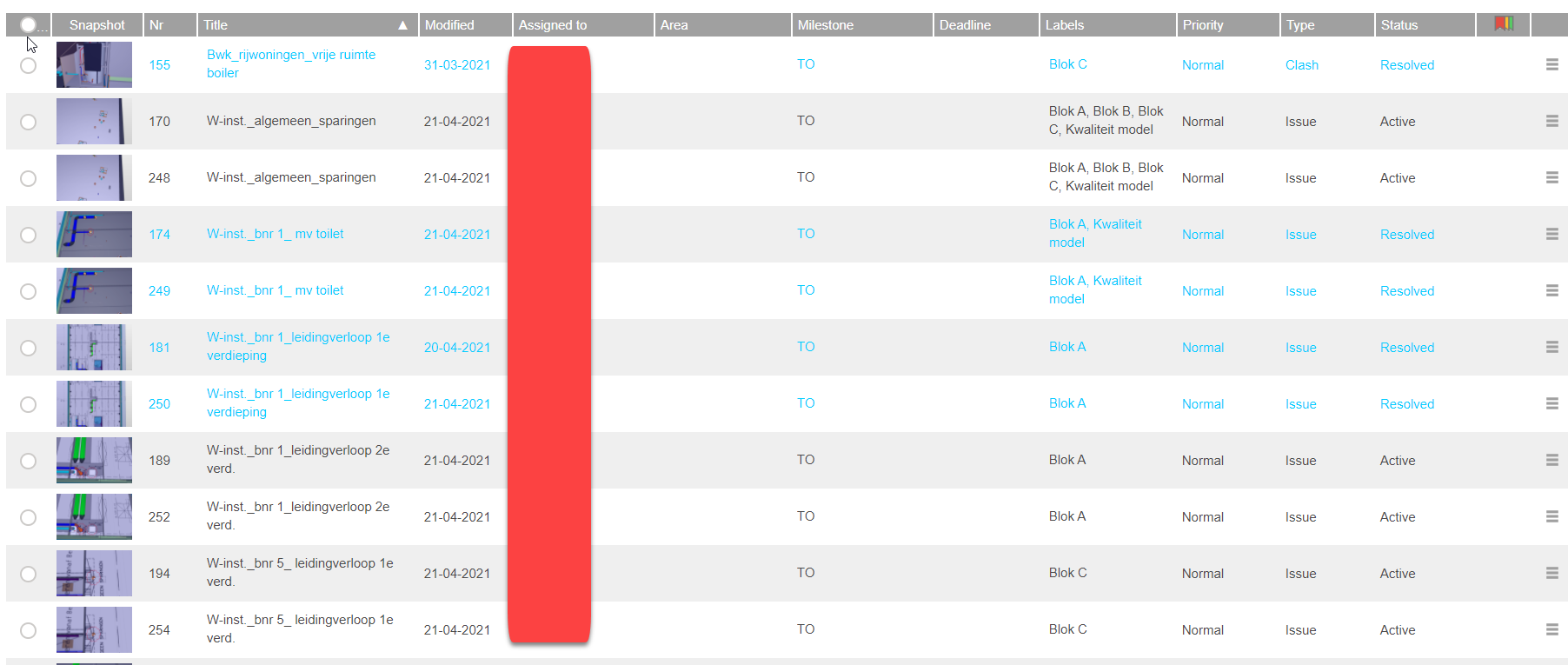
-
Hi,
I experienced the exactly same problem…
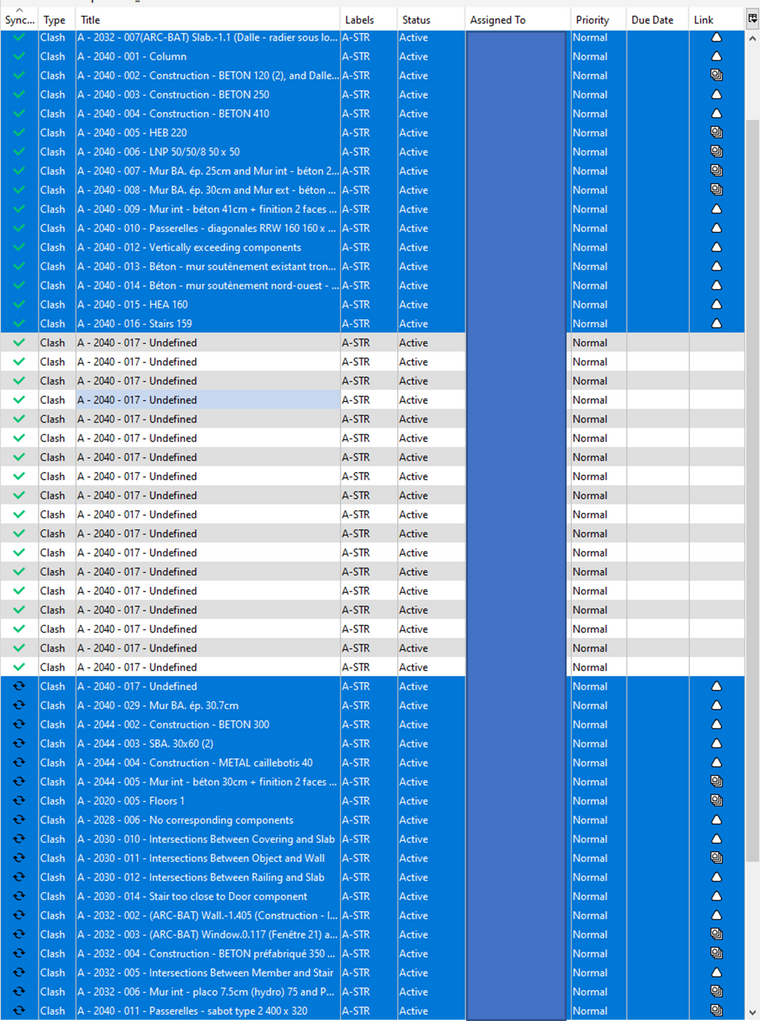
I selected all the issues I imported in the BCFlive conector. The first part of the issues synced well until it arrives on the issues named " A-2040-017" that begans to duplicate (as you can see on the image below)… And on BIMcollb platform alle the duplications haven’t any images.MY SOLUTION : After around 50times duplications I decided to turn off the connexion with server. I deleted the initial “A-2040-017” issue that hasn’t been synced (as you can see on the image below) and then I re-turned on the connexion to the server. It automatically restarts to synchronise the second part of the issues (that haven’t been synced the first time because of the duplication of the one issue).
Maxime
-
Hi @tonigyllenberg and @david-polanski, any news regarding these problems? As I understand from the post by @degraan Solibri is aware of the problem, but we haven heard anything from you guys so far.
Meanwhile the problem is getting bigger and bigger, our projects filling with hunderds and sometimes thousands of useless copies of issues, and more and more colleagues are dealing with these problems.
Have you identified the cause of all off this, is there a solution and if so will this be available soon? We need to know whether or not we have to roll back to a previous version of Solibri.
Can you please give us an update on the situation? Thanks in advance.





Copyright © 2025 Solibri Inc. | Powered by NodeBB