
COBie Type Description
-
Hi all,
I would like some help understanding how to get Type Description filled in information take off. In the end to get it exported to COBie.
From what I understand and see in Solibri I have the following Information for a Light.
*I filled in the description in the IFC “Component Description” if it’s related to its instance and “Type Description” if its related to Type for an easier understanding of the exercise.

For Type Description I have to go relations / Define by type and there I have the following:

When I do information take-off, I schedule all components from the model. I want to schedule by type basically, to get my COBie Type Information. So I schedule Type Name (this info can be found as well at the component tab) and I need to schedule a description. The description is the one from Component so the schedule is wrong. Check the picture below:

To get the Type description I need to pull the information from Relations, which I did. Check the picture below:

My question is, how do I get it reported in one row, rather than having the Type name in one row and the Type description in the 2nd row ? When I export to COBie it creates different rows.
I might be doing the take-off wrong?
Any help will be much appreciated.Thank you

-
Hey Dan,
If I understand the question correctly, I think you should be able to find the ‘Type Description’ data somewhere in the Pset tabs in Solibri… depending on what settings you use to export your IFC? For example, I have just used the out the box Arch sample project in Revit 2021 and exported an IFC with the basic ‘Export Revit Property Sets’ – just as a test.See light fixture below and highlighted Type Description in Revit.

The data comes through in the Identity Data tab in Solibri and can be mapped straight into the ITO – see two snips below.
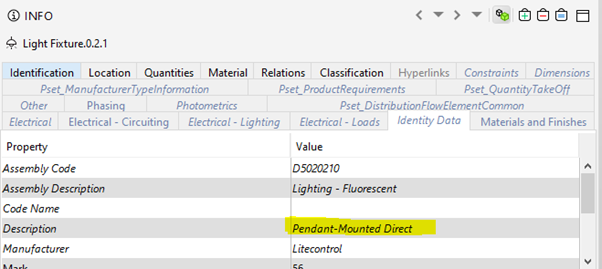
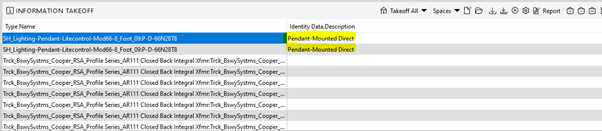
Would you like to share your export settings and we can see if this approach will work on your example? Alternatively, could you share what data comes through in your tabs in your first image?
Hope this helps!
-
Hi.
Thank you for the reply.
You are right, this information gets exported if I use Revit Property Sets, but in reality, in IFC, that is not the Type description. If you go to relations by type in Solibri, the Type description doesn’t match with the Type description from Identity Data.
Hence Revit description from Type is not Type Description in IFC. I might be mistaken on this.I am trying to avoid Revit Property sets as it gets a lot of unnecessary information to IFC and makes the file big. I am trying to keep it clean.
-
Hmmm, I agree that Revit Property Sets are not ideal. My test did seem to bring through the correct information ie. Type description in Revit into the Solibri ITO. I had also run a test using the Defines by Type & Description as you had done and was getting similar results i.e. data on two lines.
Would you be willing to share your IFC test file so that I can have a closer look using your settings?
-
Out of the box without using the API, you aren’t able to create a single row in ITO to extract the description of the type. You’ll need to use either a Javascript ITO or an Information API jar.
If you look at the Type 1.4 or Type 2015 ITOs that are part of the COBie UK Resources of the COBie extension, it uses a Javascript ITO Column to extract the description Identification property from the the component.
There is a video on this extension here:
https://www.youtube.com/watch?v=uH_KTavsEZUMore information on the Javascript ITO can be found here:
https://society.solibri.com/category/23/javascript-apiYou can also use the Info API to create a .jar file to place in the lib folders that creates a Custom Info properties in the information of the component. More information on the information API can be found here: https://society.solibri.com/topic/563/information-api
I attached such in a zip that contains the information API project along with the “smc-api-info-TypeDescription-1.0.0.jar” you can place in the lib folder of the Solibri program files. There is also a “Type Desc.ito” that has a javascript ITO that extracts the description of the type of a component if it exists.
smc-api-info-TypeDescription.zip
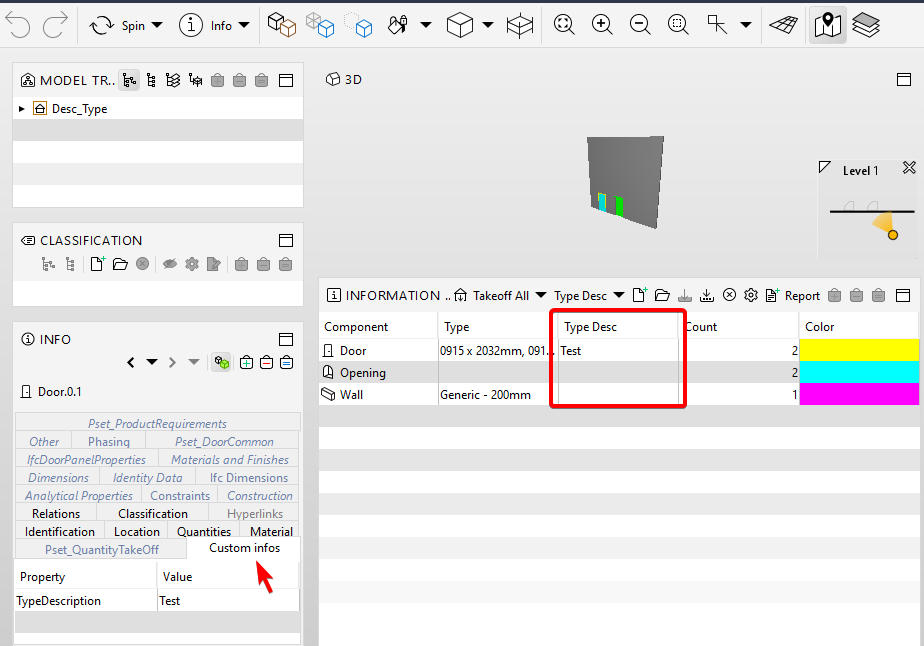
The code for the information API is below:
package com.solibri.info;

import java.util.Optional;
import java.util.Collection;
import com.solibri.smc.api.info.Information;
import com.solibri.smc.api.model.Component;
import com.solibri.smc.api.model.PropertyType;
import com.solibri.smc.api.model.Relation;

/**
 * This example custom information returns the description of a components type
 * if it exists.
 *
 */
public class TypeDescription implements Information<String> {

	@Override
	public String getUniqueId() {
		return "TypeDescription";
	}

	@Override
	public Optional<String> getInformation(Component component) {
		Optional<String> oInfo = null;
		Component typeComponent = getTypeComponent(component);

		if (typeComponent != null) {
			if (typeComponent.getDescriptionText().isPresent()) {
				oInfo = typeComponent.getDescriptionText();
			}
		}
		return oInfo;
	}

	@Override
	public PropertyType getType() {
		return PropertyType.STRING;
	}

	private Component getTypeComponent(Component component) {
		Collection<Component> col = component
				.getRelated(Relation.of(Relation.Type.DEFINES_BY_TYPE, Relation.Direction.BACKWARD));
		if (!col.isEmpty()) {
			return (Component) col.iterator().next();
		} else {
			return null;
		}
	}
}
The code for the JavaScript ITO is below:
importClass(com.solibri.smc.api.model.Relation)
importClass(com.solibri.smc.api.model.ComponentType)
importClass(java.util.HashSet)

function getValue(row, components) {
  var typeDescSet = new HashSet();

  for (var iterator = components.iterator(); iterator.hasNext();) {
    var component = iterator.next();
    var typeComponent = getTypeComponent(component);
    if (typeComponent != null) {
      if (typeComponent.getDescriptionText().isPresent()) {
        typeDescSet.add(typeComponent.getDescriptionText().get());
      }
    }
  }
  return getSetAsString(typeDescSet);
}

function getTypeComponent(component) {
  var col = component.getRelated(Relation.of(Relation.Type.DEFINES_BY_TYPE, Relation.Direction.BACKWARD));
  if (!col.isEmpty()) {
    return col.iterator().next();
  } else {
    return null;
  }
}

function getSetAsString(set) {
  var returnString = "";
  var setIterator = set.iterator();
  if (setIterator.hasNext()) {
    returnString = setIterator.next();
  }
  while (setIterator.hasNext()) {
    returnString += ", " + setIterator.next();
  }
  return returnString;
}

Copyright © 2025 Solibri Inc. | Powered by NodeBB