
Classification / ITO: Location -> Nearest Spaces
-
Is there a way or workaround to pick a different parameter for nearest spaces?
Something like this, when you add Nearest space you can also pick a different parameter instead of Name which I think is used by default.
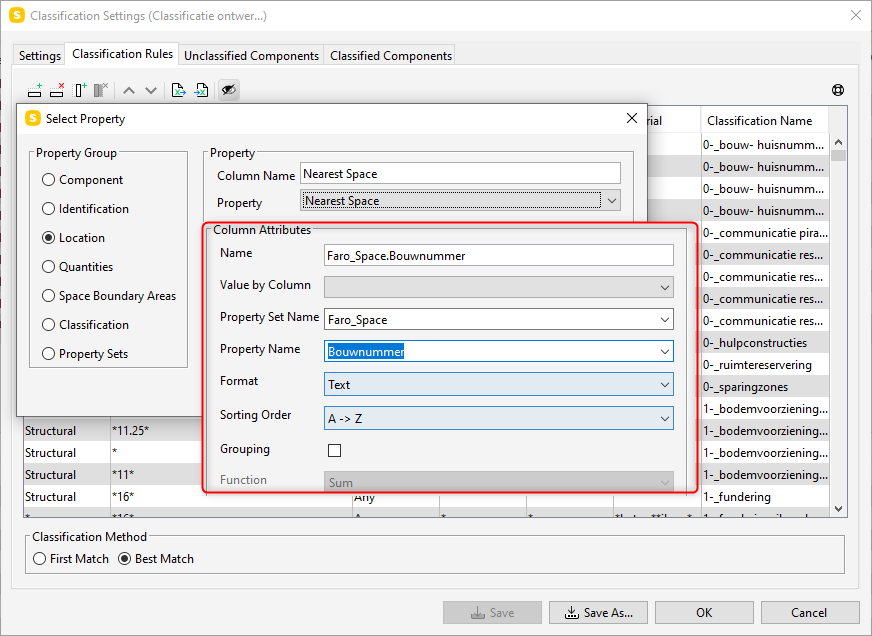
I’ve tried creating a seperate classification to group the spaces on a different parameter, but you can’t pick a classification @ the location section, so you unfortunately can’t group objects near spaces on a different parameter using a seperate classification.
Maybe one of you has done this before?
-
You can use the nearest space relation in the ITO and then use the value by column to the get the classification of those nearest spaces.
The location.nearest space only returns the name of one of the nearest spaces, but there can be multiple spaces.
For example, here is an ITO that lists doors and their nearest space’s space usage:
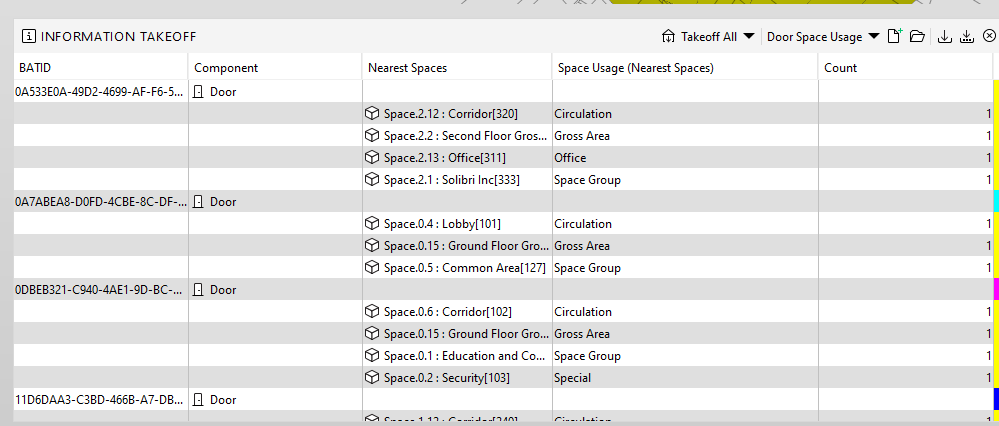
The SMC with the ITO is below that uses the out of the box space usage.classification.
Solibri Building_NearestSpaceIto.smc

Copyright © 2025 Solibri Inc. | Powered by NodeBB