
Wildcard for excluding
-
Does anyone know how to exclude a certain Type of component from the classification rule?
I am trying to exclude the “Teleskoptür”.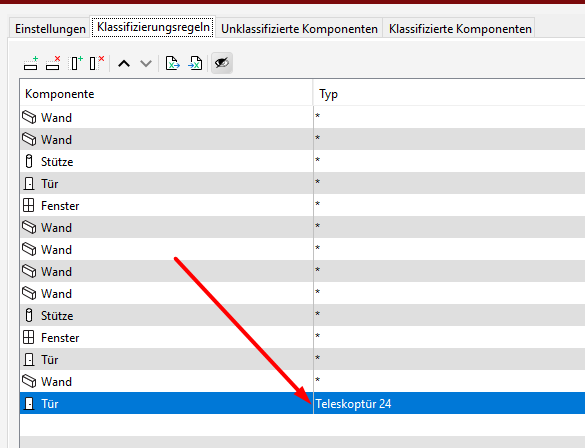
Meaning that each door should be classified, except for this one.I have check the wildcards for * and ? and the latest improvement, but did not find any appropriate wildcard for excluding.
I have also tried different variants such as /=, =/, = or =\ to simulate the exclusion symbol, but did not work.Instead of including 12 different other door types, it would be more efficient to exclude one

Any hints?TriPoint GmbH
www.tri-point.at -
@agroni
You may be interested in excluding it through the filter by adding an exclusion under settings (Einstellungen).
I think the usual script for different is <>, but I don’t think it applies here.
If you want to treat it differently as unclassified, juste give it another classification name. -
Yes it could work actually here:
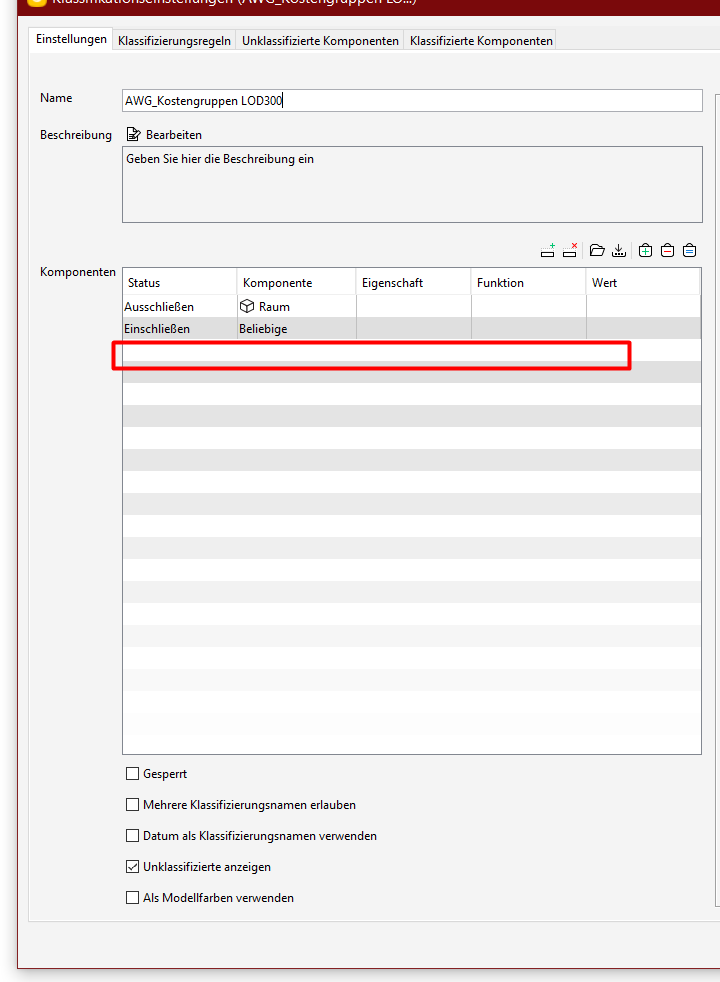
But in order to keep all the information in overview, I would prefer to have it in the place where I define all other included elements. Excluding it in the classification rules would give me a better control…I think…
But maybe it is just another workflow that I have to get used too…
thnxTriPoint GmbH
www.tri-point.at -
Hi @agroni
I think I understand your frustration because I had similar use cases.
I usually use one of these solutions :
- filter out (what we discussed before)
- classify as “not classified”. This way I have the information overview you are looking for
The result in this case would be to have both “unclassified” elements (no rule applied) and “not classified” elements (classification rule I set).
The functionality I’d like to see is to be able to have a rule to “unclassify” elements in order to get both in the same bag.Cheers
-
I guess a workaround could be by having some sort of master classification where you sort out the undesired elements beforehand so that there is no need to worry about the primary filter of the classifications - at least I have used this workflow for models where only parts of the model are relevant at a certain point. Instead of modfiying all the filters in classifications, rules, itos, you can control it in a just one central spot.
However from my experience it still makes sense to use the classification filter as the performance increases a lot if not every classification ist working with all components and therefore I would not advise it here.
StillI I like the idea of having “everything under control” within the classification rules and therefore i think it might be an idea to add here in the context menu the possibility to classify something also as genuine unclassified.
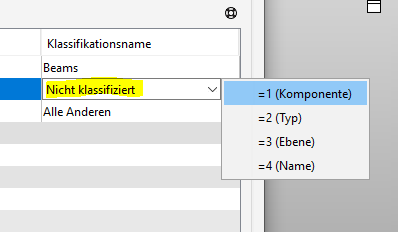
Probably it’s a bit a contradiction in itself, but on the other hand it would make thinks a lot clearer becauses the reality is that very often you have to add such filters multiple times and if you don’t have a good classification management - or you just want to test something in the heat of battle - then things can get confusing very fast.
And I also like the wildcard idea, as for numeric operators this is also possible so why not for strings?
-
Any feedback from @Solibrians on this subject?
-
Hi. If Solibri was using Regex, this would be quite simple. But Regex syntax is not that easy for people unfamiliar to that and Solibri uses much simpler syntax with the ? and * wildcards. Maybe ! could be used as the negative operator. If the thing started with !, it would flip the condition. Example:
!SmallDoor
would match anything that does not have “SmallDoor” in that field
!*Door
would match anything that does not end in “Door”The more special characters we have, the more likely it is users need to match something that contains those extra characters. Backslash is often used as the escape operator. \ would match one backslash, ! would match one exclamation mark etc. Does this syntax sound good?
-
@lasse-lindqvist said in Wildcard for excluding:
The more special characters we have, the more likely it is users need to match something that contains those extra characters. Backslash is often used as the escape operator. \ would match one backslash, ! would match one exclamation mark etc. Does this syntax sound good?
Not sure but I think the editor kinda did what you wanted to say, so I try to make it a bit clearer.
You mean if "\" would be added as an additional escape operator "\!" would be "!" and "\\" then "\" ?Or did I get something wrong?
-
-
Sounds a good, I will think about it a bit.
There is also another issue I want to point out.
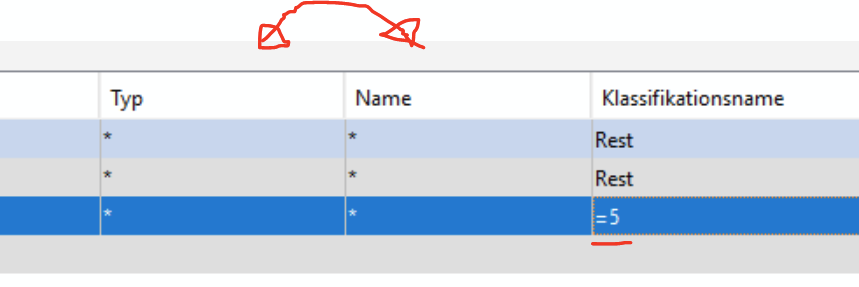
When you change columns or add new ones, the =#column number does not change automatically.
You can kinda bypass this more or less by always adding columns to the far right side, but this making things messy and annyoing - if the counter would be a bit smarter no one would be unhappy I guess. -
@lasse-lindqvist I like the idea!
!SmallDoor => is not exactly “SmallDoor”
!*SmallDoor* => does not contain “SmallDoor”
!SmallDoor* => does not start with “SmallDoor”
!*SmallDoor => does not end with “SmallDoor”
etc.As for the special characters, we already forbid special letters (ü, é, ç…), I would be surprised if “!” is used. But the escape operator would be the safe way to go, for sure.
But I still see a difference between
- classifying something that is not “SmallDoor”
- specifically unclassifying “SmallDoor”
Let’s say my only exception is “SmallDoor” and I want to unclassify it (this could be managed in the filter, but my goal is to still be able to visualize the elements which are not classified). And I also have a bunch of other stuff to classify.
- the original idea was to unclassify “SmallDoor” => this allows me to see that there is a SmallDoor element, and that I regard it as not belonging to any of my set classifications
- let’s say I classify my other bunch of stuff
– *oor* -> A
– *all* -> B
– etc.
The classification rules would try to classify the “SmallDoor” element and I don’t see a new way of ignoring it with the ! rule.
We would thus come back to the current workaround, where we set as a first rule to classify “SmallDoor” as “not classified”. This way you can use this in checking rules or ITOs to filter “Except classification is undefined” + "Except classification = ‘not classified’ "
I also agree with @JSN that managing filters separately could be helpful, although that is a slightly different subject. That way you can say “rule A uses filter B” and optimize your filter B without having to reset all links between rule results and slides, for instance.
That’s actually what we are trying to achieve with some classifications (and I’m sure we’re not alone) - the problem being that in some cases, a classification can’t achieve the same result as a filter, specifically if you work with relations. I’ve mentioned this in a different post about decomposition status, where you need to create 3 classifications in order to be able to easily distinguish:- parent elements
- child elements
- intermediate elements that are both parent and child (it does happen)
- elements that are neither an assembly nor part of an assembly
In the end, it would be easier to improve classifications than to create something new, as suggested.
And I also agree with @JSN post of today that if the referenced column could update automatically, this would prevent some quick mistakes.
-
@alexander-joslyn said in Wildcard for excluding:
I also agree with @JSN that managing filters separately could be helpful, although that is a slightly different subject. That way you can say “rule A uses filter B” and optimize your filter B without having to reset all links between rule results and slides, for instance.
That’s actually what we are trying to achieve with some classifications (and I’m sure we’re not alone) - the problem being that in some cases, a classification can’t achieve the same result as a filter, specifically if you work with relations. I’ve mentioned this in a different post about decomposition status, where you need to create 3 classifications in order to be able to easily distinguish:parent elements
child elements
intermediate elements that are both parent and child (it does happen)
elements that are neither an assembly nor part of an assembly
In the end, it would be easier to improve classifications than to create something new, as suggested.Yes, absolutely - decomposing elements are terrible cumbersome to classify at the moment - because you can’t add the relationship as a column in the classification rules - this makes things more complex that it should - it’s not impossible but I have not yet managed to bring building element parts and elements with no child parts in a good single ITO listing their material due to that issue. But I guess with the custom informations this should be possible now … have to try again.
And of course if one day the names of classifications could be changed without any issues, that would be like a second birthday.
-
@Alexander-Joslyn said in Wildcard for excluding:
I’ve mentioned this in a different post about decomposition status
–> Here is the post I was talking about:
@Alexander-Joslyn said in Improvement sugesstion: Filtering IfcBuildingElementPart:@agroni and for anyone interested, here are the classifications I use: Decomposition classifications.zip
@TheoR said in Improvement sugesstion: Filtering IfcBuildingElementPart:
@alexander-joslyn said in Improvement sugesstion: Filtering IfcBuildingElementPart:
I usually use 3 classifications to help out:
- ChildComponents => marks all elements for which the relation “Decomposes” backward is not empty
- ParentComponents => marks all elements for which the relation “Decomposes” backward is not empty
- Decomposition status => uses the previous classifications to define if an element is top-level, middle-level, bottom-level in the decomposition or not part of a decomposition
Aren’t the first two the same? Shouldn’t one of them be “forward” instead of “backward”?
@TheoR you are exactly right of course, I was a bit hasty with my copy-pasting…
I corrected it for clarity (ParentComponents => marks all elements for which the relation “Decomposes” forward is not empty) -
Digging out this topic again as I wonder what was the outocme of …
@lasse-lindqvist said
The more special characters we have, the more likely it is users need to match something that contains those extra characters. Backslash is often used as the escape operator. \ would match one backslash, ! would match one exclamation mark etc. Does this syntax sound good?
@JSN said
You mean if "\" would be added as an additional escape operator "\!" would be "!" and "\\" then "\" ?@lasse-lindqvist said in Wildcard for excluding:
Yes, exactly like that.
As I have actually exactly this case again where all the doors which are not containing ND as FireRating value should be classified as FireDoors

Moreover I have to use multiple classification values as FireDoors are also classified as normal Doors. Due to that I would need the previously discussed excluding wildcard functionality as otherwise I would need either to specify all FIreRatings as condition (which might be an option in this case, but excluding would be way more robust and elegant) or make use of an additional classification (which would rise complexity and make it more complicated than it has to be).
So, any pleans of introducing a new wildcard option for excluding anytime soon?




Copyright © 2025 Solibri Inc. | Powered by NodeBB