Skip to content
  • Categories
Collapse
Solibri Society Forum
  1. Home
  2. Comments & Feedback
  3. Tech Talks
  4. Add product choice to your shortcut

Add product choice to your shortcut

Scheduled Pinned Locked Moved Tech Talks
how-to
10 Posts 9 Posters 2.3k Views
  • Oldest to Newest
  • Newest to Oldest
  • Most Votes
Log in to reply
This topic has been deleted. Only users with topic management privileges can see it.
  • Lauri LuomaL Offline
    Lauri LuomaL Offline
    Lauri Luoma Solibrians
    wrote on last edited by Eric
    #1

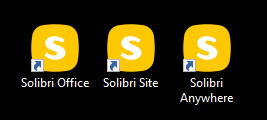
    Did you know that on Windows Operating System, you can add an argument to the shortcut properties to run Solibri as Office, Site or Anywhere.
    c61d831a-1b09-474c-aba6-dce76d113c14-image.png

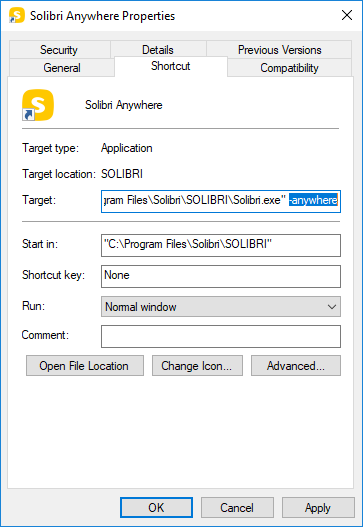
    Just right click on the shortcut, go to properties and add an argument:

    -office
    -site
    -anywhere
    dcbad854-b8eb-4401-b5c7-cf78248da443-image.png

    1 Reply Last reply
    7
    • R Offline
      R Offline
      Roy Maes
      wrote on last edited by
      #2

      Thank you, was wondering if it was possible!

      1 Reply Last reply
      0
      • cdaillouxC Offline
        cdaillouxC Offline
        cdailloux
        wrote on last edited by
        #3

        That’s great at least for Anywhere and Office.

        For site we need to change the user’s pool, the shortcut will not be usable without action on the SSC…

        1 Reply Last reply
        0
        • Peter VlugP Offline
          Peter VlugP Offline
          Peter Vlug
          wrote on last edited by
          #4

          Thanks, Nice this is possible.

          1 Reply Last reply
          0
          • André SchnabelA Offline
            André SchnabelA Offline
            André Schnabel
            wrote on last edited by
            #5

            Awesome, thanks for responding regarding this wish !

            https://www.linkedin.com/in/andré-schnabel-46b9a29/
            https://www.xing.com/profile/Andre_Schnabel14/cv?sc_o=mxb_p

            1 Reply Last reply
            0
            • R Offline
              R Offline
              Ronald van Emst
              wrote on last edited by
              #6

              Nice one…

              1 Reply Last reply
              0
              • hkringsKUBUSH Offline
                hkringsKUBUSH Offline
                hkringsKUBUS
                wrote on last edited by
                #7

                Great opprtunity in WIndows.

                @Lauri-Luoma do you know how to establish this for an Alias on mac?

                1 Reply Last reply
                0
                • O Offline
                  O Offline
                  otsob
                  wrote on last edited by
                  #8

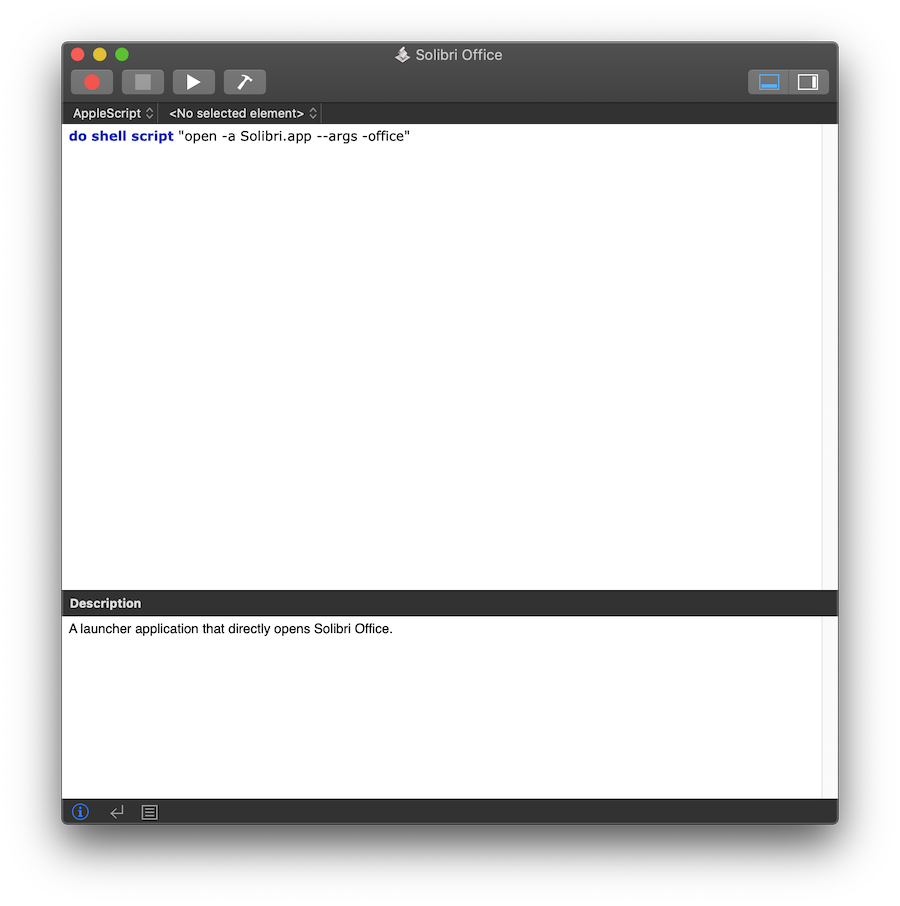
                  In macOS it is possible to achieve a similar outcome by creating a launcher app as an AppleScript application.
                  This can be done using the Script Editor application that’s a standard feature in macOS:
                  Screenshot 2019-05-31 at 13.11.46.png

                  When saving, select Application as the File Format. Now you can directly open Office by double clicking on the application created using the Script Editor. In order to create a launcher for Anywhere or Site, you can replace the argument -office with -anywhere or -site. Note that the launcher application is an independent application and will not have the Solibri icon.

                  1 Reply Last reply
                  2
                  • hkringsKUBUSH Offline
                    hkringsKUBUSH Offline
                    hkringsKUBUS
                    wrote on last edited by
                    #9

                    @otsob thank you for the additional information.

                    1 Reply Last reply
                    0
                    • HannesH Offline
                      HannesH Offline
                      Hannes
                      wrote on last edited by
                      #10

                      Nice. 🙂

                      1 Reply Last reply
                      0

                      Copyright © 2025 Solibri Inc. | Powered by NodeBB

                      • Login

                      • Don't have an account? Register

                      • Login or register to search.
                      • First post
                        Last post
                      0
                      • Categories