Skip to content
  • Categories
Collapse
Solibri Society Forum
  1. Home
  2. General Discussion
  3. How do I get a logo to stick to a custom report template?

How do I get a logo to stick to a custom report template?

Scheduled Pinned Locked Moved General Discussion
4 Posts 3 Posters 684 Views
  • Oldest to Newest
  • Newest to Oldest
  • Most Votes
Log in to reply
This topic has been deleted. Only users with topic management privileges can see it.
  • Mats_KnutssonM Offline
    Mats_KnutssonM Offline
    Mats_Knutsson
    wrote on last edited by
    #1

    Tried to make my own xlsx issue report template with my own logo but the logo (png) doesn’t show in the report… When I open the xlsx it shows…
    /Mats

    1 Reply Last reply
    0
    • MattiM Offline
      MattiM Offline
      Matti Solibrians
      wrote on last edited by
      #2

      Use <PNG_IMAGE> text in the Excel template cell where you want to place the image. You can edit the image properties in Excel e.g. fine tune the anchoring of image. Insert the PNG image to the same cell in Excel. Save template.

      More info in:
      https://www.solibri.com/learn/ito-report-templates

      1 Reply Last reply
      0
      • Mats_KnutssonM Offline
        Mats_KnutssonM Offline
        Mats_Knutsson
        wrote on last edited by
        #3

        Well I pasted a .png in the image cell and I see it in excel but it doesn’t show up in the excel report…?

        1 Reply Last reply
        0
        • P Offline
          P Offline
          Pasi Paasiala Solibrians
          wrote on last edited by
          #4

          Did you add the <PNG_IMAGE> text to the field as is done in our sample reports:
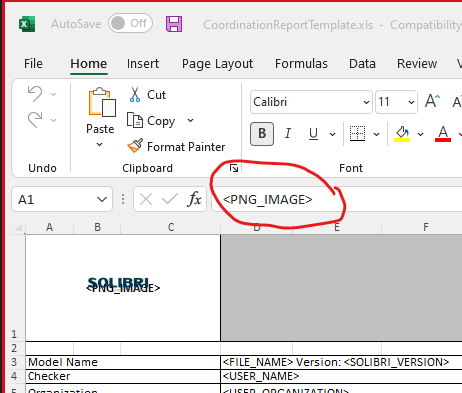
          55981aef-93df-4097-a42b-c23ccdf3177b-image.png

          1 Reply Last reply
          0

          Copyright © 2025 Solibri Inc. | Powered by NodeBB

          • Login

          • Don't have an account? Register

          • Login or register to search.
          • First post
            Last post
          0
          • Categories