
Rule Results grouping by component type desapears
-
I have a problem that when I open a saved file my rule results get ungrouped.
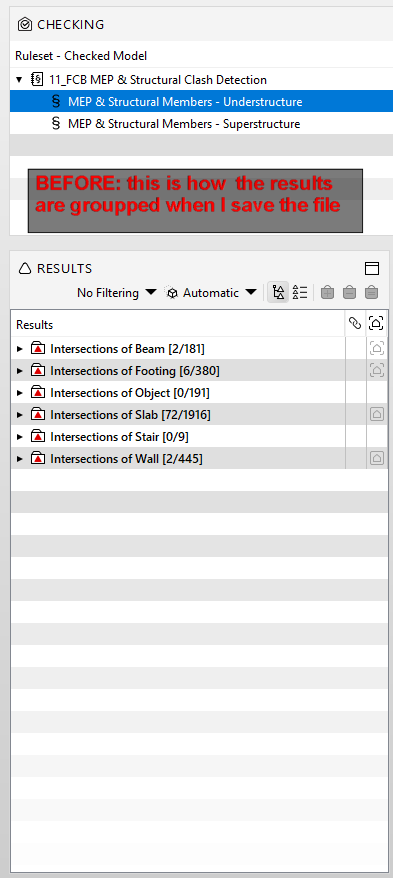
When I run a rule, in this case for a clash detection of structural vs a mechanical model, my results got sorted out by the structural category of elements: clashes against beams, clashes against columns, clashes against floors…etc, then I start reviewing them, set the status to approved and rejected and create my slides for communication. Until then everything cool.Of course, because I have so many incidences, I can´t finish all revision in one day so I save my file and close.
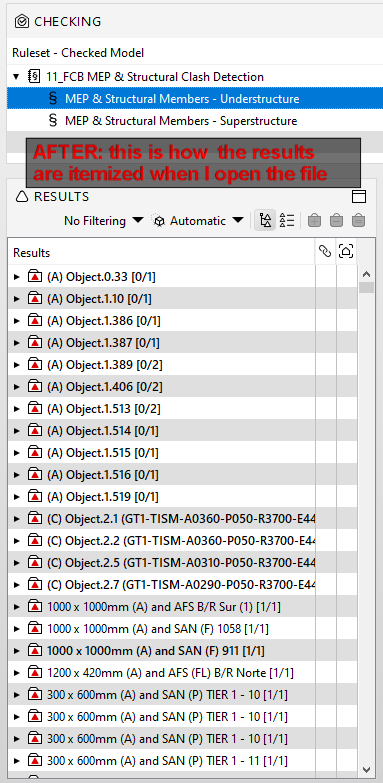
When I re-open it the next day I found that the results are not grouped by structural element categories, instead all results are spilled out in an itemized order totally different as how it was when I saved it, so I don´t know where i left it of and I can´t see how many issues are left for each structural category. If I re-run the rule as it it (as it was the first time that I run it) I get the same itemize results.
The only way that I can make the groups appear again is if i open the rule settings as if I modified something in the rule, then re-running it again, then the groups are back in the results but by doing so I also lose all my revisions of status to approved or rejected that i have done until then, and i have to start from scratch all over again… the only thing that I keep are the slides previously created, but even the slides get altered since I lose the information of the components associated to each slide, i only get to keep the issue title, description, comments and viepoint, but the component tab appears blank.
Does anyone know how can I keep the grouping in the results so I don´t have to re-run the rules and start all over again and again from scratch??
Thank you so much!
Copyright © 2025 Solibri Inc. | Powered by NodeBB