Skip to content
  • Categories
Collapse
Solibri Society Forum
  1. Home
  2. Comments & Feedback
  3. Tech Talks
  4. Issue Details -> Coordination dropdown lists: standarize content of the lists

Issue Details -> Coordination dropdown lists: standarize content of the lists

Scheduled Pinned Locked Moved Tech Talks
3 Posts 3 Posters 774 Views
  • Oldest to Newest
  • Newest to Oldest
  • Most Votes
Log in to reply
This topic has been deleted. Only users with topic management privileges can see it.
  • XavierX Offline
    XavierX Offline
    Xavier
    wrote on last edited by Xavier
    #1

    Hi all,

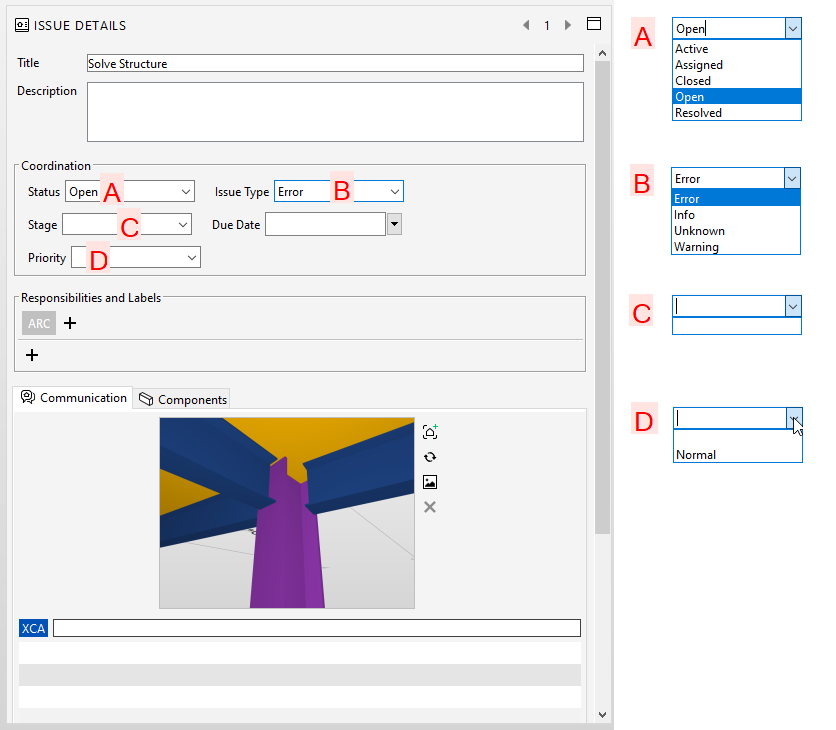
    We would like to standarize the contents of the dropdown lists in “Issue Details”-> Coordination (I attach an image).

    We know that in each SMC that we create, we can increase those lists in a manual process, but we would like to automate it in order to always shows the same lists for all our smc files.

    How to do it? is there any external file (maybe a txt file) to configure it?
    Thanks,
    Xavier Coll
    EiPM
    Solibri_Issues_Lists.png

    agroniA 1 Reply Last reply
    7
    • agroniA Offline
      agroniA Offline
      agroni
      replied to Xavier on last edited by
      #2

      @xavier
      agree, this would be very helpful
      +1

      AllesWirdGut Architecture
      www.awg.at

      1 Reply Last reply
      1
      • soininvaaraS Offline
        soininvaaraS Offline
        soininvaara
        wrote on last edited by
        #3

        How about creating a report, which has a bunch of issues, which have all required values in those lists? I believe you need several issues, since all of those are such, that only one value is allowed.

        Store this report as a BCF file and open it to every SMC where you want to have those values, and they are available in all new issues as well.


        1 Reply Last reply
        1

        Copyright © 2025 Solibri Inc. | Powered by NodeBB

        • Login

        • Don't have an account? Register

        • Login or register to search.
        • First post
          Last post
        0
        • Categories