Skip to content
  • Categories
Collapse
Solibri Society Forum
  1. Home
  2. General Discussion
  3. Solibri shuts down while saving

Solibri shuts down while saving

Scheduled Pinned Locked Moved General Discussion
11 Posts 4 Posters 2.0k Views
  • Oldest to Newest
  • Newest to Oldest
  • Most Votes
Log in to reply
This topic has been deleted. Only users with topic management privileges can see it.
  • HechtwieFischH Offline
    HechtwieFischH Offline
    HechtwieFisch
    wrote on last edited by
    #1

    Hello,

    while working with large smc. Files (400MB+) we encountered the recurring problem that Solibri shuts down while saving , without any warning or error message.

    Two other colleagues encounter the same Problem on different computers.

    It doesn’t happen every time we save the file but as the file size gets larger the Issue appears more often. Because it happens while saving the original smc. file is broken and we have to use the latest backup file.

    The solution for now is trying to keep the size as small as we can with disabling the performance option “Saving 3D Views in Model”.

    But the Problem still occurs and that is pretty annoying because now every time I save the file i have anxiety that it will shut down again.

    I hope you can help so that we can again save in peace 😉

    1 Reply Last reply
    0
    • hkringsKUBUSH Offline
      hkringsKUBUSH Offline
      hkringsKUBUS
      wrote on last edited by
      #2

      Hi,

      Could you maybe share which Solibri version you are using and how many RAM is assigned to Solibri?

      HechtwieFischH 1 Reply Last reply
      0
      • I Offline
        I Offline
        InaTofalvi
        wrote on last edited by
        #3

        Hi,
        This has been a problem for us for a long time. We have been sending log-files to Solibri but no solution yet.
        We have this problem most of the time when we want to save the model “to often”, in big project you want to save maybe every other hour but then the crash happens.
        So what we do is to save the model in different places, so we have more than 3-4 hours between the savings.
        Not the best solution but for now it works…

        HechtwieFischH 1 Reply Last reply
        0
        • HechtwieFischH Offline
          HechtwieFischH Offline
          HechtwieFisch
          replied to hkringsKUBUS on last edited by
          #4

          Hi @hkringskubus
          of course I´m using Solibri 9.10.8.34.

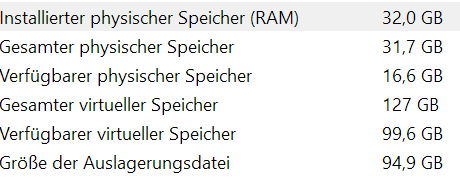
          The RAM capacity of my Laptop:
          4c94b4fa-a88f-4d01-8bbf-ca96b5bbc014-image.png

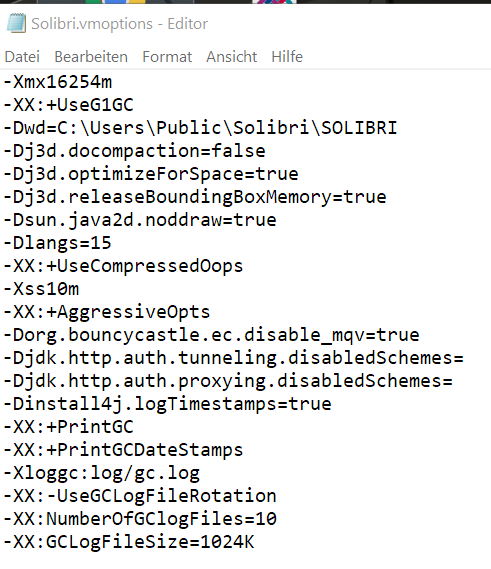
          And in the file “Solibri.vmoptions”:
          61323eed-0982-4e93-b94e-77b835754272-image.png

          I don´t now if the Solibri.vmoption file really defines my RAM usage because when solibri is running with the big project file the RAM sometime is nearly fully occupied only through Solibri:
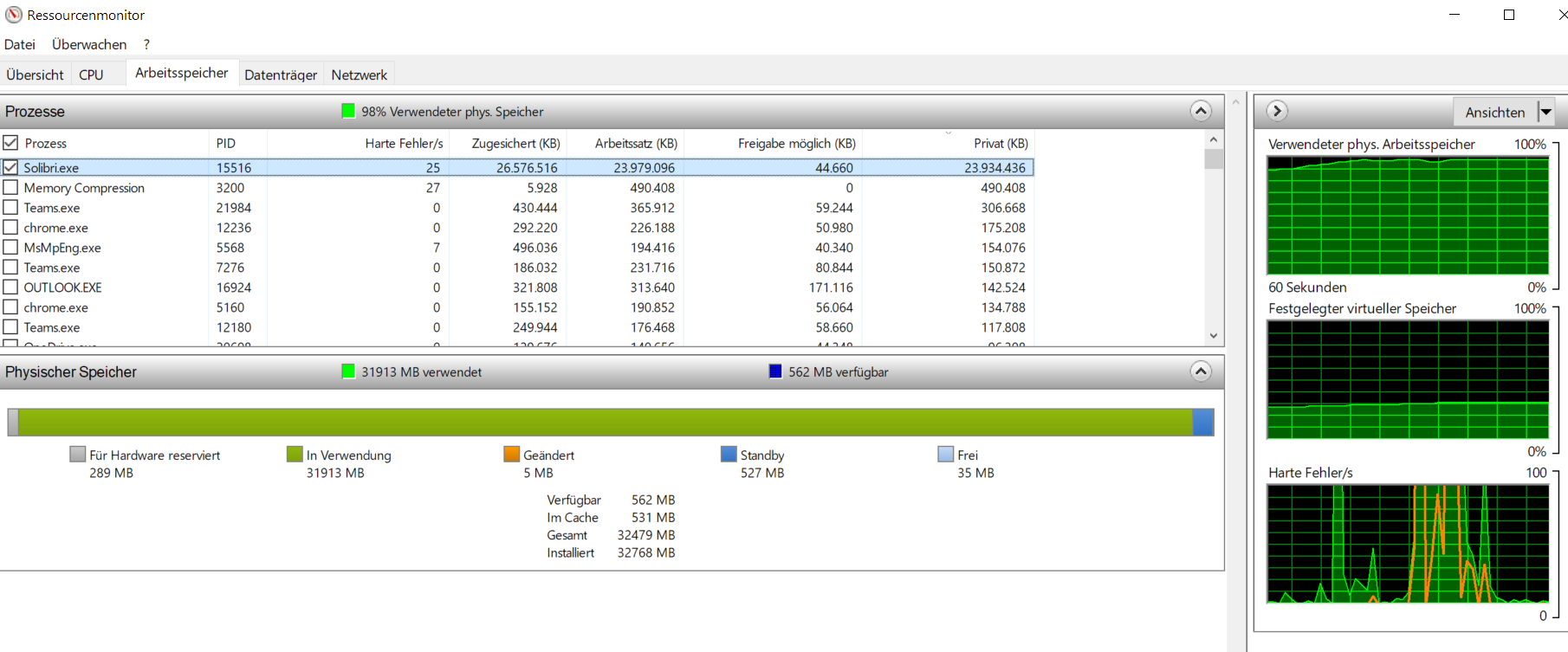
          84864350-bf10-4061-8c8f-b1fc85e5e306-image.png

          Thanks for the help

          1 Reply Last reply
          0
          • HechtwieFischH Offline
            HechtwieFischH Offline
            HechtwieFisch
            replied to InaTofalvi on last edited by
            #5

            @inatofalvi thanks for the tip, but saving only every hour seems risky for losing all the work if solibri crashes.

            I 1 Reply Last reply
            0
            • I Offline
              I Offline
              InaTofalvi
              replied to HechtwieFisch on last edited by
              #6

              @hechtwiefisch I know! So that is why you have to save your model in different places at your desktop. So you have one big project, but 2 different solibri-models so you can save every hour instead.

              HechtwieFischH 1 Reply Last reply
              1
              • HechtwieFischH Offline
                HechtwieFischH Offline
                HechtwieFisch
                replied to InaTofalvi on last edited by
                #7

                @inatofalvi ok if no other solution is found we will try this - but I hate double data management. and that will increase the time I use for saving even more 😕

                1 Reply Last reply
                0
                • HechtwieFischH Offline
                  HechtwieFischH Offline
                  HechtwieFisch
                  wrote on last edited by
                  #8

                  @Solibrians If this is not an isolated case, is there a better solution from Solibri than saving the file multiple times?

                  MattiM 1 Reply Last reply
                  0
                  • MattiM Offline
                    MattiM Offline
                    Matti Solibrians
                    replied to HechtwieFisch on last edited by
                    #9

                    @hechtwiefisch

                    Might be the same bug that was discussed in the Solibri internal chat.

                    Try adding the following to VMOptions file:

                    -Djava.util.Arrays.useLegacyMergeSort=true
                    
                    HechtwieFischH 2 Replies Last reply
                    1
                    • HechtwieFischH Offline
                      HechtwieFischH Offline
                      HechtwieFisch
                      replied to Matti on last edited by
                      #10

                      @matti-kannala thanks I will add it and report how it has helped!

                      1 Reply Last reply
                      0
                      • HechtwieFischH Offline
                        HechtwieFischH Offline
                        HechtwieFisch
                        replied to Matti on last edited by
                        #11

                        @matti-kannala Out of interest what effect does adding this option have?

                        1 Reply Last reply
                        0

                        Copyright © 2025 Solibri Inc. | Powered by NodeBB

                        • Login

                        • Don't have an account? Register

                        • Login or register to search.
                        • First post
                          Last post
                        0
                        • Categories